WhatsApp Request Account Info Sample for Better Support
If you regularly use WhatsApp for conversations with your customers, you might occasionally need a copy of the information linked to your account. This is useful when troubleshooting an issue, checking your account…
If you regularly use WhatsApp for conversations with your customers, you might occasionally need a copy of the information linked to your account. This is useful when troubleshooting an issue, checking your account details, reviewing activity, or contacting WhatsApp support.
But many users are not aware of how to request their account information on WhatsApp, what the report contains, and what they should do after getting it.
This is where a whatsapp request account info sample can come in handy. It gives you a good idea of how to make the request and how to talk to support when you need help.
In this guide, we’ll walk you through what request account info WhatsApp means, how it works, what information can be included, and how businesses can responsibly use account information to improve customer support.
What is WhatsApp Request Account Info?
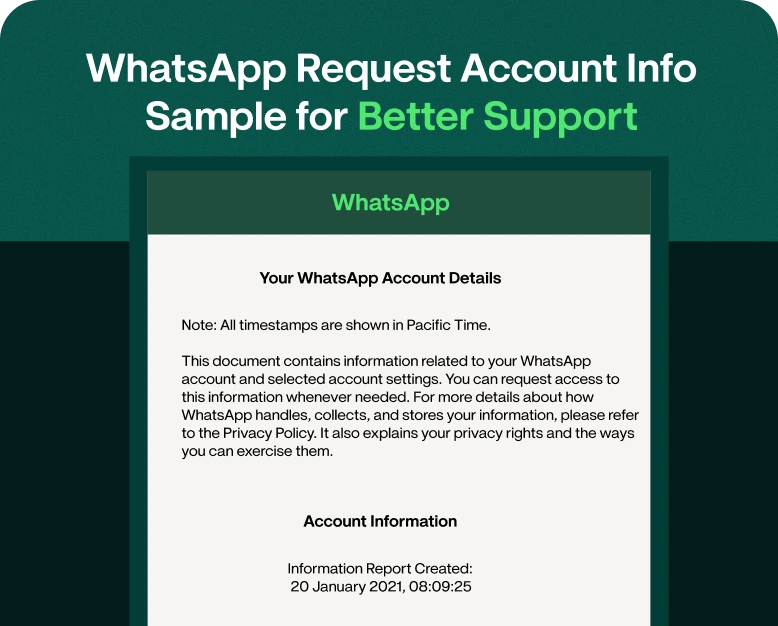
The request account info feature lets WhatsApp users ask for a report containing some information related to their WhatsApp account.
This report could help you see what account information WhatsApp has for you. This is especially useful if you want to verify your account details or if you require information while working on an account related support issue.
This is also helpful for businesses as WhatsApp is often used to communicate with customers, share order updates, generate leads and provide support.
Here is a simple WhatsApp request account info sample:
Subject: Request for WhatsApp Account Details
Hi WhatsApp Support team,
I would like to request information regarding my WhatsApp account. Please send me the report of available account information for my registered WhatsApp number.
I am asking this information for account verification and support.
Thanks for helping.
This sample is helpful when you want to make your request clear and professional.
Why would they be asking for Account info on WhatsApp?
A user may want to request account information for many reasons.
1. Problems with accounts
If you are having an account related problem this information may help you understand what is associated with your account .
2. Verify Account Details
You might want to check the information attached to your WhatsApp account for your own records.
3. Support for customers
If you’re speaking to WhatsApp support regarding an account issue, having the corresponding account details can help you manage the conversation better.
4. Keeping business records
Businesses that use WhatsApp to communicate with customers might want to know their account information as part of their internal support and documentation processes.
5. Accounts management
Users can have more control of their digital communication accounts by regularly checking important account settings and information.
WhatsApp Request Account Info Sample for Support
If you do need to contact support, keep your message clear and concise. To help us understand the problem and provide a solution, please provide the details requested below. Please do not include extraneous details or share sensitive information unless it’s a requirement of an official support process.
Here is another sample of request account info WhatsApp you can customise:
WhatsApp Account Info Request ① Humanise ② Write Like Me
Hi WhatsApp Support Team,
Request for Information on Available Account for my WhatsApp Account. I need this to check my account details and resolve a support related issue.
Let me know if any additional information or verification is required from my end.
Thanks for your support.
You can use this sample to fit your situation.
If you contact support about an account issue, you can give a short description of the problem, but don’t have to include extraneous information.
How to Ask for Account Info on WhatsApp
This is usually a straightforward process. You can access your information through the WhatsApp app.
Step 1: Launch WhatsApp
Open WhatsApp on the smartphone and make sure you are logged into the account that you want to request the report for.
Step 2. Open Settings
Settings in WhatsApp.
Step 3: Locate Account Settings
Search for the settings that have to do with accounts and find the one for requesting account information.
Step 4: Send the Request
Click on the option to request your account information and submit the request.
Step 5: Wait for the Report
Once you submit the request, WhatsApp processes it and makes the report available when it is ready.
Step 6: Look Over the Report
When you get the report, please read it thoroughly. If you requested it because of a support problem, please identify the information that might be relevant to your issue.
Note: The exact menu names and options can change as WhatsApp updates its app, so users should follow the options shown on their version of WhatsApp.
How does an account info report help you on WhatsApp?
A request account info report is meant to provide information related to an account. Not to be confused with a full backup of your WhatsApp chats.
That difference is important.
Many users believe that requesting account info means they will receive all their messages. That is not always the case.
The report is meant to provide information related to the account, not to export every conversation.
Depending on the report and account, it may include information related to areas such as:
- Account details
- Account settings
- Registration Details
- Account data general
- Some service-related details
“The exact content can vary so users should look at what they are sent in the report and not assume it will be some type of data.”
Account Info or Chat Export Request
These two options are easy to get mixed up, but they are for different things.
Request for account information
This is handy if you want information tied to your WhatsApp account.
Export chat history
This is meant for saving/sharing the contents of a specific conversation.
Let’s say a customer is having a big order discussion with a business.
If the customer wants to retain a copy of the conversation, chat export might be more appropriate.
If the customer wants to see information related to their WhatsApp account, the request account info feature is more appropriate.
Knowing the difference can save time and prevent users from asking for the wrong kind of info.
How can businesses get better at WhatsApp support
WhatsApp is more than a messaging app for businesses. It can be a crucial communication channel with the customer.
Customers can contact a business about:
- Orders
- Payments
- Product details
- Delivery progress
- Returns
- Complaints
- Account issues
- Technical questions
- Ask for appointments
When handled manually, these conversations can quickly overload support teams.
A WhatsApp marketing and automation platform like Wbotz can help businesses organise customer conversations, automate routine responses and manage incoming communication more efficiently.
This is very helpful when a company has to deal with a large number of WhatsApp messages in a day.
Requesting Account Information – Best Practices
Whether you’re a solo user, or a business, follow a few simple practices.
Be specific in your request
Describe in detail what you want. A short and direct request is easier to grasp than a long message with things that don’t matter.
Use the correct account
Be sure you are requesting information for the correct WhatsApp account.
Avoid sharing unnecessary sensitive information
Don’t share unnecessary sensitive information
Do not include passwords, verification codes or any other sensitive credentials in the support message.
Utilise official support channels
Be careful of websites, messages or people who claim to be able to provide you with information about your WhatsApp account.
Document support conversations
If you are having a current problem with a business or account, it is useful to keep all relevant support communications organised so that future follow-ups will be easier to do.
A Real World Example
For example, imagine you have a small online store and you use WhatsApp to communicate with your customers.
A customer sees something is wrong with their WhatsApp account and contacts the store’s support team. The support agent asks the customer to confirm some basic account details and directs them to the appropriate official WhatsApp support process.
The customer uses a clear sample of a WhatsApp request account info to explain what they need instead of sending random information.
The result is a more structured support dialogue.
The same applies to businesses. Clear templates allow customer support teams to write less repetitive content and ensure consistent communication style.
Advantages of a WhatsApp account info request template
A good template can have some practical advantages.
Time saver
No need to create a new support request from scratch every time.
Less misunderstanding
With a structured message, the purpose of the request is clear.
Provides consistency
Businesses can use a standardised communication to address similar support scenarios.
Boost professionalism
A well-written request gives support teams the information they need, free of extraneous information.
Follow-up easier
When you explain the issue clearly, it is easier to refer back to your original request.
How can businesses improve WhatsApp customer support?
Good WhatsApp support is not simply asking for account information. Businesses also should build a proper support workflow.
Here are some practical suggestions:
- Develop generic response templates for common questions.
- Send automated welcome messages, so you can respond to customers fast.
- Arrange talks so that customer requests can be easily found by agents.
- Schedule follow-up reminders for any unresolved conversations.
- Monitor customer enquiries and find common problems.
- For multiple staff members managing WhatsApp conversations, use a shared team inbox.
- Keep support messages short and simple.
- Escalate complex issues to the right team member.
Automation can be useful for repetitive tasks while human agents can work on conversations that require a human element.
Typical errors to avoid
Avoid these common mistakes when writing a request account info WhatsApp message:
Post a really long message
Support teams do not need your full account history in the first message. Be specific about your request, and provide more information when asked.
Verification code sharing
Never give your OTPs or verification codes to anyone claiming to be a support agent unless you’re following a valid, official process that explicitly requires secure verification.
Use unofficial services
Stay away from third-party services that claim to access private WhatsApp account information.
Mixing up account info with chat history
If you want to get a copy of a conversation, consider whether the feature you actually need is chat export.
Providing vague information
I need my WhatsApp info” may be too vague. Tell me what you’re trying to accomplish.
WhatsApp Request Account Info Example for Business Support
Businesses might prefer a slightly more formal version of the message.
Request for Business Support ① Original ② Write Like Me
Dear Team WhatsApp Support,
I am contacting you about our business account on WhatsApp. I would like to request the details of the account you have for us.
We need this info to look over your account details and help you with a support issue you have been dealing with.
If any further verification or information is required, please let me know.
Thanks for your help.
This format can be adapted to a wide range of business situations.
WhatsApp Request Account Info FAQs
1. What is request account info in WhatsApp?
Request account info is a feature on WhatsApp that enables users to request a report with certain information associated with their WhatsApp account.
2. Can I ask for information about my WhatsApp account?
Yes. WhatsApp has a process in the app that enables users to ask for a report of the available information about their account.
3. Does request account info contain all WhatsApp messages?
No. Requesting account information should not be equated to exporting your chat history. To export the content of a specific conversation, use the chat export or backup option.
4.How do I write a request for WhatsApp account information?
Be brief and professional and clear in your message. Please indicate that you require information about your account and, if it is relevant to your support request, also provide the reason.
5. Can I use WhatsApp for customer support in my business?
Yep. Businesses can use WhatsApp to speak with customers, answer questions, send updates and manage support conversations. Automation and shared inbox tools can help teams manage higher message volumes efficiently.
Summary
It can be useful to know how to request WhatsApp account information if you ever need to look at information related to your account or need to contact support about an issue. The important thing is to differentiate between a request for account information and other features such as exporting a chat.
A clear sample of a WhatsApp request for account information can also help you with support communication as it gives you a simple structure to follow.
For businesses, the bigger opportunity is to build out an organised WhatsApp support process. Automated replies, shared inboxes, follow-ups, and customer conversation management allow teams to spend less time on repetitive tasks and more time helping customers.
Want to improve your WhatsApp customer support and marketing process? Discover Wbotz to handle WhatsApp chats, automate customer communication and create a more organised support process for your business.
Written by
Kalpit Parmar
Part of the Wbotz team, writing about WhatsApp Business API, automation and the campaigns that actually convert.