Top WhatsApp Cloud API Providers for Business Automation
When your business starts getting tens or hundreds of messages a day on WhatsApp it becomes hard to keep up with conversations with customers. Customers enquire about product pricing, order status, appointments,…

When your business starts getting tens or hundreds of messages a day on WhatsApp it becomes hard to keep up with conversations with customers. Customers enquire about product pricing, order status, appointments, payments and service requests. When your team is manually handling all conversations, it can lead to slower response times, missed important follow-ups, and cold leads.
The WhatsApp Cloud API provides a way to automate business messaging, integrate WhatsApp with other software, and scale customer communication. However, the setup, automation, and daily management processes can be greatly simplified through the use of an appropriate platform or provider to utilize the API.
Choosing the right provider is a challenging decision. Some platforms are built for chatbots and marketing campaigns, some are designed for CRM integrations, shared team inboxes, customer support, or developer-friendly APIs. Also, the pricing structures and what is included can vary greatly.
This article will walk you through some of the best WhatsApp Cloud API providers for business automation, how the technology works, compare key features, and help you select a solution that matches your business goals and budget.
What is the WhatsApp Cloud API
WhatsApp Cloud API is a Meta cloud-hosted API that lets businesses and software developers send and receive WhatsApp messages through supported apps and integrations.
The API is not like the regular WhatsApp app, it is meant for business systems to programmatically manage messaging. It can link WhatsApp communication to websites, CRM systems, e-commerce platforms, customer support software and other business applications.
For example, an integration can send a WhatsApp message confirming the purchase when a customer places an order on an online store. Another message can tell you when there’s a change in the order status.
Typical applications are:
- Automated customer FAQs and support
- Order confirmation & delivery notifications
- Appointment and payment reminders
- Lead qualification and follow up workflows
- Marketing messages to qualified customers
- CRM and help desk software integrations
- Business event driven notifications
The API lays the foundation for messaging, and the interface, automation rules, analytics and integrations necessary to manage it can be supplied by a provider or a custom application.
WhatsApp Cloud API vs. WhatsApp Business App
It is important to understand the difference before choosing a solution.
| Feature | WhatsApp Business App | WhatsApp Cloud API |
| Main purpose | Direct communication for smaller businesses | Programmatic messaging and business automation |
| Setup | Install and configure the app | Configure a supported API integration |
| Automation | Basic business messaging features | Custom workflows and supported automated messaging |
| Integrations | More limited | Can connect with compatible business software |
| Team workflows | Depends on available app features | Can support shared inboxes and team tools through a provider |
| Technical requirements | Generally beginner-friendly | May require a provider or developer |
The Cloud API does not automatically include every feature found in a commercial messaging platform. A provider’s dashboard, chatbot builder, team inbox, or CRM features may be separate products built around the API.
Top WhatsApp Cloud API Providers for Business Automation
The providers below address different needs. Some have a plug-and-play dashboard with a shared inbox and chatbot builder, others have API access for developers to build custom systems. Remember that these options are not the same, so compare the full service, not just the name of the provider.
1. Wbotz For Team Inbox and No Code Automation
Best for: Small and growing teams needing a ready-made business messaging platform.
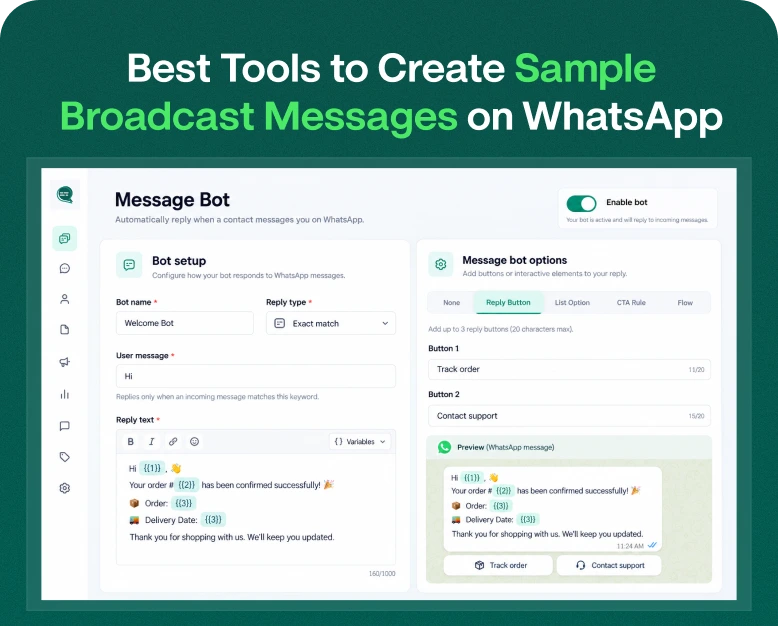
Wbotz is a WhatsApp communication platform with team collaboration, automated responses, campaigns & customer management features.
If your sales or support team wants to manage conversations in one place versus a single phone, this may be something to consider. Depending on the plan, businesses can explore shared inbox functionality, chatbot workflows, integrations and campaign tools.
Things to watch for:
- Included no of team members in
- Limits of chatbots and automation
- CRM and e-commerce integration
- Campaign & reporting features
- Costs of subscription and WhatsApp messaging
Choose Wbotz if: Your team requires an accessible dashboard and wants to create routine automations without having to build a full messaging system from the ground up.
2. Interakt for E-commerce & Sales Automation
Good For: Online sellers and companies that use WhatsApp to answer customer questions and sell products.
Interakt provides WhatsApp messaging tools for client engagement, sales workflows and business communication. It can help businesses manage conversations, organise customer information, and automate selected interactions, depending on the plan you have.
For instance, an online retailer can use WhatsApp to respond to product queries, send order updates and follow up with customers who have asked for more information.
Key points to remember:
- E-commerce Integrations & Order Notifications
- Lead & Contact Management
- Automation and campaign capabilities
- Grant access to conversation and team
- Message charges and plan limits
Choose Interakt if: You want WhatsApp to power your sales process and customer relationships, especially if you have an eCommerce store.
3. AiSensy For WhatsApp Marketing Campaigns
Best for: Companies that want to interact with their customers and run promotional campaigns.
AiSensy offers WhatsApp business messaging tools that can benefit campaigns and customer communication. If you want campaign management features, without building a custom app, and are looking to send marketing messages to eligible contacts, it may be worth comparing.
For example, a retail business could use a campaign platform to synchronise the announcement of a seasonal sale and metrics around available delivery or engagement.
Important items to assess:
- Developing campaigns and audience segmentation
- Template management
- Options for automation
- Reporting & analytics
- Subscription levels and fees for messages
Choose AiSensy if: You are mainly focused on managing permission-based WhatsApp marketing campaigns and client engagement.
4. respond.io – Multi-Channel Customer Messaging
Great for: Businesses that handle customer conversations across multiple messaging channels.
The purpose of respond.io is to unify customer conversations and assist teams in their messaging workflows. It can be useful for businesses that reach out to their customers on WhatsApp besides other supported channels, and want a more consolidated customer communication process.
From there, companies can evaluate workflow automation, team assignment, reporting and integrations with other business tools, depending on the plan and setup. Provider plans and features may change at any time, so be sure to check on the current details before you buy.
Key considerations:
- Messaging channels supported
- Workflow & routing options
- Limits on team and users
- Reports & Integrations
- Charges, subscription and usage
Pick respond.io if: Your customer support or sales team has to manage conversations on multiple channels and not only on WhatsApp.
5. Twilio – WhatsApp API Custom Integrations
Ideal for: Developers and businesses who want to build their own messaging apps.
Twilio offers communications APIs that developers are able to plug into their own custom applications. This can be useful if you want to connect your business’ WhatsApp messaging to an existing CRM, order management system or proprietary software.
Rather than just using a pre-built marketing dashboard, your development team can create workflows that are specific to your business processes.
Key things to assess:
- Developer tools and API documentation
- Usage-based pricing
- Supports WhatsApp functionality
- Effort of integration and maintenance
- Support, error handling and monitoring
Choose Twilio if: You have development resources and want more control over how WhatsApp messaging works within your application.
6. 360dialog – APIs for WhatsApp Solutions
Best for: Businesses, agencies and developers who need to integrate WhatsApp API.
360dialog is a WhatsApp business messaging infrastructure and tools company. If your team or technology partner is looking for API connectivity, and the flexibility to build a separate application or customer communication experience, it’s worth looking into.
Before you sign up, see if you only need API access or if you also need a ready-made team inbox, chatbot builder, and campaign management. These may be separate products or may involve some additional configuring.
Things to think about:
API Access & Getting Started
- Number & Account Management
- Inbox or other available tools
- Integration and support requirements
- Charges for messaging and monthly fees
Choose 360dialog if: You care about API connectivity and you have a clear plan on how your team will handle messages.
Quick Comparison: Which WhatsApp Cloud API Provider Should You Choose?
Use this table as a starting point for your shortlist. The best fit depends on the features available in the plan you select.
| Provider | Main strength | Best suited for |
| Wbotz | Team inbox and no-code automation | Sales and customer support teams |
| Interakt | Sales and e-commerce workflows | Online stores and growing businesses |
| AiSensy | Campaign management | Marketing-focused businesses |
| respond.io | Multi-channel conversations | Teams handling several messaging channels |
| Twilio | Custom API integrations | Developers and technical teams |
| 360dialog | WhatsApp API connectivity | Businesses building their own workflows |
These are general use-case comparisons, not a ranking of service quality. Features, integrations, and prices vary by plan and may change. Review the providers’ current terms before purchasing.
Benefits of Using the WhatsApp Cloud API for Business Automation
Choosing a provider is only part of the decision. The true power is in discovering repetitive tasks and developing workflows to help your business serve customers more efficiently.
1. Quick response to customers
A workflow automation can respond to a question or answer FAQs without an employee having to manually type each response.
For instance, a travel agency might automatically post its business hours, tour categories available or link to its booking page. More complex questions can then be handed to a team member.
2. Improved Lead Management
When a customer requests information, a linked system can log the request and trigger an appropriate follow-up.
A sales team can sort leads by interest, delegate conversations to employees, and monitor which enquiries still need attention. This will make the follow up process more organised, though the results depend on the quality of your workflow and sales process.
3. Order Updates More Efficiently
WhatsApp messaging can be integrated with order systems of e-commerce businesses.
The system can send a proper notification when an order is confirmed or shipped. It’s useful information for customers, and support teams might spend less time answering repetitive order-status questions.
4. Continuous customer communication
Pre-approved templates allow companies to maintain a consistent message in their routine interactions. They may contain relevant information, such as appointment dates, order numbers, or payment due dates.
Personalisation should add more value to the message rather than just being another promotional message.
5. More straightforward team collaboration
A good provider will allow multiple employees to work from a shared inbox, assign conversations, and review past interactions.
This is especially useful when sales, support and operations teams need to coordinate around the same customer.
How to Pick the Best WhatsApp Cloud API Provider
Before you buy a subscription, work through these steps to make sure the solution is appropriate to your real needs.
Step 1: Identify your main business objective
Start with the thing you want to improve.
- For marketing campaigns, focus on managing your campaign and segmenting your audience.
- For customer support, look for shared inboxes, routing and chatbot tools.
- Focus on order integrations and customer notifications for e-commerce.
- Review the API documentation and the developer flexibility to build custom applications.
- Think about using an omnichannel platform for multi-channel communications.
If you know what you want you won’t end up paying for features you don’t need.
Step 2: Calculate Total Cost
The costs of automating WhatsApp are not limited to just the platform subscription.
Here are some possible costs:
- Yearly or monthly subscription
- Meta messaging fees
- Provider markup or extra usage charges
- More team members
- AI or advanced automation plug-ins
- Cost of integration and installation
- Support or Onboarding Fees
Meta’s messaging fees are subject to the relevant pricing rules, message category, recipient market and other conditions. Some providers may charge differently for these so compare the total cost not just the advertised subscription fee. For the latest rules check out the official WhatsApp Business Platform documentation.
Step 3: Consider integration options
Your messaging platform should integrate with the systems your business already uses.
Look for integrations with, based on your needs:
- CRM software
- E-commerce websites
- Appointment and reservation tools
- Helpdesk systems
- Payment/order management systems
- Reporting and analytical instruments
A coaching institute, for example, can integrate WhatsApp with its CRM so that a fresh enquiry will create a lead record and a relevant confirmation message will be sent.
Check if an integration is built in, available via a third party connector or needs custom development.
Step 4: Test the automation prior to going live
If there is a trial or demo, try a real workflow before committing to a long-term plan.
Determine if the system can:
- New message.
- Find the right customer or event.
- Start the intended automation.
- Send the right message or approved template.
- Escalate the conversation to a human as needed.
- Best record for later review.
When you test these steps you discover practical limitations that you may not see on a feature list.
Step 5: Check Security and Customer Consent
Select a solution that offers the right control of access and allows your business to manage customer permissions.
Make sure your team knows the current messaging policies, template requirements, and opt-out management for WhatsApp. Don’t use unofficial bulk-sending tools that might get your account in trouble using the API or a supported provider.
Practical Example: WhatsApp Automation for E-Commerce Store
For example, an online clothing store gets many messages that enquire whether or not an order is confirmed or dispatched.
The store owner chooses a WhatsApp Cloud API provider that can connect to the store’s order system. The business then establishes three workflows:
- After a successful order, send a message.
- Shipping Update: Let customers know when the order status changes.
- Support handoff: For questions about late or incorrect orders, please ask a support person.
The team thoroughly tests the workflows with sample orders and ensures that cancelled orders
do not send inappropriate shipping messages.
Once the workflows are running correctly, the business monitors delivery results, customer replies and support enquiries to identify areas for improvement.
That does not guarantee more sales or fewer support requests. But it does provide a systematic way for the business to manage routine communication and improve the customer experience over time.
Common Mistakes to Avoid When Buying a WhatsApp API Solution
Price alone: An affordable subscription may be missing key automation, integrations, or team features.
Ignore messaging fees: Messaging volume can become a major expense when usage fees increase.
Let’s assume all providers offer the same service: Some will provide you with a complete dashboard, others will expose mostly an API.
Automate everything you can: Some complicated complaints or delicate questions will still need a human.
Do not violate consent requirements: Use customer contact details appropriately Honour opt-outs Comply with applicable WhatsApp policies
Skip the testing: Bad variables, duplicate notifications or broken integrations will annoy your customers. Test workflows before running them on a large scale.
Frequently Asked Questions (FAQ)
1. Which is the best WhatsApp Cloud API provider for business automation?
The right provider depends on your needs. If you’re looking for a shared inbox and no-code workflows, Wbotz might be right for you. If you’re a sales-oriented and e-commerce business, Interakt might be a good fit. If you’re looking for campaign-focused teams, AiSensy could be a good option. If you need API-focused implementations, Twilio or 360dialog might be worth evaluating. Compare features and price before you decide.
2. Is the WhatsApp Cloud API Free?
Meta provides the underlying Cloud API infrastructure but there may be costs associated with business messaging including message charges from Meta and others. If you use a third-party provider, its subscription, usage fees and optional services could add to the total. Review current pricing for your message categories and recipient markets.
3. Difference between Meta WhatsApp API and WhatsApp API Provider?
Meta owns the underlying WhatsApp Business Platform API. A provider can provide access to that API and more, such as a dashboard, shared inbox, chatbot builder, integrations, reporting, etc. If you are connecting directly to the Cloud API you may need to build or provide these extra features yourself.
4. Can I Schedule WhatsApp Messages Without Coding?
Yeah. Some providers have visual workflow builders, chatbot tools and plug-and-play integrations that require minimal to no coding for common tasks. Some more advanced integrations or custom business logic may still require a developer.
5. How to Build Official WhatsApp Business API Solution
Take a look at the provider’s current documentation, onboarding process they support, messaging policies, pricing, and integration options. Check the solution is on the official WhatsApp Business Platform. Describe how your business account, phone number, templates and data will be handled.
Conclusion: Choose a WhatsApp Cloud API Provider That Meets Your Business Needs
With the WhatsApp Cloud API, businesses can automate repetitive communication, respond to customer queries, and embed messaging into existing software. But the right provider depends on what you want to accomplish.
If you want something user-friendly, look for providers that offer shared inboxes and no-code automation. If you’re in marketing, explore campaign tools and audience management. If you’re building a custom application, you need to pay close attention to API capabilities, documentation, and integration costs.
Before you buy, compare the entire pricing model, test your most critical workflow and find out the provider’s approach to customer consent, message templates and support.
Ready to automate your business communications?
Shortlist two or three providers, get demos or trials if you can and run a real customer journey through to see what works before choosing a plan. By picking a solution that fits into your existing workflow and one that can grow with your business you’ll be able to get more value out of your WhatsApp automation.
Written by
Jayesh Makwana
Part of the Wbotz team, writing about WhatsApp Business API, automation and the campaigns that actually convert.