WhatsApp Beta Scheduled Messages for Customer Engagement
Introduction: The Secret to Never Missing a Customer Connection Has your team been so busy that they forgot to send a follow-up message to a customer, missed an important reminder for an appointment or delayed…

Introduction: The Secret to Never Missing a Customer Connection
Has your team been so busy that they forgot to send a follow-up message to a customer, missed an important reminder for an appointment or delayed announcing a special offer? These small communication gaps can impact customer satisfaction and sales opportunities, and can make your business look less responsive.
For businesses wanting to improve client engagement, this is where WhatsApp Beta scheduled messages become an interesting option. The ability to pre-schedule messages allows you to plan out customer updates, create promotional campaigns, and keep the flow of communication steady without having to recall every message in your head.
But there’s one important difference: availability of scheduled messages may vary depending on the WhatsApp version, account, device and rollout. The beta feature may not be available for all users and third party business tools may offer scheduling options not present in the standard WhatsApp app.
In this article, we’ll explore what WhatsApp Beta scheduled messages are, how message scheduling works, how businesses can use it to engage customers, and what to consider before choosing a scheduling solution. You’ll also get real-life examples, useful tips, and answers to common questions.
What are WhatsApp Beta Scheduled Messages?
WhatsApp Beta scheduled messages is the idea of preparing a WhatsApp message in advance and scheduling it to be sent at a certain date and time. This feature allows users to plan communication instead of manually sending each message when it is due.
WhatsApp Beta is a beta version of WhatsApp that may allow some users to access features that are being tested before a wider release. However, you won’t be able to access a scheduled messaging feature just because you joined the beta. Features may differ and users should check current features on their own devices.
Sending scheduled messages can be useful for companies in:
- Appointment confirmations & reminders
- Order updates & delivery notifications
- Promotional messages and seasonal promotions
- Event invitations and reminders about registration
- Payment reminders and service follow-up
- Feedback from customers requests following purchase
For example, a salon can send appointment reminders to customers a day before their appointment. An online store wants to run a campaign to announce a weekend sale. A training institute can set a reminder before the start of a new batch.
The goal is simple: deliver the right information to the right people at the right time and reduce the amount of repetitive manual work.
Why Scheduled WhatsApp Messages Are Important for Client Engagement
Customers expect companies to communicate clearly and respond when it’s convenient for them. Sending the right message at the right time can make their experience better and help them take the next step.
1. Keep Up the Communication
Busy teams may forget to follow up with customers, particularly if they’re juggling many conversations a day. By scheduling, businesses can get important messages ready ahead of time and build a more dependable communication routine.
2. Reducing Missed Appointments
Businesses with appointments can send reminders to customers ahead of a scheduled visit. A clinic, salon, repair service or consultant can remind clients of the date, time and any preparation required.
3. Sales & Promotions Support
Businesses can set up campaigns for product launches, seasonal sales, and limited-time offers. Pre-planning messages allows marketing teams to align campaigns rather than frantically trying to send everything manually.
4. Customer support teams’ free time
If routine communication is scheduled in advance, employees have more time to answer questions, resolve issues and help customers with complex requests.
5. Improve Client Experience
Relevant messages can help customers remember appointments, track purchases and understand what happens next. The trick is not to send repeated messages just to draw attention, but to provide useful information.
How to Schedule Message on WhatsApp: A Hands-on Guide
If you are looking for how to schedule messages on WhatsApp, the right method is specific to the app, device and tools available to you.
The regular WhatsApp app hasn’t always had a native, globally available feature to schedule normal messages. Before testing a beta feature, check your current app version and official WhatsApp announcements. If native scheduling isn’t an option, a business messaging platform or a suitable device-based workaround could help.
Step 1: Verify your WhatsApp Version
First, visit the official WhatsApp app store listing or your device’s app store and see if there is an update available.
If you’re a WhatsApp Beta user, check out the feature information available through the official beta programme. Note that beta access doesn’t mean all experimental features will be available on your account.
Don’t download unofficial modified WhatsApp apps claiming to have additional scheduling features. They pose a risk to your privacy and account security.
Step 2: Determine What Messages to Schedule
Before you choose a tool, identify the messages that your business sends regularly. For example:
- One day before Reminders to book an appointment
- Tracking updates when your package ships
- Class Reminders Before Online Session
- Follow-up when a customer asks for a quote
- Promotions for customers who have opted-in
This step will help you choose a solution based on real business needs and not pay for features you will never use.
Step 3: Select a scheduling method that works for you
Depending on what you need, there are a few different ways to go.
Option A: Use a native feature, if available. If the scheduling function you need is already available in your current version of WhatsApp, just follow the instructions provided in the app.
Option B: Automation through device. Some phones or automation tools may enable some actions to be prepared ahead of time. However, these methods may require manual confirmation, may not work reliably when the device is unavailable, and may be limited by operating-system permissions.
Option C: Use a business messaging platform. A platform that integrates with the official WhatsApp Business Platform may be more appropriate if your business needs team access, campaign planning, automation and reporting, or customer-management features. Make sure the provider is compliant with WhatsApp’s current policies and supports your intended use case.
Step 4: Create a Clear and Relevant Message
Schedule it once you’ve composed your message. The next step is to humanise the text. Keep the purpose clear, and make the next step easy to understand.
For example, an appointment reminder might say:
- The customer’s appointment date and time
- Business or Service Name
- Critical instructions
- A way to get to the business if plans change
Do not include unnecessary personal information. If you use message templates or customer data fields, make sure you test them thoroughly to ensure that each customer receives the correct information.
Step 5: Choose Date & Time
Pick a delivery time that makes sense for your audience. A reminder for a morning appointment may be best the day before, while a webinar reminder might be appropriate a few hours before the session.
If your customers are in different time zones, find out whether your scheduling tool operates in your local time, the customer’s time zone, or a predetermined account time zone.
Step 6: Test the Process Before You Scale It
Send a test message to a suitable test account before scheduling a large campaign. Verify that the text, links, timing, and personalisation are correct.
If you’re using automated business messaging, consider delivery reports, opt-in logs, template approval requirements and failure notices, as applicable.
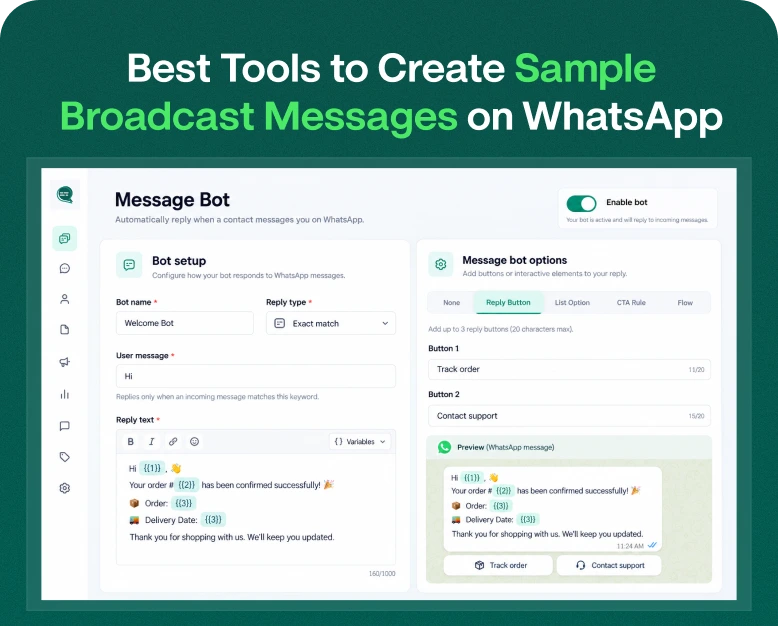
Better Engagement Sample Auto Reply Message for WhatsApp
Scheduling and auto-replies are similar but not the same. A scheduled message is a message you create to be sent at some point in the future. An event causes an auto-reply. A customer messages or reaches out to your business outside of business hours.
Here are some sample posts you can customize for your business.
1. APPOINTMENT ADVERTISEMENT
“Hi {name}, quick reminder that you have an appointment with {business_name} on {date} at {time}. Need to reschedule? Give us a call. See you soon!”.
2. Customer Follow-Up
Hi {name}, thanks for your interest in {product_or_service}. Any questions we can help with? Reply to this message and our team will be happy to assist.
3. Special Offer
Hi! Our special offer on selected products ends {end_date}. See the details here: {link} If you need help choosing the right option, just reply to this message.
4. Beyond Business Hours
“We appreciate you reaching out to {business_name}. Our team is currently out but we did receive your message. Our hours of operation are {business_hours} and we will get back to you as soon as possible.”
Be sure to test each template before sending to customers, and only use personalisation fields if your tool supports it. Promotional messages shall be sent only to persons having the required permission to receive them.
How to Use WhatsApp Beta Scheduled Messages for Business
The best results are achieved when scheduled messaging is tied to a clear customer need. Here are some real life examples from different industries.
An online store can set up order updates, product announcements and customer follow-ups. For example, after a customer makes a purchase, the business can send an order confirmation and later on, a delivery update via a suitable integration.
Don’t send the same offer to everyone – segment customers by relevant interests and permissions for promotional campaigns.
Salons, Service Providers & Clinics
Appointment reminders reduce confusion and help customers show up on time. A salon might send a reminder the day before a booking, a repair service might confirm the planned visit window.
Ensure your customers have a way to get in touch with the business if they want to reschedule.
Educational Establishments
Schools, coaching centres and online teachers are able to send reminders for class timings, assignment due dates and upcoming sessions. Timely information is available to students and parents without having to dig through old messages.
Real Estate Business
Property consultants can send reminders for an upcoming appointment or follow up after a site visit. Messages must be relevant to the enquiry and must not apply undue pressure to prospective buyers.
Small Businesses & Freelancers
For consultants, designers and service professionals, you can prepare followups after sending quotes, remind customers about project meetings and share onboarding instructions. Scheduling keeps them organised but keeps the communication personal.
These examples are potential applications, not guaranteed results. Monitor your own engagement and feedback from clients to see what messages are actually helpful.
Best Practices for Scheduling WhatsApp Messages
A scheduling tool is only one component of a successful communication strategy. Quality, timing and relevancy of each message is just as important.
Respect Customers’ Consent
Obtain the proper consent before sending business messages, particularly for promotional messages. Adhere to the applicable WhatsApp business messaging policies, privacy, and marketing laws.
Don’t Send Too Many Messages
Too many messages can annoy your customers and increase the likelihood of them blocking you or opting out. Maintain a reasonable communication schedule and only send when there is something useful to say.
Personalise Messages (Carefully)
Hi John, I’m contacting you as a customer of ours. Personalised messages should be more helpful, not intrusive. Keep customer information accurate, always.”
Make the message simpler
Use simple words. Short sentences. One clear call to action. Customers need to understand why you’re contacting them and what their next steps are.
Key Results to Watch
Monitor useful stats such as delivery status, replies, link clicks (if any), appointment attendance, conversions and opt-outs. Leverage these results to fine tune your messaging schedule over time.
Secure Customer Data
Choose providers you can trust, limit who can see your customer data, and look at how the platform stores and processes information. Never give your passwords, verification codes or sensitive customer information to untrusted services.
Selecting a WhatsApp Scheduling Tool for Your Business
If you lack native scheduling or it’s not enough, then a dedicated business messaging solution may be worth a look.
Compare these features before you get a plan:
- Scheduling: Can you tell me the exact dates, times and recurring schedules?
- Official integration: Is the official WhatsApp Business Platform used by the provider where needed?
- Automation: Are there triggers for messages based on bookings, orders, or customer actions?
- Team inbox: Can multiple agents with access speak to customers?
- Personalisation: Can I trust to put customer or order information?
- Reporting: Please check the delivery status and campaign performance.
- Consent management: How well does the tool help your team track permissions and opt-outs?
- Pricing: Is pricing made clear for message fees, subscription fees and on-boarding costs?
- Support: If a scheduled campaign fails or an integration breaks down, is there any help available?
Don’t judge a platform by the number of messages it claims to send. Reliability, compliance, customer experience and ease of use are more important for long term results.
If you need scheduled campaigns, automation and shared customer support for your business, compare business messaging platforms like Wbotz with other providers to check which features fit your workflow. Please confirm current scheduling capabilities, integration details and pricing with the provider before signing up for a paid plan.
Common Mistakes to Avoid
Here are some of the common mistakes that businesses make that can hurt their messaging efforts:
- Assuming a beta feature is available to all WhatsApp users
- Dependence on unofficial apps without considering security risks
- Sending messages without testing the date, time, or recipient details
- Sending promotional material without the required consent.
- Once you’ve sent an automated message, don’t forget customer replies.
- Sending generic messages not tailored to the customer’s situation
- Buy a tool before you know if it fits into the required workflow
A simple review process can prevent most of these problems. Assign someone to check important scheduled messages, test automation regularly and review feedback from clients.
Conclusion: Make customer communication more uniform
The scheduled messages feature of WhatsApp Beta is a good idea for modern businesses. It is easier to manage communication with customers when important messages are scheduled in advance. Scheduling enables teams to send appointment reminders, order updates, event notifications, and promotional campaigns on a consistent basis, while reducing repetitive manual work.
But the exact features you get will depend on your WhatsApp version, account, device and the business tools you select. Native scheduling is a good option, but always verify feature availability with official sources. If you’re looking for advanced scheduling, automation, or team collaboration, consider a reputable business messaging platform.
The best way is to deliver the right messages at the right time, respect the customer’s preferences and monitor what happens.
Want to boost your client engagement on WhatsApp?
Audit your current messaging process, determine which activities can be automated, and look into business messaging solutions such as Wbotz to see the features your team needs. Select a solution for trustworthy communications, ethical automation, and improved customer experience.
Written by
Jayesh Makwana
Part of the Wbotz team, writing about WhatsApp Business API, automation and the campaigns that actually convert.