






Skip to content

WhatsApp product catalogs that take the order in the chat

Turn your chat into a storefront, customers browse products, prices and offers without leaving WhatsApp.

Trusted by growing businesses across India and beyond

  • ByteNAP Networks
  • ByteWeb
  • cardziAI
  • MG Hospital
  • Mohanlal Tea
  • Origo
  • System Solution
  • Tapect

Key features and functionalities of WhatsApp Catalogs

A catalogue puts your products inside WhatsApp, with images, prices and descriptions. Customers browse, ask, add to cart and pay in the thread they are already in.

Your products, inside WhatsApp

Each item carries an image, a price, a description and a code, so customers can look properly instead of asking what you have.

  • Images, prices, descriptions and product codes
  • Group into collections customers understand
  • Share the whole catalogue or a single item in a chat
  • Update prices and stock without republishing anything
Cart and order in the conversation

Customers add items, confirm quantities and place the order without a browser, an app install or an account.

  • Add to cart and adjust quantities in chat
  • Confirm the order with a payment link
  • The order reaches your store or ERP over the API
  • Confirmation and delivery updates follow as utility messages
See transactional messages

Questions answered while they are looking

Most orders stall on one question about size, availability or delivery. The bot answers it, or an agent does, without the customer leaving.

  • Bot answers stock, size, delivery and returns questions
  • Hand to an agent for anything it cannot close
  • Replies within 24 hours of their message are free
  • Recommend alternatives when an item is out of stock
See the WhatsApp chatbot

Sync from the store you already run

Your catalogue stays in your e-commerce platform. Wbotz keeps the WhatsApp version in step through the integrations and the API.

  • Ready integrations for common store platforms
  • Push new products and price changes over the API
  • Abandoned carts can trigger a follow up sequence
  • One product source, not two that drift apart
Browse integrations

Benefits of using WhatsApp Catalogs

What changes once this is running, as opposed to what it does.

  • Fewer steps between interest and order Customers browse, ask and buy in the thread they are already in, with no browser and no account to create.
  • Questions answered before they stall The one question about size, stock or delivery gets answered where it is asked, which is usually what saves the sale.
  • You keep the customer relationship Orders come to you directly, so the conversation and the repeat purchase are not owned by a marketplace.
  • One product source, not two The catalogue syncs from the store you already run, so prices and stock do not drift apart.

Why build WhatsApp Catalogs with Wbotz

Plenty of platforms will sell you this feature. These are the four things that differ once you have signed.

No markup on your message charges

Meta charges ₹0.8631 for a marketing message to India and that is what reaches your invoice. We earn from the subscription, not from your volume, so a heavy month raises your Meta bill and leaves ours where it was.

See the rate table

Official Meta partner, not a workaround

Your number runs on the official WhatsApp Business Platform, is eligible for the green tick, and is not at risk of the bans that come with unofficial bulk senders.

See the WhatsApp Business API

Someone sets it up with you

An onboarding manager handles business verification and the green tick application, then runs live training for the people who will actually use it. That is included, not an upsell.

Talk to onboarding

Included on Starter, Growth, Enterprise

Not a module you buy separately. The CRM, chatbot builder, broadcasts and shared inbox come with every plan, from ₹1,000 a month billed annually, with unlimited contacts and conversations throughout.

Compare plans
2 Bn+
People reachable on WhatsApp
24 hr
Window in which replying costs nothing
0 %
Markup Wbotz adds to Meta message charges

How it works

Four steps from a blank account to whatsapp catalogs running on your number. No developer needed.

  1. 01

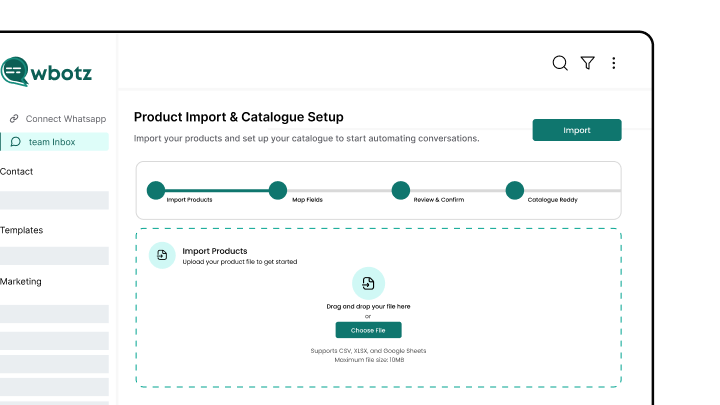
    Add your products

    Upload a product file or sync from your store, with images, prices and codes.

    Wbotz screen: product import and catalogue setup
  2. 02

    Group them into collections

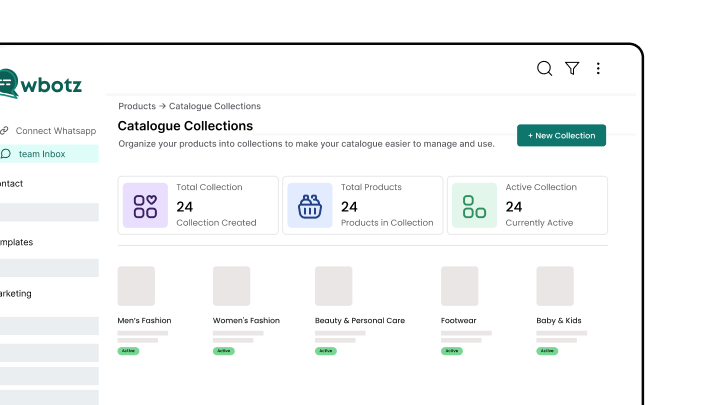
    Organise the catalogue the way customers ask for things, not the way your warehouse is arranged.

    Wbotz screen: catalogue collections
  3. 03

    Connect ordering and payment

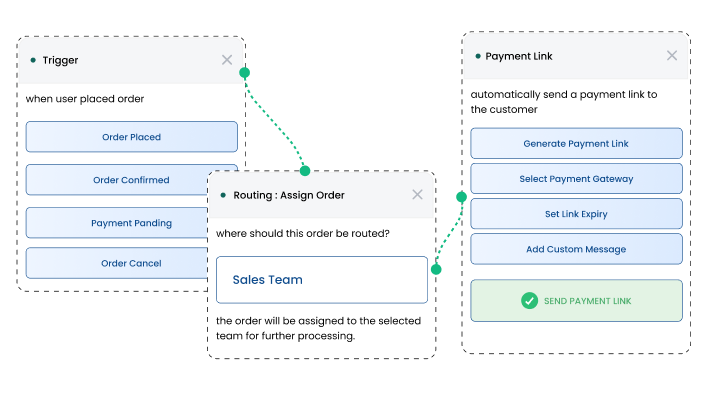
    Decide where an order goes and how the payment link is generated.

    Wbotz screen: order routing and payment link setup
  4. 04

    Share it and take orders

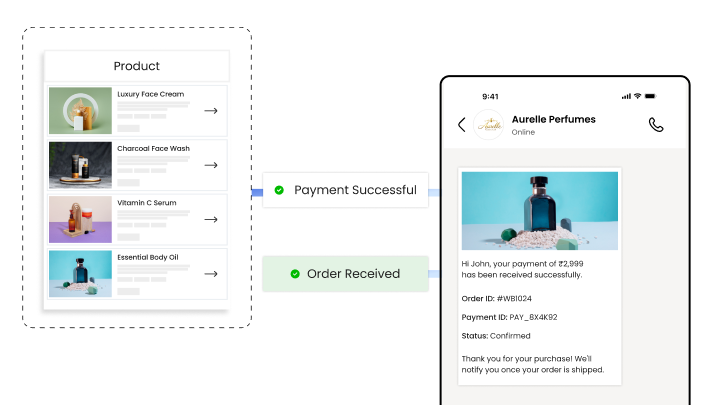
    Send the catalogue in campaigns and chats, and handle the orders that come back.

    Wbotz screen: catalogue shared in a campaign and orders received

Frequently asked questions

What is a WhatsApp product catalog?
A WhatsApp product catalog is a digital storefront within WhatsApp Business that allows businesses to showcase products or services with images, descriptions, prices, and other details, enabling customers to browse and order without leaving the chat.
How do I create and manage my WhatsApp catalog?
You can create and update your catalog via WhatsApp Business App or API platforms like Wbotz by adding, editing, or removing product listings with images, prices, and descriptions anytime.
Can customers order products directly through the WhatsApp catalog?
Yes, customers can browse products, ask questions, and place orders within WhatsApp, simplifying the buying process and boosting conversion rates.
Is it possible to update prices, stock, or items on my catalog?
Absolutely. Real-time updates ensure your customers always see accurate product information, availability, and promotions, avoiding confusion and missed sales.
How many products can I add to a WhatsApp catalog?
WhatsApp currently supports up to 500 products per catalog, suitable for small to medium-sized inventories.
Can I share my catalog outside WhatsApp chats?
Yes, catalogs can be shared via WhatsApp status, social media, email campaigns, links, or QR codes to expand reach and drive traffic.
Are digital products like eBooks or courses supported in WhatsApp catalogs?
Yes, both physical and digital products, including memberships and licenses, can be listed in your catalog.
Can I integrate payments with WhatsApp catalogs for a complete shopping experience?
Yes, integrations with WhatsApp Pay or third-party payment gateways can enable customers to complete purchases directly within the chat interface.

Connect everything you already use

Your CRM, your store, your helpdesk and your forms, joined to the same WhatsApp number. Every plan also ships unlimited REST API calls and webhooks for anything not on the list.

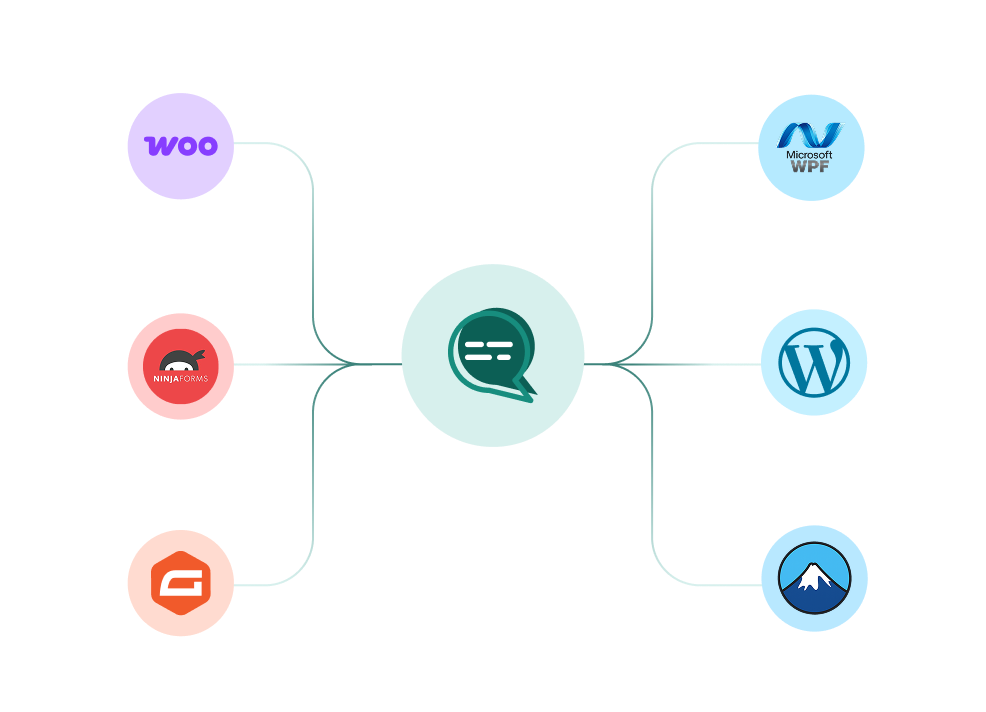
WooCommerce, WordPress, Ninja Forms, Gravity Forms and more connected to a single Wbotz WhatsApp hub
  • WooCommerce
  • WordPress
  • Gravity Forms
  • WPForms
  • Ninja Forms
  • Contact Form 7
  • + REST API & webhooks
Conversations handled on Wbotz
100K+
Conversations answered by chatbots
10K+
Markup added to Meta message charges
0%

Start on WhatsApp without paying a markup on every message

Put your campaigns, chatbot and team inbox on one official WhatsApp number, and pay Meta rates for the messages you send. Setup and green tick support are included.

  • 14 day free trial
  • No credit card required
  • No markup on Meta message charges

Cookie preferences

Choose what we may store on this device. You can change this at any time from our cookie policy, linked in the footer of every page. Your choice is remembered for 180 days.

Questions about this? Email [email protected].