Best Tools to Create Sample Broadcast Messages on WhatsApp
Sending out the same message to dozens or hundreds of customers can take longer than you think. Whether you’re launching a new product, sharing a special offer, reminding customers about an upcoming event, or informing…
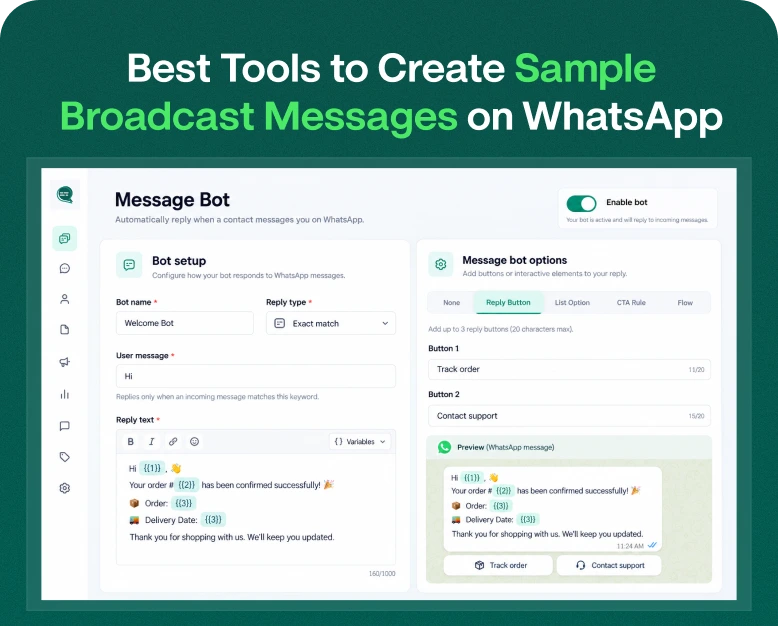
Sending out the same message to dozens or hundreds of customers can take longer than you think. Whether you’re launching a new product, sharing a special offer, reminding customers about an upcoming event, or informing clients about a service update, writing each message individually is not always practical.
WhatsApp Broadcast makes it easy for you to share relevant information with multiple recipients. But getting good results is more than just selecting contacts and hitting send. You need a clear message, the right tool and a communication strategy that corresponds to your customer’s preferences.
Hence companies look for a sample broadcast message that they can customize as per their requirement along with tools to make it easy to create, schedule, personalise and manage the campaigns.
In this article we’ll look at the best tools to create WhatsApp broadcast messages, learn how to write effective examples, compare features before you buy and find practical ways to use broadcasts to grow your business.
What is WhatsApp Broadcast Message?
WhatsApp broadcast message is a message which is sent to multiple recipients without forming a group chat. Usually the recipient gets the message in their own chat, so the customers don’t see a group discussion or each other’s replies.
You can broadcast messages to WhatsApp users via WhatsApp’s apps, and for more sophisticated messaging flows, eligible businesses can use the WhatsApp Business Platform and supported providers.
A clothing store, for instance, might announce to its customers that a new collection has been released. A coaching institute might show enrolment dates, a service provider may inform customers about changed business hours.
A message broadcast may contain:
- Product releases
- Promotions and discounts
- Event invitations
- Changes to appointments or services
- Business notices
- Useful tips & informative information
What features and limits you can access depend on the WhatsApp product and tool you use. App-based broadcasts, traditionally, might have recipient and contact requirements. More extensive campaigns may need more suitable audience management and reporting features that a business messaging platform can offer.
Why Do Companies Need WhatsApp Broadcast Message Tools?
Businesses can use a good tool to prepare messages more efficiently and manage communication as their customer base grows.
1. Create Messages Quicker
Writing each campaign message from the ground up can be repetitive. You can also use reusable templates, so you draft a message once and then can reuse it for future announcements.
For example, an online store can save a product launch format and use its structure for future collections, changing only the product name, description, and link.
2. Brand communication in a consistent way
When individual employees write customer messages on their own, there may be differences in tone and format.
Approved message templates ensure that the language, branding and calls to action are consistent across your campaigns.
3. Tailored Customer Communications
Some business messaging tools allow you to segment your contacts and personalise fields. These features can help you customize messages with relevant customer information.
For example, a travel agency might share a destination-specific offer with customers who have indicated an interest in that destination, provided the campaign complies with applicable consent and messaging requirements.
4. Improved Campaign Management
More sophisticated platforms include scheduling, reporting on campaigns, team access and integration with customer relationship management (CRM) systems.
These features can help businesses plan campaigns, organise contacts, and see how recipients are responding.
5. Support sales and client relationships
A useful broadcast gives customers information they may want. Product updates and relevant offers and helpful announcements can draw people to your website, ask questions or explore your services.
The secret is: relevance. Over-messaging or advertising products that aren’t relevant to the customer can water down engagement and erode trust.
Best Tools to Create Sample Broadcast WhatsApp Messages
The best tool depends on the size of your audience, your budget and the type of campaign you want to run. These are some options that are worth comparing.
1. WhatsApp Business App: Best for Small Business
The WhatsApp Business app is a practical starting point for small businesses looking to communicate with customers without necessarily jumping on a separate automation platform.
It has business-oriented features like business profile, product catalogue, quick replies and supported broadcast functionality. Functionality and the number of recipients may depend on the version and the account.
Features useful include:
- Easy customer contact
- Re-usable quick replies
- Catalogues of products and services
- When possible, broadcast lists
- Information on business profile
Best for: Local stores, freelancers, independent service providers, and businesses with relatively simple messaging needs.
What to know: Learn about how broadcasts work for your account, including contact requirements and audience limits. However, for more complex scheduling, detailed campaign analytics, or CRM-triggered messages, you may require a separate business messaging solution.
2. Wbotz: Perfect for Business Broadcasting and Automation
Wbotz is a business messaging platform for WhatsApp that helps businesses manage customer conversations and campaigns on a shared platform.
Features may include broadcast campaigns, team inboxes, automated workflows, customer management and integrations, depending upon the plan.
Features useful for evaluation:
- Campaign & Audience Management
- Message templates
- Automation processes
- Shared mailbox for team members
- Reporting and integrations available
Best for: growing companies, e-commerce businesses and teams that communicate with customers regularly.
Compare current plan limits, user allowances, messaging rates and campaign features before you subscribe.
Check out Wbotz’s official website to see what they have on offer today.
3. Interakt: Best for Sales Messaging
Interakt provides customer management tools and WhatsApp business messaging to boost sales and client engagement.
Depending on the product and subscription, businesses can manage campaigns, customer interactions, templates and sales-related workflows.
Useful features to consider are:
- Contact organization
- Broadcast & Campaign Capabilities
- Management of customer conversations
- CRM and sales tools
- Automation & Integrations
Best for: Small and growing businesses who want to link WhatsApp conversations to sales activities.
For latest features, pricing and availability in your area, please refer to the official Interakt site.
4. Meta WhatsApp Business Platform: The Best for Scalable Messaging
The WhatsApp Business Platform is the basis for more advanced business messaging. Businesses can access it via supported providers or build it into their own software.
It can be a good fit for companies looking to integrate WhatsApp messaging with order systems, CRM platforms, booking apps or internal tools.
Useful functions:
- Approved Message Formats
- Business systems integration
- Automated alerts
- Scale support for business messaging.
- Workflow-based messaging
Best for: Companies with more substantial messaging needs, custom integration needs, or established customer communication processes.
This option may require a technical setup or solution provider. Before activating it, check the message rates, service provider charges, the templates’ requirements and the account’s eligibility.
How to Choose Between These Tools
| Tool | Best suited for | What to check |
| WhatsApp Business app | Basic business messaging | Broadcast availability and recipient requirements |
| Wbotz | Campaigns and team automation | Subscription limits, messaging fees, and integrations |
| Interakt | Sales and customer communication | Campaign tools, CRM features, and pricing |
| WhatsApp Business Platform | Advanced or integrated messaging | Setup, template rules, provider costs, and technical needs |
There is no single best tool for every business. If you send occasional announcements, the WhatsApp Business app may be enough. If you need to coordinate campaigns across a team or connect messages with customer actions, a dedicated platform may provide better value.
Broadcast Message Examples for Various Business Needs
A good broadcast message is clear, relevant and actionable. Here are some examples you can use to suit your business. Please replace the bracketed information with the correct details before sending.
1. Promotional Offer Announcer
Sample message:
Hello [Customer Name], we have a special deal for you! Save [discount or offer] on select products at [Business Name]. Have a look at the collection here: [Link]. Offer expires on [Date]. Terms apply.
Best for: Retail stores, E-commerce stores and Service businesses.
Tip: Keep the offer, expiry date and next step simple and easy to understand. Do not send promotional messages to customers who have not opted in to receive them.
2. Broadcast Message: New Product Release
For example message:
Hi there! We’re excited to announce our new [Product Name] at [Business Name]. Check out the new features and see if it fits your needs: [Product Link] If you have any enquiries, please contact us.
Best for: E-commerce brands & retailers, product-based businesses
Tip: Focus on one meaningful benefit instead of squeezing in too many product details in the message.
3. Business Notice Msg Broadcast Msgs
Sample message:
Hello from [Business Name] . We wanted to inform you that our hours are changing effectively [Start Date]. Our new hours are [New Hours] Thanks for understanding. If you need assistance, contact us.
Best for: Clinics, local shops, educational institutions, and service providers.
Tip. Present the most important information first so customers can quickly understand the update.
4. Broadcast Message for Event Invitation
Example message:
Hello [Customer Name], We’d like to invite you to [Event Name] on [Date] at [Time]. Discover more about [Topic or Benefit] with us. Please click here for event details or to register: [Registration Link]
Suitable for: training centers, event organisers, businesses and professional communities.
Tip: Include event date, time, location or access details, and registration link.
5. Broadcast Message Feedback from Customers
Sample text:
Hello [Customer Name] Thank you for choosing [Business Name] Tell us about your recent experience. We would love to hear your thoughts. If you have a moment, please let me know your thoughts here: [Feedback Link] Your feedback helps us improve.
Best for: Service companies, online shops, and customer service teams.
Tip: Don’t force feedback, and don’t pressure customers to give positive reviews.
6. This is a reminder of your appointment.
Example Message:
Hi [Customer Name], just a reminder you have an appointment with [Business Name] on [Date] at [Time]. If you need to change the date, please let us know. We hope to be able to help you.
Ideal for: Salons, clinics, consultants and other appointment-based businesses.
Tip: If your reminders are based on individual reservations, consider an automated notification workflow instead of a general broadcast.
How To Write An Effective Whatsapp Broadcast Message
Here’s how to write a message that’s easy to read and achieves your business goal.
Step 1: Define Your Goals
Start with a definite purpose. Are you announcing a product, sharing a deal, inviting customers to an event or giving an important update?
Align your content and call to action with your goal.
Step 2: Pick Your Audience Right
Not every message should go to all your contacts. Segment your audience into relevant groups based on customer interests, past interactions, or what type of update they need.
For example, a customer who bought a skincare product might be interested in a new product launch, but a customer who booked a service might require appointment details.
Use contact data responsibly and respect client preferences.
Step 3: Write a short, punchy message.
A good broadcast message usually has:
- A greeting or introduction
- The primary announcement or benefit
- Important details, like dates or conditions
- A clear Call to Action.
Keep the language natural. No over capitalisation, no unnecessary emoji and no over claiming.
Step 4: Add a useful link where appropriate
To get customers to view a product, sign up for an event, or learn more about a service, include a relevant link.
http://www.mccormick.com/spices-and-seasonings/herbs/parsley/parsley-dried
Step 5: Test and Review Your Message
Check names, dates, spelling, pricing, offer terms and links before you send.
If you’re using a platform that has personalisation or automation capabilities, make sure you test the message to confirm it shows the right info for each recipient.
Step 6: Evaluate Results
Look at things like message delivery, replies, link clicks, enquiries, and purchases.
Use the knowledge to make future campaigns even better. If a certain type of message gets a good response from customers, you can try similar messages targeting the right audience.
Tips to Make WhatsApp Broadcast Campaigns Effective
A tool can help you send messages, but it’s the quality of your communication that will determine if those messages are useful to customers.
- Personalise where appropriate: Only use customer details if they’re accurate and supported by your tool.
- Send messages at appropriate times: Think about the recipient’s time zone and typical working hours.
- Avoid spamming your customers: with too many messages: Rather than sending the same promotions repeatedly, send promotions that customers will be excited to receive.
- Provide real value: Share relevant information, useful reminders or offers with clear terms.
- Honour opt-outs and consent: Comply with WhatsApp’s relevant requirements and cease messaging when consent is withdrawn.
- WhatsApp Business Platform: Business-initiated messages can require approved templates, depending on the purpose of the message and the current rules.
Before you scale, review costs and compare subscriptions, messaging fees and the cost of additional features.
These practices will help you protect customer trust and make your broadcast strategy more resilient.
Common Pitfalls
Before you launch your next campaign, avoid these common mistakes:
Sending irrelevant messages: Having a large audience doesn’t mean a successful campaign. Choose recipients who will probably find the message useful.
Ambiguous call to action: Use a clear call to action that tells customers exactly what to do next, whether it’s viewing a product, booking an appointment or reading an announcement.
Please ignore the platform limitations: The WhatsApp Business app and the WhatsApp Business platform have different broadcasting capabilities. Verify the requirements for your particular setup.
Buying illegal bulk-sending software: Circumventing legitimate restrictions can expose your account to security and compliance problems.
Ignoring the follow-up process: When customers send questions, make sure there’s someone available to answer quickly or a proper workflow to get the conversation to the right team.
Frequently Asked Questions (FAQs)
1. What is the Best Tool to Create WhatsApp Broadcast Messages?
The best tool depends on your needs. The WhatsApp Business app is decent for simple communication, and Wbotz and Interakt provide business messaging capabilities for teams and campaigns. For advanced integrations or scalable automation, you should look at the WhatsApp Business Platform. Compare features and current prices before purchase
2. How can I make WhatsApp Broadcast messages for free?
You can broadcast messages for free with a document/spreadsheet. WhatsApp Business has some messaging features without another third party campaign platform. But WhatsApp Business Platform messaging and advanced automation platforms can have subscription or messaging fees.
3. How do you send a broadcast message on WhatsApp Business?
It all depends on what product you use. Use the broadcast feature that is already available in the WhatsApp Business app (provided you meet the requirements for contacts and recipients). For larger campaigns, use a supported business messaging platform and adhere to the required template, consent and messaging policies.
4. Can I Automate Broadcast Messages in WhatsApp?
Scheduling features depend on your WhatsApp product and the platform connected to it. Some business messaging apps have campaign scheduling and automation, and other setups may be limited. Before you buy, check that your chosen plan includes scheduling.
5. How to make a WhatsApp broadcast message more effective?
The second was a very different sort, a young man. Pick the right audience, tell them the main benefit, include a useful call to action and check all the details before sending. Analyse campaign metrics and feedback from consumers to refine future messages.
Conclusion: Pick the Best WhatsApp Broadcast Tool for Your Business
The first step in creating effective WhatsApp broadcasts is to know your audience and choose a tool that fits your needs. A clear and relevant message makes it easier to communicate if you want to announce a new product, share an offer, invite customers to an event, or provide an important update.
Begin with a simple example of a broadcast message, customize it for your business, and run a content test before you send it out to your audience. If you’re just looking for basic communication, WhatsApp Business may be enough. If you need team collaboration, campaign reporting, scheduling, or deeper integrations you should compare platforms like Wbotz and Interakt.
Want to improve your WhatsApp marketing? Check out the tools available, compare their current plans and messaging costs and choose a solution that fits your goals. Begin with a small permission-based campaign, track results, and refine your messaging strategy as your business expands.
Written by
Jayesh Makwana
Part of the Wbotz team, writing about WhatsApp Business API, automation and the campaigns that actually convert.