WhatsApp Click to Chat URL for Lead Generation and Sales
Think of a potential client visiting your website, seeing a product they like, and having a quick question before buying. If they have to look up your number, save it, open WhatsApp and manually start a chat, they may…
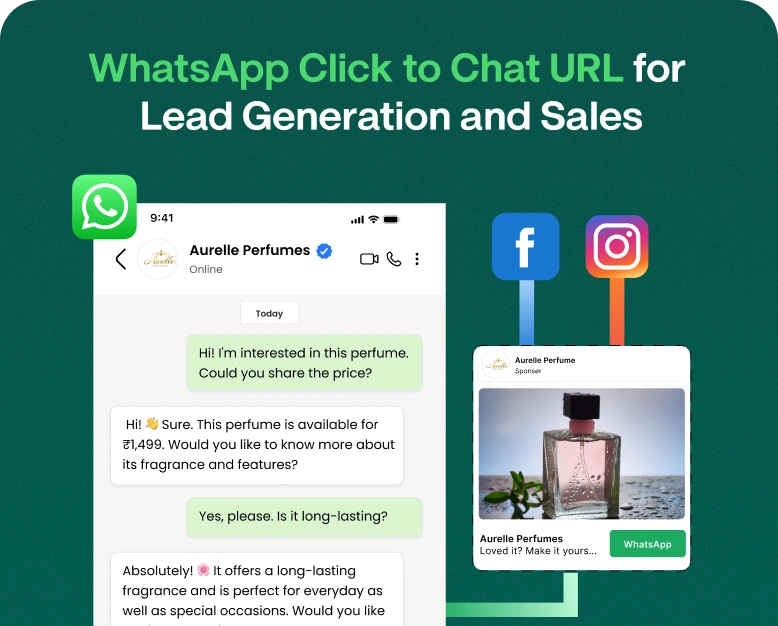
Think of a potential client visiting your website, seeing a product they like, and having a quick question before buying. If they have to look up your number, save it, open WhatsApp and manually start a chat, they may lose interest and leave.
A WhatsApp click to chat URL allows clients to open a chat with your business on WhatsApp with just a click. You can easily place these links on your website, landing pages, social pages, and advertisements.
Any business that relies on leads and direct engagement with clients can find this link useful. It allows clients to ask questions and take steps to purchasing your product.
You will learn what a WhatsApp click to chat URL is, how to generate one, and how to use and combine it with other WhatsApp marketing tools to drive leads and increase sales.
What Is a WhatsApp Click to Chat URL?
A WhatsApp click to chat URL is a special link that starts a conversation with a specific phone number on WhatsApp. When clicked on a supported device, WhatsApp opens a conversation with your business, and the client can send the first message.
The standard format is:
https://wa.me/YourPhoneNumberReplace YourPhoneNumber with your full international phone number, including the country code but NOT including the plus sign, parentheses, spaces, hyphens, etc.
An example of an illustrative Indian phone number would be:
https://wa.me/919876543210This is just an example of the format. We cannot verify the business contact.
To use a pre-filled message with a link, use the format below:
https://wa.me/919876543210?text=Hi%2C%20I%20want%20to%20know%20moreWhatsApp displays the message to the user, but they must click Send to deliver it.
A WhatsApp Click to Chat link can be used for personal or business accounts, as long as the number is registered with WhatsApp.
Why Is a WhatsApp Click to Chat URL Important for Lead Generation?
Leads are people who may be interested in your business, products, and/or services. WhatsApp makes the process of generating leads more conversational by allowing visitors to easily contact your business.
Some benefits to using Click to Chat links in your marketing are:
1. Generate More Relevant Leads
Your sales team can be proactive when leads express interest or ask for help. For example, the sales team can offer product suggestions or discuss next steps based on the lead’s interests or needs.
Prior understanding of what leads want helps the sales team suggest the best next steps.
For example:
“Could you please send me your managed WordPress hosting plans?”
When your sales team has this kind of information, they can be proactive and suggest next steps.
2. Support Faster Sales Conversations
Prospective customers have questions about your products or services, like details about features and prices, or how quickly they can expect delivery. These are the kinds of questions your sales team is fielding all the time.
Being the first to answer these questions with useful information can help a prospective customer feel more confident about making a purchase.
3. Connect Marketing Campaigns with Direct Sales Conversations
With a WhatsApp link, leads can start a conversation directly with your sales team. This can be helpful for leads that are further along in your marketing funnel.
For example, a digital marketing agency that runs a paid ad campaign for website development services can add a WhatsApp link to a post where interested leads can request information about packages.
4. Connect Marketing Campaigns With Direct Conversations
You can add a WhatsApp link to social media posts, email campaigns, online advertisements, and landing pages.
For example, a digital marketing agency can run an advertisement promoting website development services. Instead of sending every visitor to a long contact form, the agency can provide a WhatsApp link that allows interested users to ask about packages directly.
This creates a convenient path from advertising to conversation.
5. More Useful Free Trials
Click-to-chat links can give your sales team more opportunities to guide leads through a free trial of your product.
They can use it to answer order-related questions, assist with onboarding, handle service requests, help with appointment changes and request troubleshooting. This, in turn, leads to better communication with the customer, which can positively impact the overall customer experience and build customer loyalty.
How to Create a WhatsApp Click to Chat URL
Businesses can easily add WhatsApp communication by creating a URL that takes customers to the communication channel of their choice. Follow the simple steps below to create such a link.
Step 1: Get a WhatsApp Business Number
Identify the number customers should use to communicate with you via WhatsApp and make sure it is a number that you can receive business communications on. Using a business number for communication is a good practice to separate business and personal communication.
Step 2: Add the International Code
Add your country’s international dialing code and phone number without any separators.
For an Indian number, you would use 91 followed by the phone number.
For a phone number 98765 43210, you would use 919876543210 in the link.
Step 3: Create a Click to Chat Link
Add the number to the url in the following format:
https://wa.me/919876543210Replace the example number with your business number.
Step 4: Add a Prefilled Message
To make the link more useful, you can add a message that customers can send when they click on the link.
https://wa.me/919876543210?text=Hi%2C%20I%20need%20help%20with%20your%20servicesThe text after ?text= is url-encoded. Spaces are encoded to %20, and message length should be kept brief.
Step 5: Test the Link
You should test the link you’ve generated on both your desktop browser and on your cell phone.
Once you have the link generated, test that the link:
- Open the WhatsApp account you wish to connect to the link.
- Features the correct phone number you wish to link to.
- Displays the pre-filled message you wish to send.
- Is easily accessible by your intended audience.
- Has the sales or support team to answer any potential questions.
Where to Add Your WhatsApp Click-to-Chat Link?
Adding the link is only the first step, placing the link in a visible location determines how easily the link is found by your customers.
1. Your Homepage
Adding a visible WhatsApp contact button in a prominent location, like in your main call to action, can quickly connect your potential customers to your team.
2. Your Product or Service Pages
The “contact us” or “product inquiry” button can be placed next to your product or service description to answer any potential customer questions.
3. Your Landing Pages and Paid Ads
If your paid ad is focused on a product or service, add a button that directs your customers to a WhatsApp page to continue the conversation.
An example of a click-to-chat message for web design ads could be:
“Hi, I’m interested in your website design packages.”
This provides more information than a standard contact form.
4. Social Media Profiles
Posts, stories, promotions, or profile fields can all be linked to click-to-chat links.
This is especially helpful to small businesses to consolidate social media inquiries in WhatsApp.
5. Email Signatures and Marketing Messages
Link your business email signature to WhatsApp to provide customers additional ways to reach your team.
Link your WhatsApp number in your emails to facilitate a sales conversation, respond to client inquiries, or share specific offers. Make sure your email marketing campaigns comply with relevant marketing and consent laws.
How to Optimize WhatsApp Click to Chat for Higher Sales
A working link is good, a process is better.
Differentiate Links by Campaign
Separate the links you use for your website, product pages, social media, ads, and anything else you want to track campaign attribution for.
Use different messages for different pages. For example, someone clicking a link on a page about VPS hosting could have a pre-filled message saying “I want to learn about VPS hosting” and someone clicking a link on a design page could say “I’m looking for a quote for website development.”
Consider using an analytics platform, tracked landing pages, or WhatsApp marketing software to track source attribution. Reporting is done at the platform level and not automatically.
Quick Responses to Customer Requests
Customers who click your links are often ready to buy, and can lose interest if responses take too long.
Set expectations for how long potential customers will need to wait for a response. Assign conversations to specific team members based on their expertise. Use pre-approved automated messages to begin conversations.
If several team members are responding to customer requests, using a shared WhatsApp Team Inbox to manage requests can help eliminate leads from slipping through the cracks.
Qualifying Leads
Leads often need to be qualified through the use of targeted questions before a long sales pitch is sent.
An example of targeted questions could be asked by a web hosting company:
- “What type of website are you looking to host?”
- “What is your expected website traffic?”
- “Do you need managed technical support?”
- “What is your budget?”
Asking questions should be done only if they help determine the right product for the customer and to keep the conversation natural rather than lengthy.
Track Leads and Conversions
Track the number of leads and sales generated from an outreach campaign to help improve your marketing efforts.
Some metrics to track can be:
- The number of clicks a link receives
- The number of new messages created
- Number of qualified leads
- The number of sales appointments booked
- The number of sales made
- The total amount of revenue generated from a marketing campaign.
If a link is clicked a large amount of times, that doesn’t always mean the goal of the marketing campaign was a success. The most important factor is if the link attracted the right audience and helped achieve the business goal.
Real-World Examples of WhatsApp Click-to-Chat URLs
Example 1: Online Store
A clothing company adds a WhatsApp button to their product pages to allow customers to ask questions about sizing, fabric, delivery, and returns.
The message is auto-filled with the product name, making it easier for the sales team to comprehend the inquiry.
Expected Benefit: Creates a more convenient way to answer questions that can potentially block a purchase.
Example 2: Digital Marketing Agency
A marketing agency has included a click-to-chat link on its service landing page. The link is pre-set with a message to inquire about SEO packages.
The agency can now better understand prospective clients’ needs, describe the work scope, set up sales meetings, and discuss pricing and costs.
Expected Benefit: Enables prospective clients to more easily set up sales discussions.
Example 3: Hosting Provider
A hosting company added WhatsApp links on its pages for shared hosting, VPS hosting, and dedicated servers.
Each link is pre-set to message the sales team about the respective hosting option. This allows the sales team to provide the most relevant product recommendation and explain the pricing to potential customers.
Expected Benefit: Less time is wasted determining what the customer is looking for.
These examples demonstrate how the click-to-chat tool can be used to provide a better user experience. The ultimate outcome will depend on the quality of potential customers, website traffic, response time, and the sales team’s process.
Common Mistakes to Avoid
When using a click-to-chat WhatsApp link, there are a few issues that arise:
- Using an incorrect phone number: One wrong digit will route potential customers to the wrong account.
- Formatting the phone number wrong: Remove brackets, hyphens, spaces and the plus sign.
- Using unclear calls-to-action: Tell visitors whether they can get a quote, ask a question, or speak to a sales rep.
- Ignoring messages: Someone on the sales team needs to be responsible for responding to messages.
- Sending promotions via WhatsApp: WhatsApp, like any other marketing platform, has its own policies regarding business messaging. It’s important to follow those policies and respect a customer’s communication preferences.
- Ignoring the quality of your leads and sales: While tracking clicks is a vanity metric, measuring the quality of your leads and sales is what’s ultimately important. Make sure to track that too.
- Long, confusing messages: Keep your messages short and to the point.
By avoiding these mistakes, the Click-to-Chat button becomes easier to use for customers.
Frequently Asked Questions
1. How do I create a WhatsApp click to chat URL?
Use the format https://wa.me/YourPhoneNumber. Replace the placeholder with your full international phone number, excluding the plus sign, spaces, brackets, and hyphens. You can optionally add a URL-encoded prefilled message.
2. Can I use a WhatsApp click-to-chat link without saving a number?
Yes. A click-to-chat link allows users to open a conversation with the specified WhatsApp number without first saving it in their phone contacts.
3. Can I create a WhatsApp link with a prefilled message?
Yes. Add ?text= followed by URL-encoded text to the link. The message will appear in the chat box, but the user will need to send it manually.
4. Can a WhatsApp click-to-chat URL generate leads for my business?
Yes. You can place the URL on your website, landing pages, advertisements, and social media profiles. The click-to-chat link allows interested website visitors to easily contact your business. Lead quality and conversions are determined by your offer, target audience, and follow-up process.
5. Is a WhatsApp click-to-chat URL free to use?
A click-to-chat URL is always free to use. You can use WhatsApp’s click-to-chat URLs to create a marketing campaign and share a clickable link. The costs for the campaign depend on what channel you use to share the link (i.e. paid advertising vs. free advertising).
Conclusion: Create a Link to Turn Website Visitors into Sales Conversations
A WhatsApp click-to-chat URL gives a website visitor the ability to easily contact your business, provides a way to gather questions and quotes requests, and allows visitors to explore your products and services.
The main factor limiting the usefulness of a click-to-chat URL is how quickly you respond to the customer questions. To increase the usefulness of the link and respond to a higher volume of customer questions, you can purchase additional business tools through WhatsApp.
The best click-to-chat URLs are integrated with WhatsApp marketing tools to automatically route customer messages to the right employee and integrate with a shared team inbox. Wbotz can provide the same tools.
If the features that Wbotz provides align with your business needs and you want to increase the leads generated by your business, create click-to-chat URLs and add them to your business websites.
Written by
Jayesh Makwana
Part of the Wbotz team, writing about WhatsApp Business API, automation and the campaigns that actually convert.