WhatsApp Automation Tool to Boost Leads and Conversions
Picture a potential customer visiting your website, asking about your product on WhatsApp and then leaving because no one replies on time. Perhaps that customer bought from a competitor a few hours later. This is a…
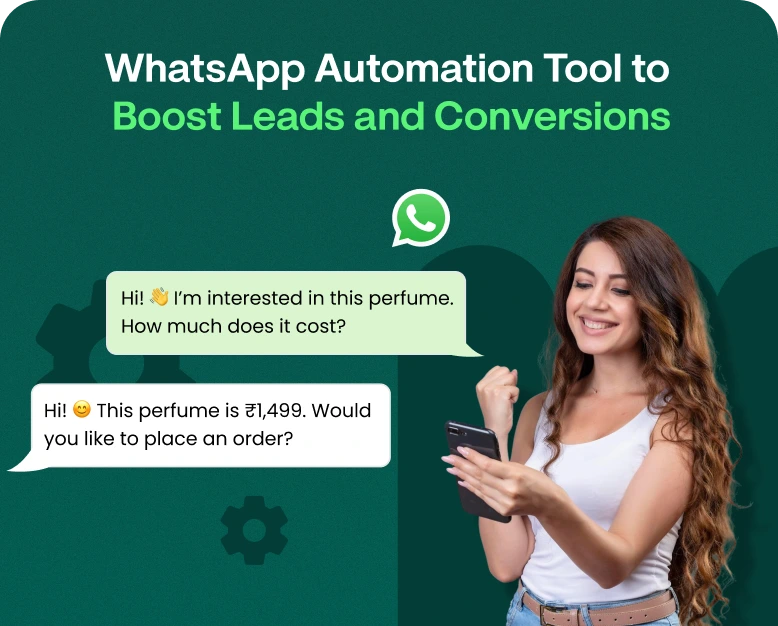
Picture a potential customer visiting your website, asking about your product on WhatsApp and then leaving because no one replies on time. Perhaps that customer bought from a competitor a few hours later. This is a common problem for businesses that receive hundreds of customer messages a day and can’t possibly handle every single conversation manually.
This is where a WhatsApp automation tool can be handy. It can send instant replies, qualify leads, follow up with prospects, and direct customers toward a purchase. Your team can stop wasting hours on repetitive questions and spend time making meaningful conversations and closing more sales.
Whether you have a small business, an online shop, a service company, or a growing sales team, WhatsApp automation can make your communication faster and more organised. In this article you will learn how WhatsApp automation works, which features to pay attention to, how to implement it step by step, and how to choose the right solution for your business.
What Is a WhatsApp Automation Tool?
A WhatsApp automation tool is a software that helps businesses automate customer communication on WhatsApp. It can send predefined replies, welcome messages, appointment reminders, order updates, follow-up messages and other business messages based on customer actions or specific conditions.
For example, when someone asks about your services, automated messages can provide your service information and ask about the customer’s needs. If the person is interested in a product, the system can lead the person to the next step or allocate the conversation to a sales representative.
There are a lot of tools that are business-oriented that connect to the official WhatsApp Business Platform, which helps businesses manage conversations, automate workflows and handle bigger volumes of messages.
WhatsApp automation for business isn’t just about sending messages automatically. It’s about being in the right place at the right time, providing relevant information, and helping interested customers along the buying journey.
Why Do Companies Need WhatsApp Auto Reply?
When customers contact a company, they generally want to hear back quickly. They are comparing multiple products or service providers and a slow response can reduce their interest.
If your business is receiving dozens or hundreds of messages a day, it can be difficult to communicate manually. Employees can forget to follow up, provide the same answers, or miss enquiries outside of business hours.
A WhatsApp automation system helps businesses overcome these challenges.
1. Respond to Leads Quicker
When a potential customer sends a message, an automated welcome reply can acknowledge the inquiry right away. It knows what information the customer should give or offers things like pricing, product details and sales support.
A fast reply keeps the conversation rolling while your team crafts a personalised reply.
2. Minimise Repetitive Work
Businesses get asked questions around pricing, delivery times, operating hours, appointment availability and product features all the time.
Automated replies and interactive menus can let customers get basic information without waiting for an employee. That means your team can spend more time on the complex questions and building relationships with your customers.
3. Follow up with Prospects Who Express Interest
Not everyone buys the first time you talk to them.” Some people need more information, more time to compare options or a reminder to complete their order.
A WhatsApp automation tool can help schedule or trigger appropriate follow-ups, subject to WhatsApp’s messaging rules and customer consent.
4. Lead Management Improvement
When you’re getting messages from all angles, it’s tough to tell which leads are ready to purchase.
Automation workflows can gather information, classify enquiries and route conversations to the right team. This helps you prioritise high-intent leads and reduce missed opportunities.
5. Support Customers Outside Business Hours
No business can have someone there to answer every message. Automated responses can recognise questions after hours, provide basic information and let you know when a human agent will reply.
This gives a more consistent customer experience, without needing staff to be available all the time.
Key Features to Look for in WhatsApp Automation Software
Capabilities – Not all tools are the same. Before you purchase a subscription, compare features to ensure they align with your business goals.
Automatic replies and welcome messages
Welcome messages are your opportunity to introduce your business and guide customers on what to do next. You can use quick replies for common questions, and keyword-based workflows to direct customers to the right info.
Find a platform that allows you to customize messages rather than rely on canned responses alone.
WhatsApp Chatbot and Lead Qualification
A chatbot can ask questions to learn about what a customer needs and then transfer the conversation to a sales representative.
For instance, a software company might ask:
- What kind of software will you need?
- How many people work on your team?
- When are you looking to buy?
- Would you like to talk to a sales specialist?
The answers help your team understand the prospect’s needs before you even begin the sales conversation.
Automated Follow Up Messages
Follow-ups enable your business to remain in touch with prospects who have expressed interest, but are not yet ready to convert.
You can send a requested quotation, a reminder about an upcoming appointment or useful product information. Pick a tool that makes it possible for appropriate timing, message templates where applicable and controls to stop follow-ups when a customer responds or opts out.
A shared WhatsApp inbox enables multiple team members to respond to customer chats from one central workspace. Depending on the platform, this can include conversation assignment, internal notes, labels and team performance reports.
This is especially useful for companies with their sales, customer support and marketing departments that handle different types of requests.
E-Commerce and CRM Integration
Integrating WhatsApp with a customer relationship management (CRM) platform can help you keep lead data, conversation history and sales activities well-organised.
E-commerce integrations can include order confirmations, shipping updates, and other transactional notifications. Check out what integrations are available and whether or not there’s any setup or fees involved.
Analytics can help you determine if your automation workflows are delivering the desired results.
Look for reports on metrics like:
- Amount of leads generated
- Time to first reply
- Qualified prospects
- Replies to follow-up
- Conversion of Sales
- Customer support resolution time
You can use these metrics to identify messages and workflows that need improvement.
How to Use a WhatsApp Automation Tool to Increase Leads and Conversions
The key to successful automation is having a clear goal. Follow these steps to create a practical system for your business.
Step 1: Determine Your Business Goal
Decide what you want to become better at before choosing a platform. Perhaps your goal is to increase leads, reduce response times, recover abandoned carts, schedule appointments, or improve customer service.
For example, a real estate agency may want to qualify property enquiries. An online store may want to answer product questions and help customers complete purchases.
Select one primary objective for your initial workflow. This makes results easier to measure and problems easier to spot.
Step 2: Pick the Best WhatsApp Automation Platform
Match tools to your business size, messaging needs, integrations, budget.
Important considerations include:
- Official Support for WhatsApp Business Platform
- Chat bot features and automated workflows
- Team Management and Shared Mailbox
- CRM & Website Integration
- Message-template management
- Analytics & Reporting
- Pricing, messaging charges and usage limits
- Customer support and onboarding
For businesses that need automation alongside team-based customer communication, a platform such as Wbotz may be worth evaluating. Review its current feature list, pricing, and integration options to confirm that it fits your requirements.
Avoid selecting a tool based only on the lowest advertised price. Consider the total cost of the subscription, messaging, integrations, and implementation.
Step 3: Set Up Your WhatsApp Business Communication
Configure your business profile with accurate information, including your business name, description, website, operating hours, and contact details.
If you want advanced automation, multi-agent access, or integrations, be sure to check if your solution requires the official WhatsApp Business Platform rather than the standard WhatsApp Business app.
Before you set up automated messaging, go through the setup process with the provider and ensure your business is compliant with WhatsApp’s policies.
Step 4: Create a Lead Capture Workflow
Have a simple conversation to gather useful info from interested customers.
For example:
- A customer taps on a WhatsApp button on your website.
- A welcoming message is automated and asks what they want.
- The customer chooses a product or service category.
- The workflow gathers relevant information, such as location or budget, when appropriate.
- The conversation is assigned to the correct sales representative.
- The rep responds to the qualified lead with a personalized answer.
Keep your questions short and to the point. Ask for too much information up front, and you may lose customers before they get going.
Step 5: Building Effective Follow-Up Sequences
The follow-up sequence should be about adding value, not asking customers to buy over and over again.
For example, a web hosting company may have the following sequence:
- First response: Send the prospect the hosting plans they asked for.
- Follow up: What is the difference between the plans available?
- Useful resource: Send a relevant setup guide or comparison page.
- Help with sales: Offer to help the customer pick out a plan or answer any questions.
Use reasonable intervals and stop promotional follow-ups when a customer opts out or indicates they are no longer interested. WhatsApp rules usually require the use of approved templates and the proper opt-in for promotional messages, where applicable.
Step 6: Automate and Add Human Support
Automation works best when customers can get a real person when they need one.
Create clear rules for when to hand over conversations to a human agent. For example, a chatbot may be able to answer simple questions about pricing, but escalate complicated questions about billing, complaints or sales of high value to a team member.
Provide the agent with sufficient context to pick up the conversation without the customer needing to repeat themselves.
Step 7: Monitor Results and Optimise the Workflow
Once your workflow is up and running, monitor how it’s doing.
See how many people start a conversation, how many give their details, how many become qualified leads and how many buy.
If customers often leave the chatbot, make its questions easier. If leads respond to follow-ups but don’t buy, think about your pricing, offer or sales process.
Try one change at a time so you can see what works for you.
Real-life Examples of WhatsApp Automation
Here are some examples of how different companies can use automation: These are examples, not claims of measured results from particular companies.
Example 1: An Online Store
Imagine an online clothing store that gets tons of questions about sizes, delivery times, and return policies.
The business has automated responses for common questions and uses approved message templates for eligible order status updates. Customers can quickly obtain basic information while staff deal with complaints and product recommendations.
The result is a more structured support process and less repetitive manual replies.
Example 2: An Agency for Real Estate
A property agency gets requests for apartments in different places. Its WhatsApp chatbot asks customers about their preferred area, budget and property type.
The system then directs each query to the proper agent. The agent can then follow up with relevant listings, rather than having to manually gather the same information from each prospect.
This allows the agency to sort incoming leads and respond with more relevant options.
Example 3: A Business Based on Services
A clinic, salon or consultancy may get appointment requests all through the day.
Automation workflow can share available booking options, confirm appointments and send relevant reminders. If a customer would like to reschedule, the system can direct them to the right place.
It can reduce admin work and assist customers in keeping track of appointments.
Best Practices for Generating More Leads and Conversions
Using a WhatsApp automation tool will not automatically get you more sales. The results are dependent on the quality of your offer, the relevance of your messages and how well your workflow serves customers.
Use these best practices to get the most from automation.
Personalised Messages
Relevant customer data from your database can be useful and appropriate, such as the product category they selected, or the service they requested.
Don’t send the same promotional message to all your contacts. Useful discussion is more likely to result from relevant communication.
Keep messages brief and clear
WhatsApp is a messaging channel. Keep it simple. Tell them what to do next. Don’t send a lot of text if a short message will do.
Add a strong call to action, such as see a product, book an appointment, or speak to an advisor.
Use Automation When It’s Appropriate
Automate the repetitive, not every customer interaction. Good starting points are welcome messages, frequently asked questions, confirmations and appropriate follow-ups.
Sensitive issues, complex questions and customer complaints often require a human touch.
Respect Customer Consent and Privacy
Only message people in accordance with applicable laws and WhatsApp policies. Obtain the necessary consent before sending business-initiated messages, use approved templates where applicable and provide a clear way for customers to opt out of receiving promotional messages.
Don’t use unofficial bulk messaging techniques that could violate platform policies or jeopardise the safety of your account.
Make every message count
Before you send an automated message, ask yourself if it’s going to help the customer. A useful reminder or a product update requested might be helpful. Repeated messages without new information can annoy customers and reduce trust.
How to Choose the Best WhatsApp Automation Tool for Your Business
The best solution depends on the work you need it to perform.
| Business requirement | Features to prioritize |
| Small business | Welcome messages, quick replies, simple workflows |
| Sales team | Lead qualification, follow-ups, conversation assignment |
| E-commerce store | Order notifications, product inquiries, platform integrations |
| Customer support team | Shared inbox, routing, conversation history |
| Growing business | CRM integration, analytics, scalable workflows |
Analytics, scalable workflow, CRM integration
If you can, ask to see it in action before you purchase. You should test out the workflow you want to implement, check the pricing, and understand how the platform handles message templates, integrations, and customer opt-outs.
Also, verify that the provider has onboarding support and documentation. A feature rich tool can be a poor choice if it is hard for your team to configure and manage.
How to measure the effect of WhatsApp automation
You should be tracking performance before and after implementation to see if automation is benefiting your business.
Focus on the following metrics:
- Lead conversion rate: The proportion of leads who become customers.
- Response time: The duration that customers have to wait for a first response.
- Lead qualification rate: The percentage of your leads that fit your sales criteria.
- Follow-up engagement: Number of recipients replying to relevant follow-up messages.
- Cost per lead: The cost of each lead that you generate.
- Customer satisfaction: The feeling of customers about their experience with communication.
For example, if you had 200 qualified leads in a month and 20 of them became customers, your lead-to-customer conversion rate would be 10%. Next month if you get 25 customers off 200 similar enquiries, the rate is 12.5%.
This is a good way to measure performance but you should be comparing like time periods and factoring in other changes such as pricing, promotions and lead quality. Automation should be measured by business results, not by how many messages are being sent.
Frequently Asked Questions (FAQs)
1. Best WhatsApp Automation Tool For Business?
The best tool will depend on your needs, budget, team size and integrations you need. Official WhatsApp Business Platform support, automated workflows, chatbots, shared inbox, reporting, pricing: compare and select.
2. Can WhatsApp automation help generate more leads?
Yes. Automation can quickly answer questions, capture important lead information, qualify prospects, and send conversations to the right team. These enhancements can assist businesses in managing their leads more efficiently, but the true impact hinges on lead quality and the sales process.
3. Is Whatsapp automation whatsapp good for small business?
Yeah. For small businesses, automation can be used for things like welcome messages, FAQs, appointment reminders and basic lead capture. Start with a simple workflow to help control costs and reduce setup complexity.
4. Is it allowed to automate WhatsApp?
Business automation is permitted provided that it’s consistent with WhatsApp’s applicable policies. Businesses must honour customer consent, message limits, applicable approved-template requirements, and opt-out requests. Avoid using unauthorised tools or practices that break the rules of the platform.
5. What does a WhatsApp automation tool cost?
Pricing varies depending on provider, plan, feature set and messaging usage. Some services charge a monthly subscription fee, and other costs may include WhatsApp messaging charges, setup fees, or paid integrations. Check out the full pricing schedule before choosing a plan.
Conclusion: Leverage WhatsApp Chats to Generate Business Opportunities
A WhatsApp automation tool can help your business to respond faster, manage leads more efficiently, follow up with interested prospects, and deliver a better customer experience. It can be a valuable part of your sales and customer communication strategy together with helpful messages and timely human assistance.
The best way to start is to start small. Choose a business goal, build a simple workflow, measure results and optimize according to customer behaviour.
Want to take your WhatsApp lead management to the next level? Consider a business messaging platform like Wbotz, compare its automation capabilities with your requirements and select a plan that supports your growth. Begin with a workflow that addresses a genuine customer issue, and then expand your automation as your business requirements change.
Written by
Jayesh Makwana
Part of the Wbotz team, writing about WhatsApp Business API, automation and the campaigns that actually convert.