Affordable Tools to Write the Best WhatsApp Description
A potential customer may first check your WhatsApp profile to decide if they want to contact your business. But what happens when your profile has no description, a confusing introduction, or a message that doesn’t…
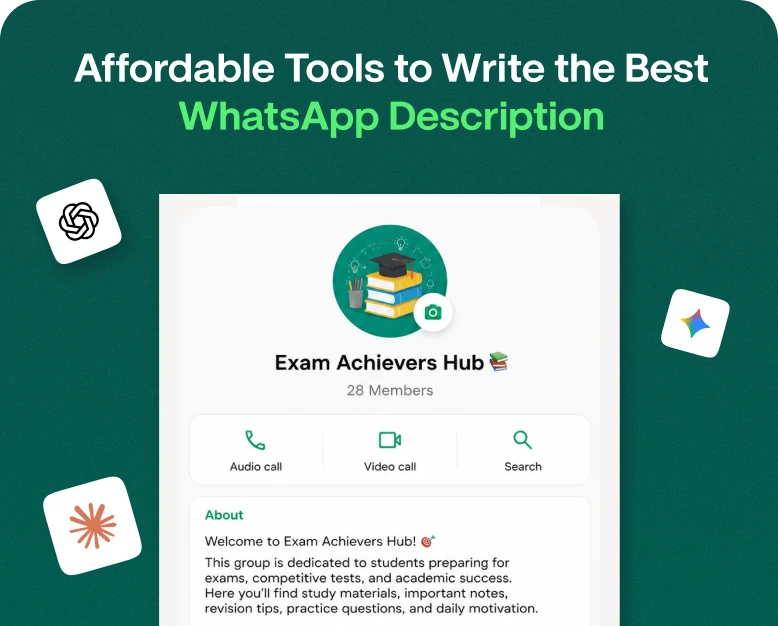
A potential customer may first check your WhatsApp profile to decide if they want to contact your business. But what happens when your profile has no description, a confusing introduction, or a message that doesn’t explain what you offer? You could lose the chance to turn a simple profile visit into a valuable customer conversation.
Creating a professional WhatsApp description doesn’t have to be difficult or expensive. If you own a small business, sell products online, offer professional services or use WhatsApp Business to communicate with your customers, the right writing tools can help you write a clear and engaging profile description in minutes.
The good news is you don’t need to hire a copywriter or spend money on expensive software. There are tons of free and low cost tools to help you find the right words, showcase your services, and write a description that will have people picking up the phone to call you.
In this article we will go over the effective tools to write the best WhatsApp description, how to choose the right option, real-world examples, and how to improve your profile for more client engagement.
What Is A Description On WhatsApp?
A WhatsApp description is a short intro that tells people about you, your business or the services you provide. It helps visitors to know who you are and what they can expect when they get in touch.
If it’s a personal account, a description might include interests, personality, or a short message. For businesses, it can describe the products or services that are offered, define the target audience, and encourage customers to take action.
For example, a clothing store might say:
“Fashion on point for any occasion. “Browse our new collections and call us for orders and product information.”
This description tells what the store is all about without over complicating the message.
WhatsApp ke liye ek achha description hona chahiye:
- Clear: Tell me in plain language what you do.
- Relevant: Concentrate on what your audience needs to know.
- Concise: No extra words, no complicated sentences.
- Professional: Use a tone that fits your brand.
- Action-Oriented: Encourage visitors to ask questions, explore products, or contact your team as appropriate.
Your WhatsApp Business profile description is different from your greeting message, away message or product catalogue. They each serve a different purpose, so it’s important to choose the right one for your needs.
Why is Your WhatsApp Business Description Important?
A good description can help your customers understand your business before they write their first message. It also makes your profile look more complete and professional.
Here are some benefits to watch for.
1. Gives a Good First Impression
When a potential customer finds your business through a website, an article on social media, or a referral, they might check out your WhatsApp profile before reaching out to you. A clear description helps them understand what your business is all about.
For example, look at these two descriptions:
Simple description: We sell clothes.
Better description: “Shop style men’s and women’s everyday clothes. “Send us a message for product info, sizes and help with ordering.”
The second choice gives customers more relevant information and makes the next step more obvious.
2. Builds Customer’s Trust
Before they ask their questions or place an order, customers often want to know if a business is relevant to their needs.
A description that correctly explains what your services are, where you operate, or what your business speciality is can help to build credibility. Don’t make unsubstantiated claims like “India’s number one store” unless you can substantiate it.
3. Quickly Explains Your Services
A brief description can answer basic questions before a customer contacts you. This is especially helpful for businesses that get questions about prices, availability, delivery, appointments or service areas.
4. Helps Your Marketing Efforts
Your WhatsApp profile can be a great addition to your website, social media, advertisements and other marketing channels. A consistent description helps customers to recognise your brand across platforms.
But a WhatsApp description alone will not assure you of more sales or better search rankings. The primary goal of the website is to provide a clear picture of your business and enable chat with customers.
Free Tools for Writing the Best WhatsApp Description
You don’t have to use every writing tool available. Find one that fits your budget, writing experience and business needs.
1. ChatGPT for Individualised & Custom Descriptions
ChatGPT can help you come up with multiple ideas for your description based on your business type, target audience, products, and preferred tone.
Rather than wasting time trying to craft the perfect sentence, provide a few details and request several options for comparison.
Best for: Small business owners, freelancers, online sellers, service providers and anyone who wants custom writing ideas.
How to use:
- Describe what your business does.
- Define your target customers.
- What is your main product or service?
- Request a short professional WhatsApp Business description.
- Use the suggestions provided and tailor them to your actual business.
Sample prompt:
Write five professional WhatsApp Business descriptions for an online skincare store. Mention variety of products and customer support. Keep each option short. Use plain English. “Don’t overdo it.”
You can also ask for different styles such as friendly, premium, professional, creative or sales descriptions.
Check the current plan information before opting for a paid subscription, as the amount of free access and usage limits may differ.
2. Grammarly for clarity and grammar
Grammarly helps you catch mistakes in grammar, spelling, punctuation, and clarity. This can be useful if you already have a description written but want to make it easier to read.
For example, you could write:
We are offering the best digital marketing services for all businesses.
A set one would be:
We offer digital marketing services to businesses of all sizes.
The edited sentence is cleaner and more professional.
Best for: Business owners who write their own descriptions and want to minimise language errors.
You can start with the free features and consider a paid plan only if you need its additional writing help. Always check the final wording to make sure it accurately describes your services.
3. Brand Consistency with Canva
Canva is a design tool but can help you create consistent brand messaging for your WhatsApp profile and other marketing materials.
Say you’re designing a graphic to promote your business. You can create your business intro, design a matching brand message, and maintain consistency in your wording in your social media posts.
Best for: Businesses who want their visual identity and written messaging to work together.
Canva is especially helpful when creating graphics for profiles, promotional posts and other branded materials. You still need to type the description you have chosen directly into the appropriate field of the WhatsApp profile.
4. Writing and editing with Google Docs
Google Docs is a good choice if you want to write a few options and compare before publishing.
You can save different versions for seasonal promotions, product categories or service updates. It also helps teams who need to review content before making changes.
Best for: Teams, agencies and businesses with multiple customer-facing messages.
A simple way is to make three versions:
- A brief introduction to your main service.
- Customer-Focused Version Highlighting A Benefit
- A professional takes on what you do.
Compare the options and pick the one that best describes your business.
5. Basic Writing Support with Microsoft Editor
Microsoft Editor helps you with spelling, grammar and other writing improvements across supported Microsoft products and experiences.
If you’re already using Microsoft Word or similar and you want to polish your business description without learning another writing platform, it’s a handy option.
Best for: Professionals and entrepreneurs who frequently produce written content.
Available features vary by product and plan, so check the current offering before paying for more functionality.
How to write the best WhatsApp description in 10 steps
Choosing a writing instrument is just one part of the equation. The most important thing is how well you know your audience, and how well you communicate your business value.
This is how to create a useful description for WhatsApp:
Step 1: Identify Your Main Objective
Begin by asking yourself what you want people to know when they look at your profile.
Are you selling products? Offering a service? Taking appointments? Providing customer support?
Your reply should activate the full description.
To wit,
- Highlight your product: category and ordering process on your online store.
- Consultant: What is your expertise, and what type of clients do you work with?
- Restaurant: Describe your food, takeaway options or booking process.
- IT company: Describe your technology services and support offering.
It is not easy to describe everything in one short description without confusing the reader. Get your most important message out first.
Step 2: Understand Who Your Target Audience Is
Think who is most likely to be in contact with you.
What do you want to know? What problem are they trying to address? What does your business represent to them?
A fashion retailer, for instance, may want to appeal to a buyer seeking inexpensive everyday wear. Its description should communicate fashion and shopping assistance, not just the company’s history.
A better alternative might be:
Discover everyday style for every occasion. Message us to see what styles, sizes are available and to order.
Step 3: Seamlessly Integrate Relevant Keywords
Keywords can help you describe your business well, but you don’t want your description to sound repetitive or unnatural.
If you build websites, you could use phrases like “website design,” “web development,” or “digital solutions” when they accurately describe what you do.
Likewise, when creating a description for WhatsApp Business, concentrate on words that are relevant to your industry and audience.
Have you noticed? I’ve been having a lot of trouble with the computer lately. Your profile is written for people so clarity should trump keyword frequency.
Step 4: Pick One or Two Key Benefits
Why would a customer want to get in touch with you?
Some helpful info might be:
- Personalised Assistance.
- Easy to order online.
- Schedule appointments.
- A niche service.
- Support of a specific customer group.
Just be sure you’re only talking about benefits your business actually offers.
For instance, a digital marketing agency might write:
Helping small businesses with SEO, content marketing and website optimisation to improve their online presence.
It tells visitors about what the agency does and whom it serves.
Step 5: Add a Clear Call to Action When You Need To
A call to action tells the customer what to do next. Not always necessary but can make the description more useful
The examples are:
- Send us a message for product info.
- Contact us to discuss your project.
- Check appointment availability.
- Contact for service information.
Avoid being overly promotional in the description. A simple, relevant invitation is often all that is needed.
Step 6: Check Length and Readability
Character limits apply to WhatsApp profile fields and may vary by field and product version. Make sure to check the current limit in the app before you finalise your description.
Use concise wording and delete the fluff.
With WhatsApp Business in the past, the business description field has been able to accommodate 512 characters, but be sure to check the limit in your current app.
Read the description out loud. If it sounds awkward or needs too much explanation, simplify it.
Step 7: Review and Publish Your Description
Please ensure before updating your profile:
- Does your business name or goal make sense?
- Is the description reflective of your services?
- Is the wording correct and easy to understand?
- Did you remove repeated words and unnecessary claims?
- Does the tone fit your brand?
- What would be a helpful next step for customers?
When you’re happy, you can go to your business profile settings in WhatsApp Business and update the description field. Menu names may vary slightly by device or app version.
WhatsApp Business Description Examples for Various Businesses
If you don’t know how to begin, check out the following examples for inspiration. Adapt them to your actual services, do not just copy them word for word.
About an online clothing store
“Shop for trendy everyday and special occasion clothing. Message us for availability, new arrivals and help with ordering.”
For a Digital Marketing Agency & Consulting Firm
We help businesses grow and improve their online presence with SEO, content marketing, and digital marketing solutions. Let’s talk about your goals Contact us
Delicious meals served with care. For menu information, takeaway information and reservations contact us.
For the Freelance Graphic Designer
Graphics and brand design services for businesses and individuals. “Message us about your next project in design.
For an IT Service Company
Reliable IT solutions for business including hosting, website support and technical assistance. Contact our team to find out more.
For a Beauty Saloon
Beauty and personal care services customized to your needs. Message us for service details, appointments availability & booking help.
They work because they explain the business purpose in plain language. You can use an AI writing tool to generate some more options, but take the final and make it specific to your brand.
Common Errors to Avoid When Writing a WhatsApp Description
Even the best writing tool cannot salvage a message lacking useful information. Don’t make these common mistakes.
Employing Vague Language
Saying “Best service available” doesn’t tell your customers what you actually do. Substitute general phrases with concrete details about your products or services.
Adding Information on Overload
That is not a full company profile in your description. Don’t put all your services, promotions, qualifications and contact info in one place. First, the most helpful information:
Making Unbacked Promises
“guaranteed results” or “lowest prices in the market” or “instant delivery anywhere” can create unrealistic expectations if they are not true.
Use honest language that represents what your business can deliver.
Copying the Competitors Word for Word
Competitor profiles can be used for inspiration but imitation can make your brand look generic and misrepresent your business. Create a unique description using your own services, strengths and tone.
Ignore Updates
Businesses evolve over time. If you change your offerings, operating hours or add new services, be sure to check your profile and make sure your description is accurate.
How to Choose the Right Affordable Writing Tool
The best tool depends on what you need help with most.
| Your requirement | Tool to consider |
| Generate multiple description ideas | ChatGPT |
| Improve grammar and clarity | Grammarly |
| Keep written and visual branding consistent | Canva |
| Draft and compare different versions | Google Docs |
| Polish text in a familiar office workflow | Microsoft Editor |
Always use free features when you can. Try the tool before you pay for a plan to see if it saves you time or makes your writing better.
If you run several business profiles or regularly write marketing copy, a paid writing tool may be worth the cost. But if you only want to change your WhatsApp description from time to time, then a free tool should do the trick.
How Businesses Can Get More From Their WhatsApp Profiles
A good description is just one part of an effective WhatsApp Business presence. Consider enhancing the rest of your profile to provide your customers with a better experience.
- Share your business information: Provide accurate contact information, business hours and relevant website information where appropriate.
- Use a recognisable profile image: A clear business logo or suitable image will help customers recognise your brand.
- Arrange your product catalogue: In case you are selling products, ensure that product names, images, and prices are correct.
- Create useful welcome messages: A friendly greeting can acknowledge incoming enquiries and tell customers what to do next.
- Be responsive: Be helpful and let people know when they can expect to hear back from you.
- Review customer questions. If you are being asked the same question about a service or product, you may need to make your profile clearer.
If your business receives a lot of customer conversations, you may also want to consider a WhatsApp Business messaging platform like Wbotz. Business messaging tools can help teams organise conversations and manage customer communication more efficiently, depending on the features available in your chosen plan. Check the current features, pricing, and WhatsApp integration needs of the product before you buy.
FAQs (Frequently Asked Questions)
1. What is the best free tool to write a WhatsApp description?
ChatGPT can help you come up with ideas for customized descriptions, and you can use tools such as Google Docs, Grammarly’s free features and other writing tools to write and polish your text. What you choose depends on whether you want creative suggestions, grammar correction or document editing.
2. How to write a professional WhatsApp Business description?
What does your business do? Who is your target market? Name one or two benefits that would help. Keep it simple, and if appropriate, add a relevant call to action. Please double check the description for accuracy and the character limit before publishing.
3. What to include in a description for WhatsApp
Your business purpose, main products/services and useful customer information. Depending on your business, you might want to mention your speciality, service area or how customers can get help. Don’t include unnecessary details and unsupported claims.
4. Can AI write the best WhatsApp description for my business?
Yes. AI tools can assist with idea generation, tone suggestions, and wording improvements. But you should enter correct information about your business and check the result before publishing it. Your AI generated material should reflect what you actually offer, not make assumptions or promises you cannot back up.
5. Do you have to pay for a WhatsApp bio generator?
Not always. If you only need a short profile description, you might be able to get away with free writing tools. Only consider a paid tool if the additional features add enough value to your regular content creation needs.
Conclusion: Write Better WhatsApp Description Without Spending More
You don’t need a huge budget or high writing skill to write a good WhatsApp description. You don’t have to hire a professional copywriter for every small update to your business introduction; tools like ChatGPT, Grammarly, Canva, Google Docs, and Microsoft Editor can help you generate and improve your business introduction.
The trick is to tell people what you do, why it matters to them, and then use plain, correct language. Find an inexpensive tool that works for you, experiment with a couple of them and update your profile whenever your business information changes.
Want to improve your WhatsApp Business profile? Write three options for the description and pick the clearest one. Publish a description that rings true to your brand. If your business also needs help managing customer conversations at scale, consider business messaging solutions such as Wbotz and review their features and pricing to find one that meets your objectives.
Written by
Jayesh Makwana
Part of the Wbotz team, writing about WhatsApp Business API, automation and the campaigns that actually convert.