Click to Chat Solutions to Boost Sales and Conversions
Picture a customer coming to your website and checking out your products. You can almost feel them getting more interested as they learn more. Then they have that 1 last question about your pricing, delivery, or…
Picture a customer coming to your website and checking out your products. You can almost feel them getting more interested as they learn more. Then they have that 1 last question about your pricing, delivery, or product availability. Unfortunately, they cannot find a simple way to reach out to your company. Rather than waiting on a slow or unresponsive email or contact form, they get up and walk away from your website.
Companies lose business this way more often than they realize. Even if your website has good traffic and engagement, losing communication with your potential customers at the end of the funnel can cause them to never become your paying customers.
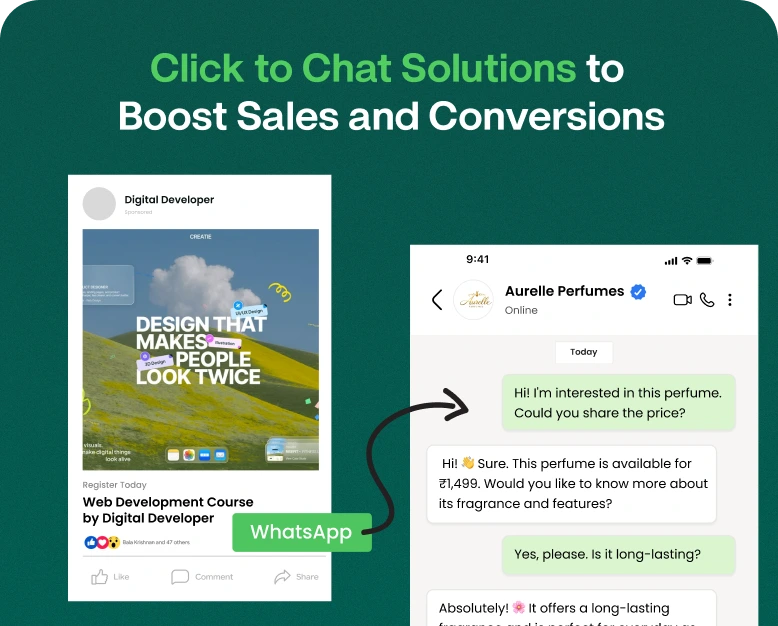
A click to chat button solves this communication problem by enabling simple communication between a customer and a business by allowing customers to message the business using a channel of their choice (like WhatsApp). For the customer, it’s as simple as the click of a button.
No matter what type of business you run, whether it’s a product/service company or a digital business, click-to-chat solutions offer easy customer communication and increase lead and sales opportunities.
In this article, we will cover what a click to chat solution is, how it works, benefits, key features to look for when choosing a solution, and ways to use click to chat solutions to improve conversions.
Visitors no longer need to manually save a number or go through the hassle of finding a company’s contact details. With click to chat, visitors can simply start a conversation using their preferred messaging platform.
An example of when click to chat would be helpful is when a visitor is on an eCommerce site and wants more information about sizes, payment methods, or shipping. With click to chat, the visitor can get in touch with the sales team to get answers to their questions.
Some of the features that a click to chat app would have based on the platform are:
- Buttons that prompt a WhatsApp chat.
- Pre-written messages.
- Customizable chat widgets.
- Automated responses.
- Multiple agent support.
- Tracking of customer conversations.
- Management of leads.
- Analytics.
- CRM and marketing integrations.
These features enable a business to turn their website visitors into conversational leads, and provide a way for customers to get the information they need to make a purchase.
How Does Click to Chat Work?
From a visitor’s standpoint, click to chat is simple. It doesn’t require a user to fill out a lengthy web form.
Click to chat works like this:
1. A visitor comes to your website.
2. A chat button is displayed.
3. The visitor clicks the button to begin a chat.
4. The visitor is taken to a chat window to contact your business.
5. The visitor sends a message to your business.
6. A member of your sales or support team responds and engages with the visitor.
For instance, a website may show a message like “Have questions? Chat with us on WhatsApp.” Clicking on the message will open WhatsApp and a message to the business like “Hello, I would like to know more about your products” will be pre-filled.
This reduces the effort a visitor has to take to get in touch with the business.
Importance of Click to Chat Solutions
It is important for businesses to provide convenient ways for customers to get in touch. Customers will only choose your business if you provide the information they want, when they want it.
Adding a click-to-chat button can positively impact customer experience and business sales in several ways.
1. Generate More Qualified Leads
Not all leads are created equal. A lead that will buy your product in the next hour is more valuable than someone that will buy it in the next month.
Not all website visitors are sales-ready. Some may want to gather more information before making a purchase.
Providing a click-to-chat button allows visitors to ask sales-related questions and speeds up the purchase process for these leads.
2. Strengthen Customer Interactions
Not all the information website visitors need can be found on the website. Even if there are detailed product descriptions and frequently asked questions, customers will want to know more information that is specific to their needs.
The click-to-chat option fosters a conversation where customers ask specific questions, receive advice on the product or service, and understand if the product is right for them.
3. Alleviate Purchase Hesitation
Customers may abandon their shopping journey because of concerns about product specs, payment methods, shipping costs, or returns.
Concerns can usually be resolved by a quick conversation.
An electronics store, for example, can provide chat to answer questions about whether a given product is compatible with others the customer may own. Providing the information can help customers make a purchase.
4. Offer Customer Support Convenience
Customers do not always want to talk on the phone or email for support. Chat is often a more convenient method to provide customer support and answer customer questions.
Using the right customer support platform, agents can do things like assign or transfer chats to other agents, view or update customer information, and see previous customer chats and requests.
5. Add to Sales Opportunities
Every conversation a salesperson has is an opportunity to understand the customer’s needs to recommend solutions. In a chat window, a salesperson can:
- Explain product benefits.
- Provide pricing information.
- Suggest a better product or service.
- Link to the product or service.
- Address why a product is not the right solution for the customer.
- Help a customer complete a purchase.
The goal of each conversation should be to empower the customer to take the next step and move one step closer to a purchase.
Three Best Features to Look for in a Click to Chat Solution
When shopping for a click-to-chat solution, look for the right features for your business. For a basic solution, a chat button may be all a business needs. However, to grow your business, a solution may need to offer additional communication and automation features.
Consider the following elements.
1. Customizable Chat Widget
You should be able to customize the design of your chat widget.
Some options to customize your chat widget include:
- Settings for the color and style of your button.
- Default welcome messages.
- Custom messages and icons.
- The location and size of the widget on your site.
- Differing chat options for various pages of your site.
Your chat widget should be noticeable without obstructing site visitors from seeing content or navigating your site.
2. WhatsApp Integration
Adding WhatsApp integration gives visitors the ability to contact your business over a platform they may be more comfortable using.
Depending on your business needs, look for a solution that integrates WhatsApp in the correct way for your business.
If you expect to have numerous conversations to manage at one time, look for a provider that allows you to use the official WhatsApp Business Platform, and avoid reliance on unofficial automation.
3. Automated Greetings and Replies
The customer experience can be easier with automation features such as a greeting message like “Hello! Thanks for contacting us. Are you interested in our products and pricing?”
This message can provide the customer with information on how to proceed even if your employees are occupied with other messages.
If a number of your employees are communicating with customers, look for a solution that allows:
- Grouping or assignment of conversations.
- Tracking the status of conversations.
- Leaving internal messages.
- Generating performance reports.
- Viewing conversation histories.
- Managing numerous conversations.
5. CRM and Marketing Integrations
Some CRMs and marketing applications integrate with chat applications, and these integrations help your team create and update better customer records. For instance, when a lead asks about a service, your team can answer the question, modify the lead’s status, and add a follow-up to the lead in the CRM.
6. Analytics and Performance Tracking
The click-to-chat tool should provide the ability to analyze how the chat widget is used. Depending on the platform, metrics may include the number of times the chat button is clicked, how many conversations are started, how many leads are generated, how long it takes team members to respond to messages, what customers are asking, how many sales are attributed to the chat campaigns, and which website pages generate the most conversations.
How to Add Click-to-Chat to Your Website
Adding a chat button to your website is easy, but there are ways to improve it to better help your business.
Step 1: Understand Your Business Needs
Before looking for a solution, decide on your business goals to help you choose the right solution.
Consider the following:
- Do you want more leads?
- Are product-related questions asked frequently?
- Do you need WhatsApp integration?
- Will a single person or several agents manage the conversations?
- Do you need to automate messages?
- Do you want to track chat-generated conversions?
Simple WhatsApp chat buttons may be sufficient for a small business, but a larger or more established business may need features such as automation, integration with WhatsApp and CRMs, and team inboxes.
Step 2: Choose the Right Click to Chat App
Evaluate your options based on your requirements and your budget.
Check if the tool allows you to:
- Easily add your website.
- Integrate WhatsApp.
- Modify chat widgets.
- Message automation.
- Work with several agents.
- Lead and customer tracking.
- Get reports and analytics.
- Contact customer support.
Review your subscription plan and check if there are any additional costs.
Step 3: Create Your Chat Button
Once you have your tool, it’s time to add a chat button to your website.
Here are some messages to add to your chat button to prompt customers to contact your business.
- Chat with us.
- Need help? Message us.
- Talk with a sales expert.
- Get product information.
- Contact us on WhatsApp.
Use simple messages. The goal is to have customers immediately understand what happens when they click the button.
Step 4: Add the Widget to Your Website
Your click-to-chat provider should give you the resources you need to integrate the chat widget to your website.
Using your website’s platform, you may be able to add the chat widget using a plugin, website builder, or HTML.
A header or footer script to add to a website.
A tag management solution.
Follow the provider’s directions and confirm the widget appears on both desktop and mobile views of the web pages.
Step 5: Set Up Welcome Messages
Write a simple message that helps visitors feel comfortable beginning a chat.
“Hello! Welcome to our website. We are here to help you find the right solution. Tell us what you are looking for and we will help you with that.”
Also, provide quick replies to common questions such as pricing, product details, or technical support.
Step:6 Test the Customer Experience
Before turning this feature on for all web visitors, test it yourself.
- Did the chat button appear?
- Did the correct WhatsApp account open?
- Was the pre-filled message sent?
- Were mobile users able to see the chat button?
- Were agents notified of a new message?
- Did the automated messages function correctly?
- Was the website performing well?
Conducting these simple tests can help prevent issues with customer communication.
Step:7 Monitor Results and Adjust
After setting up the chat feature, take a look at how customers are communicating with you and see if you need to adjust button placement or text.
Consider your follow-up process if customers initiate communication but don’t make a purchase.
Taking a look at communication can help your team adjust processes to make your chat feature more effective.
Real-World Examples of Click to Chat for Different Industries
There are different types of businesses and ways click-to-chat solutions can be used. Check out some examples.
An online clothing store gets a lot of questions about the sizes, colors, and availability of products as well as when the products will be delivered.
Adding a WhatsApp chat button to product pages provides the store’s customers the opportunity to get product information and clarify any concerns before purchasing the product.
The support team can also provide the information and assist customers in completing the purchase.
Business advantage: remove some of the communication barriers customers have while making a purchase and give the support team an opportunity to guide customers in a buying journey.
Real Estate Businesses
A real estate agency can place a click-to-chat button on a property listing page and use it to collect information about interested buyers.
The sales agent can also set up a follow up conversation to discuss the questions asked by the buyer.
Business advantage: Lead management and communication with interested buyers.
Schools, colleges, and coaching centers can do click-to-chat to respond to questions about admissions.
Parents and students can enquire about different courses, fees, eligibility and other admissions related questions.
Business advantage: improve the way they respond and communicate to admissions queries.
Appointment Based Businesses
Congenial contact chat options can help doctors and other service providers answer frequently asked questions and assist customers in understanding the appointment process.
The contact chat option helps with appointment related queries and facilitates communication.
Business Advantage: contact chat option for appointment related queries and communication.
How Click to Chat Improves Website Conversion Rates
Click-to-chat features allow customers to communicate with your team at the click of a button. It’s a great way to reduce communication barriers and increase conversion rates. Here are a few ways to utilize click-to-chat features on your site.
Place Chat Buttons on High-Intent Pages
It is standard practice to only include a chat widget on your site’s homepage, but you should also consider including the chat widget on high intent pages. These pages include your product, pricing, service, and landing pages, as well as your contact and checkout pages. Click-to-chat features are a great way for customers to get help when they are considering making a purchase.
Use Clear Calls to Action
Your chat button should instruct visitors on what to expect. Using a vague “chat” button is not helpful to your visitors. Use a button that is clear and direct. Some button options could include
- “Ask About Pricing,”
- “Get a Free Consultation,”
- “Check Product Availability,”
- “Talk to Sales.”
Respond to Customers Quickly
Because customers expect immediate assistance with a chat button, not responding to customer inquiries in a timely manner is very frustrating. To better serve your customers, set support hours, respond to customer messages in a timely manner, and assign conversations to available team members.
Follow Up with Interested Leads
Some customers need time to make a purchase and a follow up message from your sales team can help move the customer along in the buying process. With messaging and consent from the customer, your sales team can help move the customer along with follow up messages that include answering questions, and sending promotional offers.
Track Conversations That Generate Sales
It is important to analyze which pages on your site help generate sales. With campaign tracking and a CRM, you can see which pages help generate sales, and which communication channels help move customers along in the buying process.
Thanks to click to chat, your team won’t make decisions based on click count. They will make decisions based on actual business outcomes.
Common Mistakes to Avoid When Using Click to Chat
1. Using an Unclear Chat Button: Your visitors should be able to immediately understand how your click to chat button aides them.
2. Overlooking Mobile Users: Ensure your click to chat widget works well on mobile devices and does not obstruct website content.
3. Send Visitors to the Wrong Account: Test your chat links and contact details.
4. Taking Too Long to Respond: Replying to a chat quickly builds customer confidence and gives you the best opportunity to influence the sale.
5. Over Using Automated Messages: Automation should make communication easier, not create a barrier for the customer to reach out to a representative.
6. Ignoring Analytics: Understand if your investment is providing a return.
Frequently Asked Questions
1. What is Click to Chat?
A click to chat button is used to chat with a business via WhatsApp or other messaging platforms.
2. How does a click to chat app help businesses increase sales?
A click to chat button is an easy way to allow customers to engage with your business to ask questions about your products or services. Click to chat buttons can help answer questions or redirect visitors to the correct sales path.
3. Can I add click to chat to my WordPress website?
Yes. You can add click to chat to your WordPress website via a plugin, integration, or code. Choose the option that best fits your requirements and supports your preferred channel.
4. Is click to chat free to use?
Basic click to chat links and widgets are typically free. More robust solutions including features such as chatbot automation, multiple users, and reporting and analytics may carry a cost. In addition, using the WhatsApp Business Platform may carry a cost depending on your use case.
5. Which is the best click to chat solution for small businesses?
The best click to chat solution for small businesses depends on what you need. A simple WhatsApp chat widget may be the best solution. However, if your business manages a high volume of customer conversations and needs automation, as well as reporting and a shared team inbox, you may want to consider a different solution.
Conclusion: Choose the Right Click to Chat Solution to Grow Your Business
Everything from lead generation to post-purchase customer support is possible with click-to-chat solutions. Such tools play an important role in website visitor conversion. A well-thought out design can still leave gaping holes for missed opportunities if visitors can not get their questions answered easily.
A click to chat solution lets customers reach your business through a channel of their preference. Consequently, it can be pivotal in establishing leads and answering product questions, along with managing sales conversations and customer interactions digitally.
When considering different options in the market, have a clear idea of the pricing and features of each. Ensure that the solution offers enough flexibility in terms of workflow automation, team inboxes, and analytics. WhatsApp integration is nice to have. Pick a solution that addresses your requirements today and can help you scale as your customer base grows.
Effortless communication is integral to closing more sales. Get Wbotz, check out other options and pick features that help you with WhatsApp based marketing, sales and service process automation. You can use it for team communication as well. Finally, give your customers the ability to chat with you conveniently.
Written by
Prachi Soni
Part of the Wbotz team, writing about WhatsApp Business API, automation and the campaigns that actually convert.