Best Description for WhatsApp Business to Attract Customers
There are many reasons to include a description of your business in your WhatsApp Business Profile. A well-written description for WhatsApp provides valuable details to prospective customers who are considering…
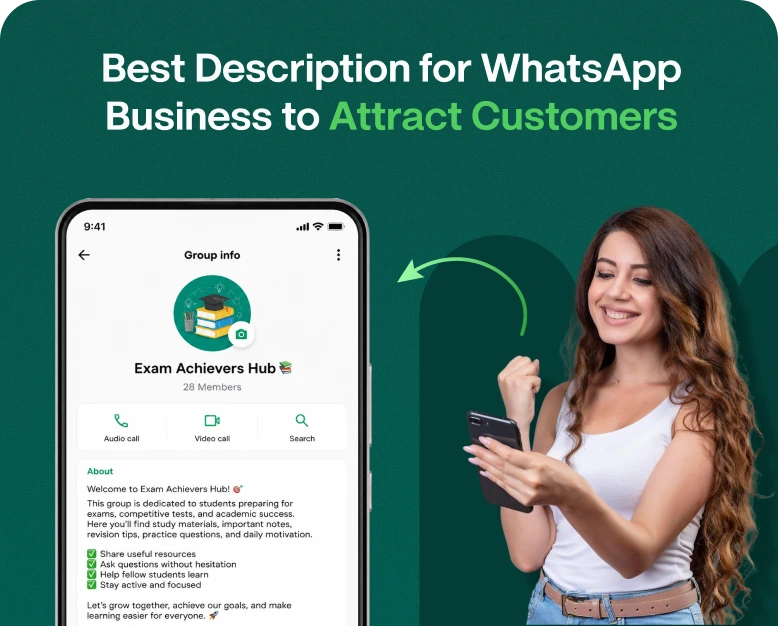
There are many reasons to include a description of your business in your WhatsApp Business Profile. A well-written description for WhatsApp provides valuable details to prospective customers who are considering contacting you. Before starting a conversation, customers often check your business profile to understand the services you offer, your business hours, and how to reach you. An unclear, too-short, or overly lengthy description can confuse potential customers and create a poor first impression.
Having a descriptive WhatsApp Business Profile is extremely important for building trust and attracting new customers. When written effectively, your profile description can help expand your customer base, highlight your services, and provide essential information that encourages potential customers to connect with your business.
If you own a shop or provide services, completing your WhatsApp Business Profile description with a professional description will greatly improve your client interactions.
In this article we will describe how to enhance your WhatsApp business profile to provide important information to a client in an easy to read format. Along with this, we will describe the common blunders made by users, and give multiple industry specific examples. We hope to increase your client interactions through WhatsApp.
What Is a WhatsApp Business Description?
A WhatsApp Business description is a short business profile summary that is presented to your clients. It provides an introduction to your business and the services you provide, and details the reasons a client should reach out to you.
You can include details in your description, for example, that you prepare fresh cakes and pastries and make customized desserts for different occasions.
Similarly, a digital marketing agency can include different services in the description such as SEO, social media management, website development, and online advertising.
An ideal description for WhatsApp consists of answers to the following questions:
- Who are you? Talk about your business or brand.
- What do you offer? Mention your key products and/or services.
- Why should customers contact you? Give your main value proposition or include a clear call to action.
Your description needs to be clear, relevant, and simple.
Why Is a Good WhatsApp Business Description Important?
Your business profile is usually the first impression that a person gets of your business or brand when they learn about it through an advertisement, mention, website, or direct message.
Here are some major reasons for having a strong description.
1. Creates a Professional First Impression
Customers are more comfortable contacting businesses that provide clear and complete information.
A professional description helps communicate that your business is active, organized, and serious about serving customers.
For example:
Instead of writing:
“We sell clothes. Contact us.”
Try:
“Discover stylish clothing for every occasion. Explore quality fashion, affordable prices, and friendly customer support. Message us to find your perfect style!”
The second example explains the business more clearly and gives customers a reason to start a conversation.
2. Helps Customers Understand Your Services
People do not always have time to visit your website or read lengthy business information. They want to understand what you offer quickly.
A clear WhatsApp Business description helps visitors identify whether your business provides the products or services they need.
For example, a restaurant can mention its food category, takeaway options, and ordering availability. A software company can highlight its main solutions and target customers.
3. Builds Customer Trust
Trust plays an important role in purchasing decisions, particularly when customers are interacting with a business for the first time.
Your description can communicate important information such as:
- Your main business category
- The products or services you provide
- Your customer service approach
- Your business values
- Your service area, when relevant
Avoid making unsupported claims such as guaranteed results or being the best company in the market. Honest and specific information creates a stronger impression.
4. Encourages More Customer Conversations
A description should not simply explain your business. It should also encourage visitors to take action.
A simple line such as “Message us today for product details and pricing” gives customers a clear reason to contact you.
When your profile information matches your products, advertisements, and customer support, it also creates a more consistent brand experience.
30+ Best Description for WhatsApp Business Examples
Looking for inspiration? Here are ready-to-use WhatsApp Business descriptions for different industries. You can customize them according to your brand, products, and target audience.
1. General Business Description
- “Welcome to our business! We provide quality products and reliable services to make your experience better. Contact us today to learn more.”
- “Your satisfaction is our priority. Explore our products, discover our services, and connect with our team for friendly assistance.”
- “Quality, reliability, and customer satisfaction come first. Message us to explore our latest offers and services.”
2. Clothing and Fashion Business
- “Discover the latest fashion trends with stylish outfits for every occasion. Shop your favorite looks at affordable prices!”
- “Bringing fashion closer to you! Explore our collection of trendy clothing, accessories, and everyday essentials.”
- “Upgrade your wardrobe with stylish designs and quality fashion. Message us to explore our latest collection.”
3. Restaurant and Food Business
- “Fresh flavors, delicious meals, and quality ingredients! Contact us to explore our menu and place your order.”
- “Serving happiness one meal at a time. Discover delicious food and enjoy a wonderful dining experience with us.”
- “Craving something delicious? Explore our menu and message us for orders, takeaway, and food-related inquiries.”
4. Digital Marketing Agency
- “Grow your business online with SEO, social media marketing, content creation, and digital advertising. Let’s build your online presence!”
- “Helping businesses reach more customers through effective digital marketing strategies. Contact us to discuss your growth goals.”
- “Your partner in digital growth! Explore our marketing solutions and take your brand to the next level.”
- “Shop quality products at competitive prices. Explore our collection and message us for product details, orders, and support.”
- “Your favorite products, just a message away! Discover our latest arrivals and enjoy convenient online shopping.”
- “Welcome to our online store! Find products you love with a simple shopping experience and helpful customer support.”
6. Beauty Salon and Spa
- “Feel beautiful, confident, and refreshed. Explore our professional beauty treatments and book your appointment today.”
- “Your beauty and self-care destination. Contact us to discover our salon services and available appointments.”
- “Relax, refresh, and enjoy personalized beauty services designed around your needs.”
7. Real Estate Business
- “Find your dream property with our real estate services. Explore residential and commercial properties and contact us for assistance.”
- “Helping you find the right property for your needs and budget. Message us for available property details.”
- “Your trusted connection to property opportunities. Contact our team for buying, selling, and rental inquiries.”
8. Education and Coaching Business
- “Learn new skills and build a brighter future with our professional training programs. Contact us to explore available courses.”
- “Making learning easier through quality education, expert guidance, and practical training.”
- “Take the next step in your learning journey. Message us for course details, enrollment, and support.”
9. Technology and IT Services
- “Smart technology solutions for modern businesses. Explore our IT services, software solutions, and technical support.”
- “Helping businesses simplify technology with reliable IT solutions, website development, and digital services.”
- “Your technology partner for innovative solutions and professional support. Contact us to discuss your requirements.”
10. Freelancers and Consultants
- “Professional services tailored to your business needs. Let’s discuss your project and find the right solution.”
- “Helping individuals and businesses achieve their goals through creative ideas and expert guidance.”
- “Have a project in mind? Connect with us to discuss your requirements and explore how we can help.”
These examples are starting points. Add your actual brand name, location, unique services, and contact instructions where appropriate. Also, check the current WhatsApp Business profile description character limit before publishing.
How to Write the Best Description for WhatsApp Business
Writing an effective business description doesn’t need to be complicated. Follow these steps to create a description that gives a high level overview of your value and encourages customers to reach out.
Step 1: Start With Your Business Name or Identity
In this step, you introduce the business.
You do not need to include your business name again if it is already on your WhatsApp profile. Use the space to describe your business category.
Example:
“Professional web development and digital marketing services for businesses looking to grow.”
Step 2: Identify Your Main Products or Services
You do not need to include every product or service you offer. Choose the most important ones.
A digital agency might include:
SEO
Website development
Social media marketing
Paid advertising
Step 3: Explain Your Competitive Edge
Think about why your customers should choose you.
Your unique value proposition may be any of the following:
- Being price-competitive
- Being able to modify your services to your customers’ needs
- Selling quality products
- Having seasoned personnel
- Providing an easy and comfortable way to purchase
- Providing timely after sale services
Step 4: Add a Clear Call to Action
A call to action (CTA) button guides a customer to take a specific action. Examples of CTAs include:
- Message us to know more
- Contact us to know more about our products/services
- Check out our latest products
- Inquire about services
- Have a chat with us
Keep your CTA short and simple.
Step 5: Keep it Short and Readable
Your description should be clear and easy to read. Avoid complicated words and sentences. Customers are not interested in the techy aspects of your business. They want to know how your services will benefit them and why your services stand out. For example:
“We have quality skincare products for your daily use. Message us for product recommendations.”
This describes the product category and gives a next action step.
Step 6: Update Your Description Regularly
Your business should be reviewed at regular intervals. For example, if your business has a new service or product, you should add information about it to your business description if it is relevant to your customers.
Additional tips to make your WhatsApp Business Description Appealing
To make your business profile description appealing, include the tips below:
- You can have special promotional offers
- Describe your products/services and include a clickable link to the product page
- Identify what’s unique about your services
Use Customer-Friendly Language
When describing your business, aim for simplicity. Use shorter sentences and avoid elaborate vocabulary.
Focus on Customer Benefits
Listing your services doesn’t always communicate how your customers benefit from them. Be sure to include customer benefits when describing your services.
Use Emojis Carefully
Using emojis can help add visual appeal to your description. However, an overabundance of emojis can distract and become unprofessional.
Maintain Brand Consistency
Your description for WhatsApp Business should be the same as what’s on your website, other social media, and marketing channels.
Avoid Unnecessary Keywords
Keyword stuffing does not help your customers. Using related keywords can increase the meaning of your description, however. For example, instead of using “best clothing shop” three times, using a sentence that explains your products or services can more effectively communicate your message to customers.
How to Add or Change Your WhatsApp Business Description
Updating your description is simple if you already have WhatsApp Business.
1.Open WhatsApp Business on your mobile device.
2.Go to Settings or the business profile, depending on your device.
3.Open your business profile.
4.In the Description field, tap to edit, and write your new description.
5.Review the text and tap save.
Your description will be visible on your business profile.
The way your menu is organized can vary between the different versions of the WhatsApp Business application and the device you are using.
How WhatsApp Business Tools Help You Get More Customers
An effective WhatsApp marketing strategy involves several components and describes your business, but it is only one of many components.
Other WhatsApp Business tools help businesses communicate with their customers and facilitate sales.
1. Add Your Products and Services
If your business is located in one of the supported countries, you can use WhatsApp Business to showcase your products and services.
2. Use Automatic Greeting Messages
You can create automatic messages to welcome your customers based on the conditions you set.
3. Use Quick Replies
Quick replies are answers to common questions.
4. Marketing With WhatsApp
Some businesses may need marketing solutions for their WhatsApp accounts to facilitate a high volume of customer communication.
A WhatsApp marketing platform such as Wbotz allows businesses to manage their customer conversations, team communication, and marketing automation, based on the plan and integration used.
An online retailer, for instance, can use a shared team inbox to manage customer orders and shipping status, while a marketing team can use it to plan and execute their activities.
If you want to go beyond communicating with customers for business purposes on WhatsApp, you should look for WhatsApp marketing software and see if it meets your needs before buying.
Common Mistakes to Avoid in a WhatsApp Business Description
Some small mistakes can render your profile less effective. Here are a few common ones and how to correct them.
- Generic Description: Instead of stating “Welcome to our business” describe your offering and what you do.
- Using Too Much Promotional Language: Rather than creating a long description, highlight the important things your customers need to know in a few sentences.
- Not putting Yourself in Your Customers’ Shoes: Tell your customers what you are selling, the services you offer and answer the questions your customers want to know.
- Incorrect Business Information: Keep your WhatsApp Business description up to date with correct business details.
- Too Many Emojis: A description should be neat and professional.
- Not Including A Call to Action: Make your customers want to message you by including an offer, promotion, or deal.
- Irrelevant Old Information: Keep your information up to date and relevant to what’s going on in your business.
Avoiding the above should help get a trusted and useful WhatsApp Business profile.
Frequently Asked Questions (FAQs)
1. What is the best description for WhatsApp Business?
A good WhatsApp Business description includes a clear overview of your business and a call to action to contact you. It should include a sentence or two to entice the customer to want to know more and contact you. For example: “We offer the best quality products and services at the best prices. Message us for more details and to receive assistance.”
2. How do I make my description attractive?
You need to give an overview of your business. Mention your main products and services. Include a benefit to the customer. Finally, provide a clear call to action. Keep the description simple and do not include unrelated information.
3. Can I include Emojis in my description?
Yes. Relevant emojis can be included to describe your business. However, use emojis judiciously, especially if you run a corporate or service business.
4. What is the ideal length of a description?
You need to make your description as short as possible while including the main points about your business. Remember each app has a character limit for each field, so work within that character limit and include the most important information.
5. Does a good description help in gaining more customers?
A good description helps the customer to quickly understand your business, build some level of trust, and prompt the customer to reach out. However, other factors such as pricing, marketing, customer experience and responsiveness, and product quality also impact whether the customer purchases from you.
Conclusion
A strong WhatsApp Business description helps your team make a professional first impression. It helps potential customers easily understand your business. It doesn’t matter if you own a local business, restaurant, agency, consultancy, or online business. You need to create a description that captures what you do and why people should communicate with you via WhatsApp.
To help you write better business descriptions for WhatsApp, think of descriptions for your main services, write effective customer benefits, and finish your description with a clear call to action.
There are several ways to improve your WhatsApp business. Some of them include creating product catalogs, using greeting messages, quick replies, and useful marketing automation tools.
Are you interested in improving your WhatsApp business account? Start with implementing one of the examples in this article. To take your customer communication a step further, check out Wbotz and explore how WhatsApp marketing can improve and build customer relationships.
Written by
Prachi Soni
Part of the Wbotz team, writing about WhatsApp Business API, automation and the campaigns that actually convert.