Get Quick Reply for Business with Powerful CRM Software
How many times has this happened? One of your potential customers sends your business a WhatsApp message. They want to know about your product prices, the details of your services, and even your delivery options.…
How many times has this happened? One of your potential customers sends your business a WhatsApp message. They want to know about your product prices, the details of your services, and even your delivery options. Meanwhile, your team is dealing with a ton of messages, and this new customer’s message sits there…and sits there…and sits there. Of course, this new customer can always go to your competitor.
Manually answering every message takes a ton of time and creates even more unneeded work. Maintaining speedy and consistent communication with customers gets hard really fast.
This is where quick replies come in. By using WhatsApp quick replies with some solid CRM software, frequent customer questions can be answered quickly, and customer messages can be properly organized. A quick reply for business also helps your team respond to common queries faster, maintain consistent communication, and avoid missing important customer conversations.
Whether you are managing a small business, an online store, a service company, or a growing sales team, quick replies can help you better organize your customer messages.
In this article, we will cover what quick replies are, how they work with CRM software, the advantages they offer, and how they help you improve customer communication and increase sales.
What are Quick Replies?
A quick reply is a pre-programmed or saved message that allows employees to quickly respond to customer questions without having to type the answer every single time.
Examples of common questions include:
- What are your business hours?
- What is the price of this product?
- Do you deliver to my location?
- How can I track my order?
- What payment methods do you accept?
- What is your contact information?
With quick replies, employees can select a saved message to send to customers in just a few seconds.
If quick replies are integrated with CRM software, businesses can create organized customer communication and assign messages to employees. Quick replies can also help employees maintain contact with customers, access customer information, and manage contact with customers.
Quick replies can be very helpful to businesses that communicate a lot with customers via messages.
What Is WhatsApp Business Quick Reply?
With the quick replies feature of WhatsApp Business, companies can save messages that are sent repeatedly and access them using shortcuts.
Quick replies can help companies create messages that are sent repeatedly to customers like pricing messages, delivery messages, confirmation messages, and messages regarding customer support.
The feature helps employees maintain communication with customers, and reduces the need for repetitive typing. WhatsApp Business has a shortcomings when it comes to organizing messages sent by multiple employees. This is where CRM software comes in handy.
Why Should Business Use Quick Replies With CRM Software?
Quick replies make it easy for businesses to send predefined messages to customers. This comes in handy when a company wants to create an organized system for customer communication.
A CRM (Customer Relationship Management) system helps businesses manage their contacts, sales, leads, and communications.
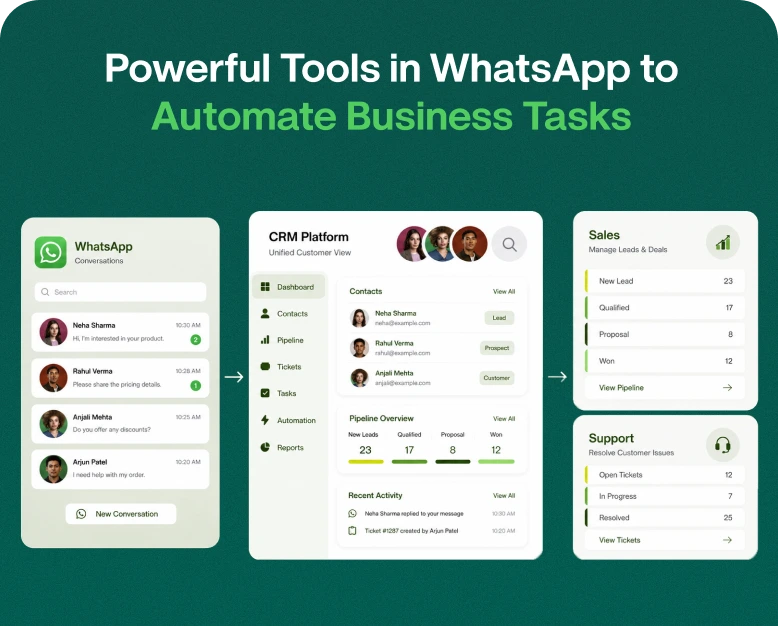
A CRM integrated with WhatsApp allows staff to communicate with customers on WhatsApp, while keeping a centralized record of the communications.
Here are some important reasons to use this integration.
1. Save Time with Quick Replies
Customer support staff receive numerous questions each day. Some staff members may work in different time zones and get the questions in another language. For example, a company that sells products to people in the USA may also sell to people in Canada, and get questions in both English and French.
Rather than taking time to type a long message to multiple people, staff can use quick replies to send a prewritten response to a message. While the quick reply is being sent, staff can work on more important or customized messages.
2. Customer Response Time
People want to buy a product or service when they are interested. If a staff member takes a long time to respond or is unavailable, the customer may lose interest, or think the business is unprofessional.
The software helps customers communicate with the staff in a timely manner to give the customer peace of mind. Staff can use quick replies to give customers the information they want. The CRM can also help staff direct conversations to other employees, or answer common questions so that staff can work on more important tasks.
3. Consistent Communication
Communication often varies based on the person doing the communicating. For example, one employee may provide a thorough explanation of the return policy, whereas another may explain it only partially.
Using quick replies to communicate helps a business stay consistent across multiple employees.
Companies can create pre-approved responses for:
- Product descriptions
- Pricing information
- Refund and return policies
- Delivery instructions
- Appointment details
- Frequently asked questions
This helps employees share approved information and guides them in writing in the tone that best represents the organization.
4. Manage Multiple Customer Conversations
As a business grows, an increase in the number of customers may result in messages being sent to your business at the same time. Dealing with several conversations over a single phone line quickly becomes a challenge.
Shared team inboxes in a CRM help employee users manage multiple conversations in an organized format.
Based on the CRM in use, a business can:
- Assign conversations to employee users.
- Track customer requests pending response.
- See previous conversation history.
- Include private notes.
- Track employee user performance.
- Follow up with leads.
This feature is useful to both the sales and the customer support departments.
5. Improve Lead Management and Sales Opportunities
Not all leads are immediately ready to make a purchase. A customer sending a message may be looking to collect information to make an informed buying decision. Another customer may be looking to compare prices. Still another may want to know what services are available.
A CRM helps businesses manage these leads and track where the leads are in the sales funnel.
For example, a sales user can save a response to answer a pricing question, log the lead’s interest in the CRM, and set a follow-up. This saves the lead and ensures no opportunity is missed.
Best Quick Replies for Business: Examples You Can Use
Creating useful saved responses is one of the easiest ways to improve customer communication.
Below are practical examples that businesses can customize according to their products and services.
1. Welcome Message
Create a good first impression with a friendly, welcome message to customers when they contact your business.
Example:
“Hello! Thanks for contacting [Business Name]. We’re here to help! What product/service are you interested in? Our team is here to help.”
2. Product Price Inquiry
Potential customers usually ask about the price of a product before making a purchase.
Example:
“Thanks for the interest! [Product Name] costs [Price]. Is there anything else we can do to help you with placing your order?”
3. Business Hours
Use this example when customers want to know when your team is available.
Example:
“Thank you for your message. We are available Monday-Saturday from [Opening Time] to [Closing Time]. We look forward to assisting you!”
4. Order Confirmation
Let customers know their order has been received.
Example:
“Your order has been received! Your order number is [Order Number]. Our team will be in touch with more information. Thank you for shopping with us!”
5. Customer Support Response
When a customer informs you of an issue, thank them, apologize for the inconvenience, and let them know your support team will get back to them.
Example:
“Thanks for bringing this to our attention. We are sorry for the inconvenience. Our support team is looking into this and will be in touch with more information.”
6. Follow-Up Message
A follow up message can be used to remind interested customers of your product/service.
Example:
“Thanks for following up! We are always happy to be of assistance. [Mention product or service] is currently [X]% off! Are there any questions we can answer for you?”
Example:
“Hello [Customer Name],
We follow up on your request about [Product/Service].
Do you need anything else?
Our team is ready to assist.
These examples can be saved as pre-defined responses in a compatible business messaging or CRM application.
How to Set Up Quick Replies for WhatsApp Business
Setting up quick replies in WhatsApp Business is simple. Just follow the steps below.
1. Open WhatsApp Business and make sure you’re logged into your business account.
2. Go to the settings or business tools section.
3. Select Quick Replies.
4. Enter the message you wish to save. For example, “Thank you for contacting us! Our team will get back to you as soon as possible.”
5. Add a shortcut. For example, /hello, /support or /price.
6. Add related keywords or notes if the application supports it.
7. Save the quick reply and test it.
To test your quick reply, open a customer chat and type the shortcut. It will display your saved message.
Your quick reply is now ready for use!
How to Use Powerful CRM Software for Better Quick Replies
Quick Replies can make your conversations on WhatsApp Business better and faster. With the right CRM software, you can build a more efficient workflow. Here’s how to do it.
Step 1: Choose the Right CRM Software
Start by selecting CRM software that supports your business communication requirements.
Look for features such as:
- WhatsApp integration
- Shared team inbox
- Saved replies and message templates
- Contact management
- Lead tracking
- Conversation assignment
- Reporting and analytics
- Automation and follow-up options
If you want to use official WhatsApp Business Platform messaging, verify that the software supports the required integration and follows applicable WhatsApp policies.
Step:2 Create a Library of Quick Replies
Prepare responses for questions your team receives regularly.
Organize them into categories such as:
| Category | Suggested Shortcut |
| Welcome message | /welcome |
| Product pricing | /price |
| Payment details | /payment |
| Delivery information | /delivery |
| Business hours | /hours |
| Customer support | /support |
| Order confirmation | /order |
| Follow-up message | /followup |
This organization makes it easier for employees to find the right response during busy working hours.
Step:3 Connect Your Business Communication Channel
You may have to connect your WhatsApp account to your CRM software, by following the instructions provided by your software and CRM platform.
Based on your integration, you may need to have a verified business number, Meta Business account and other permissions.
Once linked, authorized employees can administer customer discussions through the CRM control board.
Step 4: Assign Conversations to Team Members
Divide customer queries among employees based on their responsibilities.
- Sales agents handle product and pricing queries.
- Support agents handle queries about complaints and technical issues.
- Order management employees handle queries about delivery and payment.
This decreases confusion among the employees and helps the customer to get directed to the right team.
Step 5: Use Quick Replies with Customer Information
A good CRM allows employees to see customer information while replying to messages.
If a customer messages about their order, the employee can see the order information and message back the customer about the order.
Where supported, personalized fields can also be used to add customer name, order ID, or appointment date.
Step 6: Track Performance and Improve Responses
Evaluate how your communication process is working based on conversation reports and customer feedback.
- Average response time
- Number of conversations handled
- First response rate
- Customer inquiries
- Lead conversion rate
- Customer satisfaction is some of the parameters that can be evaluated.
If employees need more support in a certain area, recognize it, and update saved responses based on the feedback.
Real World Example: How a Retail Business Can Use Quick Replies and CRM
An electronics store receives a lot of queries through WhatsApp, everyday.
Customers query about prices, models, warranties, payment and delivery options, and more.
Initially, 2 employees handled all the queries. During peak hours, many queries went unanswered.
Customers also had to wait for a long time to get a response.
The company is rolling out a CRM with WhatsApp integration and a team inbox.
The team develops a collection of saved replies to common questions.
These include:
- If a product is in stock
- Price of iPhones
- iPhone warranty info
- Payment methods
- Delivery info
When a customer inquires about a product, a salesperson uses a saved reply to share basic info. If the customer is interested in buying, the salesperson takes note of it in the CRM and schedules a follow up.
Support employees use the same system to manage questions about warranty and delivery.
This improves business communication. Employees spend less time typing out repeat info. Customers get consistent messages, and the business gets visibility into sales conversations.
Quick replies and CRM integration are essential to building a business.
How to Pick the Right Quick Reply and CRM Software
When shopping around for CRM software for your business, consider these points.
Ease of Use
The dashboard and features should be easy to pick up by employees.
WhatsApp Integration
If your business has important communication with customers via WhatsApp, look for CRM software that integrates WhatsApp business solutions.
Multi-Agent Support
If your business has a large employee count, look for CRM software that supports a shared inbox and assigns conversations to different employees.
Automate tasks like assigning leads, sending notifications and reminders to follow up. Ensure messages are automatic and conform to the platform’s messaging policy.
Reporting and Analytics
With the help of good reporting tools, managers can get a clear picture of their team’s performance, including how customers are engaged and how sales activities are managed.
Pricing and Scalability
Assess subscription costs and user limits for messaging, integrations and other features. Select a tool that supports your business needs and growth.
Benefits of Using Quick Replies for Business Communication
There are many practical benefits of quick replies when used in conjunction with CRM software.
- Improved communication: Employees communicate quickly and accurately with customers.
- Increased productivity: Employees spend less time communicating and can focus more on helping customers and closing deals.
- Set messaging standards: Standardize communication with approved responses.
- Effective lead management: Track and organize leads in a central location.
- Improved collaboration: Agents work with one another on the same conversations.
- Enhanced customer experience: Timely and relevant communication helps facilitate a seamless experience for the customer.
- Advanced reporting and communication history: Provides insight into work activities and helps align business communication to meet business objectives.
Quick replies help automate repetitive messages to free up time for staff to communicate with customers who require more in depth engagement.
Frequently Asked Questions (FAQs)
1. What is the best quick reply for business on WhatsApp?
The best quick reply varies by your business and what your customers need. Examples of quick replies include messages with welcome offers, product pricing, delivery info, business hours, payment instructions, and general customer service messages. Keep quick replies short, helpful, and simple.
2. How do I create quick replies for WhatsApp Business?
In the WhatsApp Business app, go to Business Tools or settings, and then select Quick Replies. In this area you can create your own quick replies, create an abbreviated name for that quick reply, and then save that quick reply to use when chatting with customers.
3. Is WhatsApp quick replies integrated into CRM?
Yes. CRM and WhatsApp messaging systems can be integrated to provide shared inboxes, contact management, assignment of conversations to users, and other features.
4. Is WhatsApp quick replies the same as automated messages?
No. Quick replies are messages that employees can select and send. Automated messages are sent by the app based on predetermined conditions, triggers, or schedules.
5. Is CRM software good for small businesses?
Yes. Small businesses can use CRM software to maintain and organize customer information, track leads and improve follow-ups. A CRM can also be a good communication and organization system for a small business.
Conclusion: Use CRM Software to Improve Customer Communication
Having effective communication systems helps business owners build better customer relationships and increase their customer base. A delay in communication or inconsistent messaging may make a customer lose interest and look elsewhere.
Business Communication solutions like quick replies help employees spend less time answering repetitive questions, provide them with the correct information, and help them communicate more effectively with customers.
CRM integrations help businesses manage conversations and leads, assign and distribute leads and messages, and keep track of employees’ performance.
It does not matter if you are the owner of a small online store or a growing sales department; investing in a communication solution helps simplify your business processes.
Looking to improve your business communication? Check out Wbotz, a CRM software that lets your business manage conversations on WhatsApp, customer messages, and team communication. Check out its features, compare prices of available plans, and pick the plan that works for you.
Written by
Prachi Soni
Part of the Wbotz team, writing about WhatsApp Business API, automation and the campaigns that actually convert.