WhatsApp Automation Software: Find the Right Tool
Imagine that you’re getting hundreds of customer messages every day, answering the same questions over and over, manually following up with leads, and still missing important conversations. WhatsApp has become one of…

Imagine that you’re getting hundreds of customer messages every day, answering the same questions over and over, manually following up with leads, and still missing important conversations.
WhatsApp has become one of the main channels of communication with customers for many businesses. But as the number of conversations grows, it can be hard to manage it all by hand.
You can use WhatsApp automation software here
With the right software, you can automate repetitive conversations, send timely follow-ups, manage leads, answer common questions, and help your team communicate with customers at scale. But there are so many WhatsApp automation tools in the market that it can be confusing to select the right one.
In this guide, we’ll discuss WhatsApp automation software, how it works, features to look for, benefits and how to choose the right WhatsApp automation tool for your business.
WhatsApp automation software is the software that helps you automate the process of sending and receiving messages on WhatsApp. It allows you to send bulk messages, schedule messages, and create chatbots to interact with customers.
WhatsApp automation software is a business communication solution that helps automate customer interactions and repetitive tasks on WhatsApp.
Instead of having an employee manually respond to every message, automation can take care of some actions based on pre-defined rules, customer responses, or events.
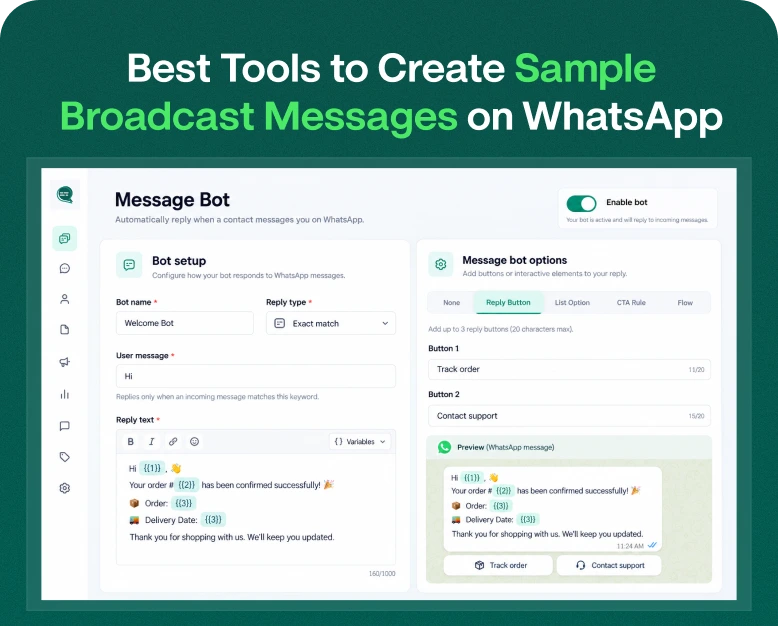
For example, say someone messaged “Hi” to your business WhatsApp number. An automated system can instantly respond:
“Hi! Welcome to ABC Store. How can we help you?
The customer can then choose an option such as:
- Product list
- Order Status
- Contact Sales
- Get help
- Get a Quote
This means that businesses can respond faster and there’s less need for employees to get involved in every simple dialog.
How Does WhatsApp Automation Work?
Your business communication is connected to automation workflows by a standard WhatsApp automation system.
A simple workflow may look like this:
Customer messages → Automation recognizes intent → System responds → Lead captured → Follow-up scheduled → Sales takes over when needed
This is the right platform for businesses to automate marketing, sales, customer support, notifications, and lead management.
What’s the need of WhatsApp automation for businesses?
WhatsApp offers convenience for customers, who can talk to companies in an app they already use every day.
But as your business grows, it becomes difficult to handle WhatsApp conversations manually.
Picture a real estate company receiving 200 inquiries in a day. Sales representatives might need to answer questions about:
- Housing prices
- Places
- Availability
- Types of property
- Visits to sites
- Monetization
- Documentation
The questions asked are mostly repetitive.
The company can use WhatsApp automation for business to create automated responses to common questions, allowing sales representatives to focus on qualified prospects.
This can mean less repetitive work, quicker communication, and a more organized sales process.
Important Features of WhatsApp Automation Tool?
Not all WhatsApp automation tools have similar features. Before you select software, know what your business actually needs.
1. Automatic Replies
Look for basic features like auto-replies.
You should be able to answer common customer questions like greetings, product inquiries, support requests and other frequently asked questions.
As an example:
Customer: What time do you open?
Automated answer: We are open Monday to Saturday, 9 a.m. to 7 p.m. What can we do for you today?
This prevents your team having to answer the same question again and again.
2. WhatsApp Chat Bot
A chatbot can go further in automation by handling conversations based on customer inputs.
For instance:
Customer: I’d like to purchase a laptop.
- Bot: Perfect! Which budget do you prefer?
- Less than Rs 40,000
- ₹40,000–₹70,000
- Above 70,000
The chatbot can continue the conversation and extract useful information based on the customer’s response.
3. Lead Generation
An efficient automation platform should enable you to gather and organize lead data.
You can gather data such as:
- Name
- Phone no
- Interest in the product
- Place
- Budget
- Preferred Service:
- Purchase schedule
This data can assist your sales team to locate quality leads.
4. Auto Follow Ups
One of the biggest advantages of automation is the ability to provide consistent follow up.
A customer can ask about your service without buying right away.
An automation workflow can send a follow-up after a specified time period, rather than depending on a salesperson to remember the lead.
For instance:
- Day 1: Thank you for your interest.
- Day 3: Do you have questions about the service?
- Day 7: Interested in scheduling a demo?
This type of workflow can help companies stay in touch with potential customers.
5. Team Mailbox
If you have lots of employees who handle customer conversations, consider a team inbox.
Manage customer conversations from a single place with a team inbox.
Team members are able to:
- Instruct dialog
- reply to customer
- Watch conversations
- Add to notes
- Lead status tracking
- Move conversations to other departments
This is especially useful for scaling sales and support teams.
6. Customer Segmentation
Different needs for different customers.
A good WhatsApp automation system should allow businesses to segment contacts into relevant groups.
Here is the magic.
- New Clues
- Current customers
- Repeat customers
- Premium subscribers
- Customers looking for Product A
- Customers seeking assistance
Segmentation allows you to send the right message to the right people, not the same message to everyone.
7. Analytics & Reporting
Without measurement, automation can leave you wondering if your campaigns are working.
Look for reporting features that enable you to track:
- Number of conversations
- Generated leads
- Participation Rates
- Performance of the Campaign
- Agent effectiveness
- Client engagement
- Conversion Information
You’ll use these tips to tweak your WhatsApp strategy as you go.
WhatsApp Automation vs Manual Messaging
The difference becomes apparent as your customer base grows.
- WhatsApp Automation WhatsApp Manual Messaging
- Needs constant manual work Automates repetitive tasks
- Instant responses can be givenResponses may be delayed
- Large volume handling difficult Designed for scalable communication
- Follow-ups are employee dependent Follow-ups are schedulable
- Limited tracking Better tracking and reporting
- Reduces repetitive tasks for staff Repetitive tasks for staff
Automation doesn’t necessarily mean removing humans from customer communication.
The idea is to let automation handle the repetitive work and let employees focus on the conversations that need human attention.
Benefits of Using WhatsApp Automation for Business
There are a number of practical benefits to be gained by choosing the right WhatsApp automation for business.
Faster CustomerResponse
As a rule, customers don’t want to spend hours getting an answer to a simple question.
Automation can provide instant answers to frequently asked questions, even when it’s outside normal working hours.
Improved Lead Management
Automation can also assist in capturing and organizing lead information instead of letting inquiries get lost in chat histories.
So your sales team can focus on the most promising prospects.
Saves Employees Time
Employees don’t have to answer every question over and over again themselves.
Automation can take care of the routine stuff, so the employees can focus on sales, support and relationship building.
Regular Communication
The same question may be answered differently by different employees.
Automated workflows can help keep the message consistent across customer conversations.
Easier to Follow Up
It’s hard to follow up on all the leads manually.
Automated reminders and workflows make it possible for a business to communicate on a regular basis without relying on memory alone.
Business Growth Support
When customers have questions, it’s not always a case of just hiring more people.
A scalable automation system can make your existing team more efficient in managing more conversations.
Real Life Example: WhatsApp Automation in a Small Business
Consider an online clothing store that gets questions via WhatsApp.
Often our customers ask:
- Is there any of this product?
- What sizes do you carry?
- How much does shipping cost?
- Can I change the product?
- When will my order be delivered?
Rather than answering each question individually, the business may set up an automated WhatsApp workflow.
Step 1: Greet the Customer
The system will automatically welcome you.
Step 2: View Options
The customer can choose:
- Shop Products
- Check order
- Delivery Details
- Exchange policy
- Speak to an agent
Step 3: Gather Lead Information
If the customer wants to buy, the system collects basic information.
Step 4: Follow Up
If the customer does not pay, a follow-up can be sent according to the communication strategy of the business.
Step 5: Escalate to a Human Agent
For complex customer questions, the conversation can be escalated to sales or a support rep.
This is a balance between automation and human engagement.
Selecting the Best WhatsApp Automation Software
Picking software based only on price can be a mistake.
The cheapest platform might not have the features you need for your business, and an expensive solution might have features you’ll never use.
Do this one instead.
1. Define Your Business Purpose
First, figure out why you want automation.
Are you attempting to:
- Build leads?
- Automate Customer Service?
- Notifications?
- Follow up with prospects?
- Increase sales?
- Run whatsapp campaigns?
- Cut down on repetitive work?
The tool you use should be driven by your goal.
2. WhatsApp Check Works
Make sure the platform supports the official WhatsApp business ecosystem and has the features your use case needs.
This is important because companies should not use solutions that are based on unsafe or unsupported practices.
3. Compare Features of Automation
Verify whether the platform provides:
- Bots
- Automatic replies
- Workflow designers
- Follow-ups
- Triggers
- Contact segmentation
- Campaign management
- Templates
- Analysis
Choose features that are really needed in the business.
4. Assess the usability
A powerful tool is useless if your team can’t use it comfortably.
Select an intuitive interface that lets employees build workflows, manage conversations, and monitor campaigns without needing advanced technical knowledge.
5. Team Collaboration Considerations
If more than one employee will use the platform, check to see if it supports:
- Collective Inboxes
- Discussion of the assignment
- Several agents
- Roles & Permissions
- Internal memos
- Conversation history
6. Integration Options Check
Your WhatsApp automation software may need to integrate with other business systems.
Useful integrations could be:
- CRM systems
- E-commerce websites
- Lead forms
- Payment systems
- Customer databases.
- Marketing tools
- Enterprise apps
Integrations will help you reduce manual data entry and make your workflow more efficient.
7. Compare Pricing & Scalability
Don’t just look at the starting price.
Watch what happens when your business grows.
Think about:
- No. of users
- Quantity of contacts
- Message restrictions
- Limits to automation
- API expenses
- Other features include
- Integration fees
- Cost of support
Today you need the right tool that fits your budget but also is practical for your communication volume as it grows.
Common Errors To Steer Clear Of When Using WhatsApp Automation
Automation can be powerful, but if it is done poorly it can damage the customer experience.
Too many messages sent
Customers don’t want to be sent promotional messages that they don’t need.
Stay relevant in your communication and adhere to the relevant WhatsApp messaging and consent requirements.
Automating Every Conversation
Not every customer wants to deal with a bot.
Provide customers with an easy way to reach a human agent when they need one.
Forget Personalization
A generic message can be robotic.
Make messages more relevant by using customer information and segmentation.
Choosing Software Just Because It’s Cheap
Price is important but functionality, reliability, support, scalability and compliance also count.
No tracking results
If you don’t measure performance, you won’t know if automation is helping.
Focus on the metrics that matter and use the findings to streamline your workflows.
Who Are Whatsapp Autoreply For?
WhatsApp Automation can be useful for many industries.
Ecommerce
Automate product questions, order updates, customer support and follow-ups
Real Estate
Generate property inquiries, share basic information, qualify prospects and book site visits.
Education and Training
Manage calls to the admissions department, course information, application status and student communication.
health care
Automate appointment reminders, simple information requests and notifications while ensuring that sensitive workflows are properly managed.
Travel & Hospitality
Assist customers with booking questions, reminders, FAQs and service information.
Financial Service
Automate customer notifications, FAQs and support workflows where applicable and required by security and regulatory requirements.
Technology and SaaS
Automating lead qualification, onboarding messaging, and customer support.
Is it Worth Using WhatsApp Automation?
For businesses with a large volume of conversations on WhatsApp, automation can be a good investment.
The biggest value is not just automatic message sending. It’s leading to a more organized communication process.
A good system can help you to:
Capture → Qualify → Engage → Follow Up → Convert → Support
Businesses can use WhatsApp as part of their broader customer journey, rather than just a messaging application.
The important thing is to select software that matches your goals, not to buy a platform because it has a long list of features.
Checklist for Buying WhatsApp Automation Software
Before you buy a WhatsApp automation tool, ask these questions:
- Does it support the WhatsApp business ecosystem that I need?
- Yes, you can build automated workflows.
- Does it have a chat bot function ?
- Can I capture and manage my leads?
- Can it be used with multiple team members?
- Can I automate follow ups?
- Will it work with my CRM?
- Does it offer analytics?
- Can my team easily use it?
- Will it grow with my business?
- Is the provider’s customer support reliable?
- Does the price reflect my message and user volume expectations?
If you answered yes to most of these questions, chances are the platform is a good fit for you.
FAQs
1. WhatsApp Automation Software: What is it?
Businesses can automate repetitive WhatsApp conversations and workflows with the help of WhatsApp automation software. You can use it for automated replies, chatbots, lead capture, followups, notifications and customer support.
2. What is the best WhatsApp automation tool for business?
The best WhatsApp automation tool for you will depend on your business goals, the volume of communication, features you need, integrations, team size and budget. Compare automation capabilities, ease of use, scalability, support and pricing and pick one.
3. Yes, WhatsApp automation can generate leads.
Yes.Companies can also use automated conversations to ask qualifying questions, gather customer information, segment prospects and pass qualified leads to the sales team.
4. Is WhatsApp Automation Effective for Small Businesses?
“Yes. Automation allows small businesses to answer frequently asked questions, generate leads, send updates and follow up with customers without a large support team.
5. Can WhatsApp automation substitute human customer service?
Not entirely. Automation works best on repetitive, predictable tasks, but human agents are still needed for more complicated questions, complaints, negotiations and relationship-driven conversations.
Concluding Thoughts
Picking the right WhatsApp automation software is not about the platform with the most features. It’s about developing a solution to solve your real business problems.
Identify the areas where your team spends the most time. If employees are repeatedly answering the same questions, manually collecting lead details or forgetting follow-ups, those are great opportunities for automation.
The right WhatsApp automation tool helps your business respond faster, organize conversations, improve lead management and create a more seamless customer experience.
If you want to cut down on repetitive WhatsApp work and build a more efficient customer communication process, check out a reliable WhatsApp automation for business solution and compare its features, pricing, integrations and scalability before you get started.
Want to automate your WhatsApp messages? Try a WhatsApp automation platform that fits your business needs, simplify your customer communication and convert more conversations into real business opportunities.
Written by
Jayesh Makwana
Part of the Wbotz team, writing about WhatsApp Business API, automation and the campaigns that actually convert.