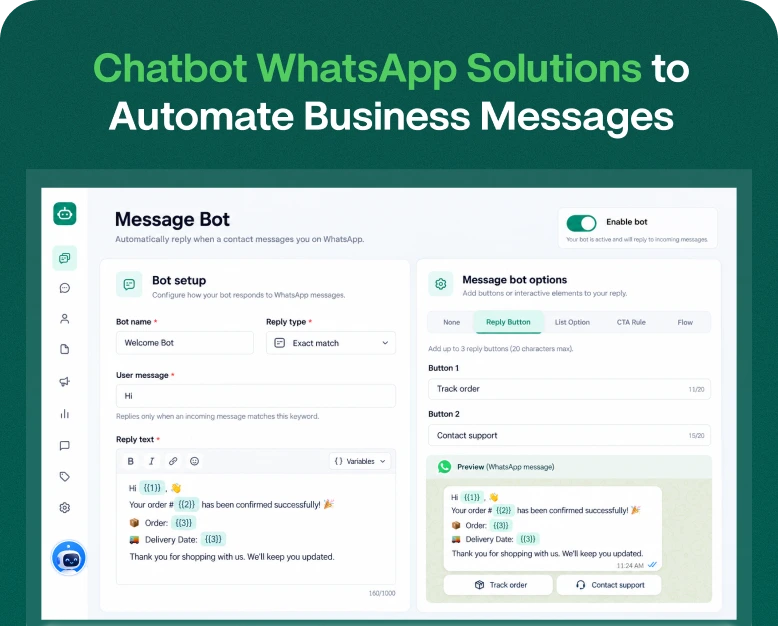
Chatbot WhatsApp Solutions to Automate Business Messages
Picture the scene. A customer visits your website at midnight. They want to find out your product price, delivery time, or the services you offer. But your support team is offline. What are the chances that, before…
Picture the scene. A customer visits your website at midnight. They want to find out your product price, delivery time, or the services you offer. But your support team is offline. What are the chances that, before your team comes online the next morning, that customer has already contacted a competitor to get the information they need? Pretty high, right?
Manually replying to every customer message and providing timely, appropriate support is difficult for any business, except perhaps the smallest ones.
This is where automation comes in. A chatbot whatsapp solution is a great way for businesses to automate messages, provide 24/7 customer support, and collect customer information automatically. It takes the pressure off your support team by answering repetitive questions and helping customers find the information they need.
This approach works for businesses of all kinds, from online stores and service providers to educational institutions and marketing agencies.
In this article, we will cover the ins and outs of using WhatsApp chatbots for business, the features you should look for when considering automation, and how to find the right solution for your business.
What Is a WhatsApp Chatbot?
A WhatsApp chatbot is an automated system that uses artificial intelligence or predefined conversational rules to understand messages it receives, and responds to them appropriately. Instead of requiring a support agent to respond to every message manually, the chatbot can answer repetitive messages automatically.
For example, say someone messages an online clothing store and asks “What is the price of your latest collection?”
The chatbot shows product information, prices, pictures, and has a link to the online store. The customer is then given the option to continue to chat with a human representative if they need further assistance.
A WhatsApp chatbot can help a business with many different activities including:
- Answering Frequently Asked Questions
- Giving Product and Service Information
- Collecting Customer Data and Requests
- Order Status and Delivery Updates
- Appointment Scheduling and Reminders
- Lead Qualification
- Transferring Customer to Support Representative
Many businesses have created these experiences using the official WhatsApp Business Solution and compatible chatbot solutions. The solutions available vary by provider and integration.
Why Should Businesses Use Chatbot WhatsApp Solutions?
Customer preferences have changed and the new standard is to quickly get information using simple and convenient methods.
Meeting these preferences reduces repetitive work. Some of these methods include:
1. Providing Instant Customer Responses
Customers don’t always want to wait to get information. The chatbot can quickly and automatically provide many of the information that customers ask for including prices and products. It can answer questions about order process and availability.
2. Automating Business Messages
Customers asking the same questions repetitively happens in every business. Automating these responses frees up time for employees to do more important work.
Examples:
- What are your working hours?
- Where is your business located?
- How do I place an order?
- What payment methods do you accept?
- How do I track my order?
- Do you deliver to my location?
You can automate responses to these common customer requests using WhatsApp Business API and a business bot. Your employees will have more time to resolve complex customer issues.
3. Generate and Qualify More Leads
You can use your chatbot to offer lead capture forms and quizzes to customers. This can help capture additional information and leads for your business.
For example, a lead capture form or quiz can be used to capture a customer’s preferred location of a property they wish to buy, their budget, and the type of property they wish to buy. If lead capture forms or quizzes are used, the sales team can follow-up with qualified leads.
4. Improve Customer Engagement
WhatsApp provides an easy to use platform for customers to communicate with businesses. Customers can do many things via a single WhatsApp chat including making purchases, getting status updates, and requesting product information.
A WhatsApp bot can provide a menu and buttons for customer interactions.
Common requests should be automated, but more complex tasks should be left for your employees.
5. Offer Support Outside Business Hours
While your employees are not available 24/7, customers can contact your business anytime.
A WhatsApp chatbot can answer FAQs for customers so that your employees do not have to answer the same questions repeatedly.
A chatbot can respond to common requests for information and capture leads to be followed up by the team later.
A customer contacting a coaching institute at 10 PM may want to learn about the courses offered, admissions and even register, instead of waiting for the working day to contact them.
A chatbot offers a convenient 24/7 communication channel for customers.
Important WhatsApp Chatbot Features
Different chatbot platforms may have different features. Look for the following features based on your specific requirements before purchasing a chatbot solution.
1. Reply to Messages
A good chatbot solution allows you to configure messages to be sent automatically to customers based on keywords in customer queries. Some common examples include greeting messages, product inquiries, service requests and even Thank you messages. The solution should provide an easy-to-use interface for non-technical users to create and modify these messages.
2. No-code Chatbot Builder
A no-code chatbot builder allows users to create and modify chatbots using visual tools instead of writing code. Look for features such as:
- Drag and drop creation of conversation flows.
- Ready made conversation templates.
- Interactive buttons.
- Conditional Logic
- Easy editing and testing of flows.
No-code chatbot builders are ideal for small to medium businesses that have a limited development team.
3. AI-powered Conversations
Some whatsapp chatbots use AI to interpret customer queries and offer contextual responses. For example, instead of having a menu based conversation, a customer may ask “When will my order be delivered?”. A chatbot powered by AI may recognize the query and guide the customer on how to track their order.
However, there are ways of using the technology to your advantage. Make sure the information you are feeding the AI is accurate. Set boundaries and provide human assistance if the bot is unable to fulfill the request.
4. CRM Integration
CRM integration allows businesses to bring WhatsApp conversations to their CRM systems. With this feature, users can:
- Save customer data.
- Manage customer inquiries and sales opportunities.
- Schedule and manage customer follow-ups.
- Review previous interactions.
- Organize customer data by status.
If conversations and customer information are synced, sales and support teams can engage with more context.
5. Multi-Agent Team Inbox
As your business grows, so may the number of employees handling WhatsApp conversations.
A centralized team inbox lets multiple employees manage customer conversations.
Depending on the tool, users may be able to set rules on how conversations are assigned, leave internal notes, set roles and performance metrics, and add tags.
This is especially useful when a chatbot needs to transfer a conversation to a human employee.
6. Analytics and Reporting
To see if your chatbot is successful, look at metrics like:
- Total number of conversations.
- Number of conversations resolved by the bot.
- Number of conversations handed off to a human.
- Top questions asked by customers.
How to Setup a WhatsApp Chatbot for Your Business
Setting up a chatbot can feel overwhelming. Following these steps will make the process easier.
Step 1: Determine Your Automation Needs
Do you want to respond to frequent queries, generate leads, organize meetings, provide product information, give order updates, or do something else?
Examples include an online store handling product queries and delivery status requests, and a coaching institute answering queries related to its course and admission.
Identify the questions that are usually asked by your customers, and record them. These will form the core of your chatbot.
Step 2: Select the Appropriate WhatsApp Chatbot Platform
After you know the requirements, examine different chatbot solutions.
If you opt for a subscription-based model, go for a solution that does not include unnecessary and unwanted features.
Refer to the checklist below:
- Integration with the WhatsApp Business Platform.
- Easy-to-use flow builder.
- Automatic replies and message templates.
- Contact list.
- CRM integration.
- Shared team inbox.
- Analytics and reports.
- Handover to a human agent.
- Clear pricing.
- Good customer support.
Additional charges for onboarding, template management, and messaging should be included in the pricing.
Step 3: Connect Your WhatsApp Business Account
Select a platform and follow the steps to connect your business number via the supported WhatsApp Business integration.
You may have to:
- Sign in to your platform account.
- Initiate the WhatsApp integration process.
- Complete business verification or set up your Meta account.
- Connect or add an eligible business phone number.
- Provide your business information.
- Complete integration checks.
Step 4: Develop Chatbot Conversation Flow
You know your requirements, and you have a list of Frequently Asked Questions.
Use this info to build a simple flow.
Ask only the essential questions.
As an example, a simple welcome flow for a service business may look like this:
Hello! Welcome to ABC Services. How can we help you today?
We hope this basic example has shown you how easy it is to set up a simple flow with multiple options.
Again, imagine a customer selects the “Book an Appointment” option in the example flow above. In order to fulfill this option, your chatbot could respond with the available appointment slots for that day. You could then give the customer the ability to select an available time for the appointment booking.
Step 5: Add Automated Responses
Now add answers to the questions customers ask the most. This may require a bit of research on your part in order to find the answers customers are most interested in knowing.
In this example, one customer may ask, “What are your business hours?” and the bot response may be, “Our team is available Monday to Saturday, from 9 AM to 6 PM. You can leave a message outside of these hours and we will get back to you.”
Another example may be the customer asking, “How can I contact your sales team?” and the bot may respond, “You may select the option below to be contacted by a sales representative.”
Once again, answers should be simple and direct.
Step 6: Test the Chatbot
At this point, you can test your chatbot. You may want to do this internally a few times and also send the link out to some beta testers. The goal of internal testing is to locate as many errors as possible.
Prior to launch, you should test:
- Welcome messages for correct flow and language
- If buttons direct customers to the correct options
- If automated responses are correct and have the right flow
- If customer information is captured properly
- If there are links to external websites and if they work properly
- If handoffs to humans work as intended
- That fallback responses are helpful
If there are multiple possible directions conversation paths are correct
You should be ready to make edits and answer customer questions once your chatbot is launched.
Find instances where the chatbot does not answer questions, where conversations stop because customers no longer interact with the chatbot, or instances where the chatbot requires human assistance.
Use these scenarios to improve your conversation flows.
Improving chatbots is essential as a company’s offerings, customers’ needs, and preferences change.
Examples of WhatsApp Chatbot Automation
There are several implementations of chatbot solutions across industries.
Online stores often have to answer repetitive questions about product information, pricing, payment, and delivery status.
To reduce load on its support team, the store develops a WhatsApp chatbot to display product information, and shows customers the way to the online store.
After customers make an order, the chatbot shares order tracking information to customers.
Education
A coaching institute has a chatbot to collect visitors’ information about course details, fees, and admission process.
Interested visitors can leave their contact details to receive a callback from the admissions team.
Healthcare Appointment Services
A clinic can use a chatbot to share information about appointment availability, consultation times, and clinic address.
Clients can make an appointment, and receive confirmation and reminder messages, through an integration with a chatbot.
Business benefit: Business admin communication becomes more organized. Staff can focus on patient-facing duties.
Sensitive data should not be transmitted through insecure channels in healthcare businesses.
How to Choose the Best WhatsApp Chatbot for Your Business
A chatbot is an investment, so it’s important to consider several platforms before making a purchase.
| Selection factor | What to look for |
| Pricing | Clear subscription and messaging charges |
| Automation | Easy-to-build conversation flows |
| Integration | Official WhatsApp Business support |
| AI features | Reliable answers and configurable controls |
| Team management | Shared inbox and agent assignment |
| Analytics | Useful conversation and campaign reports |
| Scalability | Ability to support business growth |
| Support | Helpful onboarding and technical assistance |
You should also consider how easily the platform connects with your existing CRM, website, ecommerce system, and other business applications.
A low-cost tool may be suitable for a small business with basic requirements. However, a growing company may benefit from a platform with advanced automation, team management, and reporting capabilities.
Mistakes to Avoid when Using WhatsApp Chatbots
1.Nested menus: If your business has more than 4 main navigation options, customers will become lost and frustrated.
2.Lack of human support: Many customers will be frustrated if they are unable to get in touch with a human.
3.Uncurrent information: Stay on top of your chatbot response to inform customers of current prices and hours, promotions, service details, etc.
4.Sending unwanted messages: Make sure to follow WhatsApp’s messaging policies and obtain the appropriate consent. Respect your customers’ opt-out requests.
5. Choosing a platform without checking integration: Confirm that the solution provides the WhatsApp features and integrations with the third-party systems your business needs.
6. Ignoring chatbot analytics: Use conversation reports to identify issues and opportunities for improving the customer journey.
Frequently Asked Questions
1. What is a chatbot WhatsApp solution?
A chatbot WhatsApp solution is a messaging automation system that helps businesses communicate with customers through WhatsApp to answer frequently asked questions and collect customer leads, as well as share information and automate conversations.
2. How does a WhatsApp chatbot work?
A WhatsApp chatbot works by integrating with the WhatsApp Business Platform. With a customer request, the chatbot processes the request and responds using conversation flows, rules or AI.
3. Can I create a WhatsApp chatbot without coding?
Yes, many chatbot platform providers have no-code and low-code builders that allow businesses to design and build conversation flows using buttons and other visual editors.
4. Is a WhatsApp chatbot solution good for small businesses?
Absolutely! Small businesses can utilize a WhatsApp chatbot to provide automated customer service to answer frequently asked questions and provide product information and customer support. The best solution depends on the budget and communication requirements of the business.
5. What is the difference between a WhatsApp bot and a WhatsApp chatbot?
A WhatsApp bot describes automated messaging in general. A WhatsApp chatbot, on the other hand, refers to a more specific system for interactive messaging that can be used to handle customer conversations using flow or chatbots powered by AI.
Conclusion: Automate Your Business Communication with Chatbot WhatsApp
Eventually managing customer conversations manually becomes impossible as your business grows. This is due to challenges such as repeated questions, late and missed responses, and disconnected communication channels that adversely impact customer experience and business opportunities.
An effective WhatsApp chatbot can help simplify communication by automating response messages, leads generation, and customer care, among other things.
Before purchasing a WhatsApp chatbot solution, consider its integration with WhatsApp and CRM, automation features, team inbox, analytics and pricing. Choose a solution that meets your requirements and has potential to support business growth.
WhatsApp chatbots can help your business and customer care team manage their communication more efficiently. WhatsApp chatbots can also assist in generating leads, automating responses, and offering around the clock customer care. To learn more, check out a WhatsApp chatbot provider like Wbotz and explore their plans and features to learn how they can assist your business.
Written by
Prachi Soni
Part of the Wbotz team, writing about WhatsApp Business API, automation and the campaigns that actually convert.