Buy WhatsApp Scan Tool to Simplify Customer Messaging
When your business gets dozens or hundreds of customer messages a day on WhatsApp, it can be difficult to manage the conversations. Flipping between devices, re-scanning codes, searching for the right chats, and…
When your business gets dozens or hundreds of customer messages a day on WhatsApp, it can be difficult to manage the conversations. Flipping between devices, re-scanning codes, searching for the right chats, and maintaining organization of customer conversations can eat up precious time.
This process can be so much easier with a WhatsApp scan tool. This makes it easier for businesses to connect WhatsApp to a computer or a business workflow with a WhatsApp Web QR code, making it easy to access conversations and interact with customers on a larger screen.
If you’re looking for a WhatsApp scan tool, this guide will help you understand what it does, how WhatsApp scan works, what features to look for, and how the right tool can improve your customer messaging process.
What Is a WhatsApp Scan Tool?
A WhatsApp scan tool is software or a feature that helps users connect their WhatsApp account to another device, usually a computer, through a QR-based authentication process.
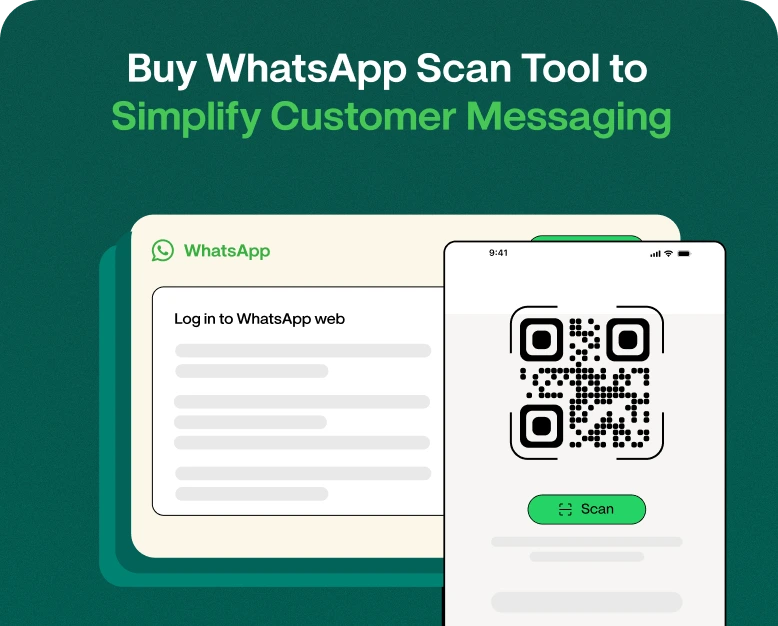
WhatsApp Web scan is the most common one. You launch WhatsApp Web on your computer and a QR code for WhatsApp Web is shown on the screen. Then you open WhatsApp on your phone, choose the linked-device option and scan the code shown.
After connection you are able to manage your WhatsApp chats on your PC.
Specialised WhatsApp tools can do more than just link devices for companies. Depending on the platform, they might offer features like:
- WhatsApp Messaging for Customers
- Team inbox
- contact management software
- Message templates
- Automatic responses
- Broadcast messaging
- Lead administration
- Conversation Tracking
- Analytics
- Managing campaigns
- Whatsapp integration to CRM
This makes WhatsApp scanners useful for companies looking for a more convenient way to manage customer communication.
Why Companies Need a WhatsApp Scan Tool
WhatsApp is now an important channel for businesses to communicate. Customers use it to ask questions, request prices, track orders, book appointments, and receive support.
But it gets kind of frustrating to manage all these conversations just on a phone.
Let’s say a small online shop gets 100 messages from customers in a day. The team must answer questions about product availability, shipping times, payment options and order status.
It takes time to type out each reply on a phone.
The team can more easily deal with customer messages by accessing conversations from a computer with a WhatsApp scan tool.
Typical problems that a WhatsApp scan tool can solve
- Slow typing on mobile phones
- Difficulties handling multiple conversations
- Repeated manual replies
- Poor customer follow up
- No transparency on the team
- Customer chats, unstructured
- Time lost switching between devices
- Struggling to handle the growing communication on WhatsApp
The goal is simple: customer messaging that is faster, easier and more organised.
How Does WhatsApp Scan Work?
The basic WhatsApp scan process is simple.
Step 1: Launch WhatsApp Web
Open WhatsApp Web on your PC. A QR code will appear on the screen.
Step 2: Open WhatsApp on your phone.
Open WhatsApp on your phone and tap on the Linked Devices option.
Step 3: Select Link a Device
Choose the option to link a new device.
Step 4: Scan QR code
On your phone, scan the WhatsApp Web QR code on your computer.
Step 5: Send Your Messages
After successful authentication, you can access your WhatsApp chats on the connected device.
If you are a business that uses a dedicated WhatsApp scan tool, the process may differ depending on the software and what it can do.
WhatsApp Web QR Code vs. WhatsApp Scan Tool
These two terms are related, but they are not always the same thing.
A WhatsApp Web QR code is primarily used to link WhatsApp with a web browser or another supported device.
A dedicated WhatsApp scan tool may provide additional business features around WhatsApp communication.
| Feature | WhatsApp Web Scan | WhatsApp Scan Tool |
| QR-based connection | Yes | Often |
| Desktop messaging | Yes | Yes |
| Customer management | Limited | Depending on tool |
| Team communication | Limited | Often available |
| Automation | Limited | May be available |
| Campaign tools | No | May be available |
| CRM features | No | May be available |
| Analytics | Limited | Depending on platform |
If your requirement is simply to access WhatsApp from your computer, WhatsApp Web may be enough. But if you want to manage customer conversations as part of a business process, a dedicated tool can provide more functionality.
Before you buy a WhatsApp scan tool, check this
Not all WhatsApp tools come with the same features. Think about how your business handles customer communications today before buying one.
1. Easy WhatsApp Scan Procedure
Connecting should be a straightforward process. “We find that complex set-ups can create problems for staff and customers.
Find a tool that makes the whatsapp scanning process simple and easy.
2. Customer Conversation Management
A business-oriented tool should help you sort out customer conversations, not just show you chats.
Features that can be helpful are:
- Labels
- Search
- Contact details
- Chat history
- Assigned agent(s)
- Notes
- Reminders for follow-up
3. Team Inbox
If you have multiple employees who handle WhatsApp conversations, a shared inbox is very useful.
For example, a message is received from a customer asking about an order. The right agent can manage the conversation in a team inbox rather than manually forwarding the conversation to another employee.
4. Automate
Look for automation features if your business gets repetitive questions.
For instance:
Customer: “What are your hours of operation?”
Automated Reply: Our support team is available between 9 AM and 6 PM, Monday through Saturday.
Simple automation can save employees the headache of answering the same questions repeatedly.
5. Contact & Lead Management
Managing your contacts is very important if you use WhatsApp for sales.
A good tool will allow you to organise your prospects by phase as in:
- New lead
- Contacted
- Interested
- Follow up required
- Converted
- Customer
This can transform WhatsApp conversations into a more structured sales process.
6. Security and Protection of Account
Before purchasing any WhatsApp related software, security must be one of your first considerations.
Test how the tool feels:
- Login information
- Customer details
- Sign in to your account
- User rights
- Information security
- Session management
Do not trust tools that require unnecessary sensitive information or make unrealistic claims of being able to bypass WhatsApp security systems.
How to Use WhatsApp Scanner Tool for Customer Messaging
Having selected the right tool, you can improve your daily communication workflow.
Step 1: Link Your WhatsApp Account
Follow the tool’s setup process and perform the required WhatsApp scan or account connection.
Step 2: Classify Your Contacts
Import or manage customer contacts where available. Add useful labels as needed by the customer.
E.g.
- New Customers
- Existing Customers
- Question about Product
- Follow-Up
- Follow-Up to Support Request for High-Value Lead
Step 3: Compose Quick Responses
Prepare answers to common questions.
Templates could be created for:
- Product pricing.
- Shipping information
- Hours of operation
- Billing information
- Confirming his appointment.
- Change of order
Step 4: Distribute Conversations
If multiple employees use the platform, route conversations to the appropriate team member.
For example,
Sales Team: Product and Pricing Issues
Support Team: Technical issues
Accounts team: Questions about payments
STEP 5: Check In
Don’t lose interested customers after the first conversation.
Create reminders, labels or use features in your CRM to flag conversations that need follow-up.
Real World Example: Online Store
Think of an online clothing store that gets customer queries through WhatsApp.
Employees answer questions from their phones manually first, and then use a dedicated tool.
Customers often ask:
- “Do you have this item in stock?”
- “What sizes do you have?”
- “How much is delivery?
- “When is my order arriving?”
- “Can I exchange this item?”
The team spends hours answering the same questions.
Once the business has adopted a WhatsApp messaging workflow, it can create quick replies, organise conversations, assign chats to team members, and track follow-ups.
The result isn’t just faster messaging. The business also has a more organised process of communication with customers.
Why You Should Buy a WhatsApp Scan Tool
The right tool can be a practical advantage in investing.
Quick customer response
If you’re in a team that deals with a lot of messages, a computer-based interface can make typing and managing conversations easier.
Improved Team Collaboration
Platforms with shared inboxes and the ability to assign conversations allow multiple team members to manage customer communication in a more systematic way.
More Productive Follow-Up
It’s easier to see who needs another message with structured conversations.
Less Repetitive Work
Quick replies and automation can cut down on manual typing for common questions.
Improved Customer Experience
Generally customers like to get communication that is quick, clear and consistent.
Easier Scaling for Businesses
As your customer base grows, manually managing WhatsApp can become more and more difficult. A structured tool can support your communication process to grow with it.
Who can use a WhatsApp Scan Tool?
A WhatsApp scan tool can be useful for various kinds of businesses.
Online shops can use WhatsApp to answer questions about products, give order updates and support customers.
Real Estate Firms
Agents can take property enquiries, share information and follow up with potential buyers.
Schools and Universities
Schools, coaching centers and training businesses can contact students and parents.
Eating Out
Restaurants can use WhatsApp for queries, reservations, offers and customer support.
Service Businesses
Service providers (e.g., agencies, consultants, salons, repair companies) can handle appointment and inquiry messages.
Sales Teams
Sales reps can handle leads and follow up on them regularly.
Mistakes You Should Never Make
Purchasing a tool is only the first step. Avoid these common mistakes when setting up your WhatsApp customer communication.
Overusing Automated Messages
Automation is helpful but when customers have a complex problem, they want human support.
Failing to Follow Up
You might receive a customer inquiry, but not following up can cost you a potential sale.
Sending Bulk Messages You Don’t Want
Customer communication should be both permission-based and relevant. Trust can be damaged by excessive or unwanted messages and this may also breach applicable WhatsApp rules.
Picking a tool simply because it is cheap
Price is important, but so is functionality, security, reliability, support and scalability.
Don’t Train Your Team
Staff need to know the WhatsApp scan process, how to assign chats, respond to customers and follow the internal communication guidelines.
WhatsApp Scan Tool Buying Guide
Before you buy a tool ask these questions:
- Is there a simple way to scan WhatsApp?
- Is it easy for employees to establish?
- Does it help you control the conversations you have with your customers?
- Can more than one team member use it?
- Does it have a shared inbox?
- Are there quick replies?
- Is it possible to automate it?
- Could you sort out customer contacts?
- Are there follow-up features?
- Does it fit in with your current workflow?
- How secure is my customer data?
- Is there any customer support?
- Can the platform grow with your business?
If your needs meet most of these requirements, the tool may be worth considering.
Why choose a WhatsApp tool for business?
Using WhatsApp as a messaging application may work fine when you have a small number of customers. But as you have more conversations, you need a more organised system.
A business-centric WhatsApp solution can combine customer communication, lead management, automation and team collaboration into a single workflow.
You can make a structured process instead of having your employees remember every customer conversation.
So your team spends less time digging through chats, more time helping customers and closing sales.
Frequently Asked Questions About WhatsApp Scan Tools
1. WhatsApp Scan Tool?
A WhatsApp scan tool enables you to connect WhatsApp with another device or business communication platform, generally using a QR-based authentication process. Business-oriented tools can include contact management, automation, team inboxes and customer messaging.
3. How does WhatsApp Web scanning work?
WhatsApp Web scan makes use of a QR code displayed on your computer. Open WhatsApp on your phone, go to Linked Devices and scan the QR code to connect your account.
3. Can I use WhatsApp Scan Tool for business?
Yes, depending on the tool and the features it supports. The right WhatsApp solutions are designed to help businesses manage customer conversations, organise leads, create quick replies, and enhance team communication.
4. WhatsApp Scan Tool – Can sales teams benefit from it?
Yes. Sales teams can use it to sort enquiries, reply faster, assign conversations, and track follow-ups. Tools with CRM or lead management features can help make WhatsApp sales workflows even more organised.
5. What should I look for when buying a WhatsApp scan tool?
See how it connects with Whatsapp, its security, team features, automation, customer management, integrations, pricing, scalability and customer support. Select a solution that meets your actual business needs, not just the cheapest one.
Final Thoughts
WhatsApp is a very powerful customer communication channel but handling an ever-increasing number of conversations manually can soon become a challenge. A good WhatsApp scan tool can help you to access, organise and manage conversations more easily.
Before deciding to buy a WhatsApp scan tool, focus on the features your business really needs. Search for easy whatsapp web scanning features, customer management, team collaboration, automation and follow-up options, and strong security.
The right solution will allow your team to move faster, stay organised and deliver a better customer experience.
Want an easy way to message your customers on WhatsApp? Find a reliable WhatsApp business communication tool, compare its features with your needs and pick a solution that can scale with your business.
Written by
Kalpit Parmar
Part of the Wbotz team, writing about WhatsApp Business API, automation and the campaigns that actually convert.