Buy WhatsApp Scan Software for Easy Customer Engagement
Businesses are always looking for easy ways to connect with customers, answer questions, and build better relationships. However, manually handling many conversations on WhatsApp can be tricky, especially for a…
Businesses are always looking for easy ways to connect with customers, answer questions, and build better relationships. However, manually handling many conversations on WhatsApp can be tricky, especially for a business that gets messages from various customers throughout the day. A delayed response, missed inquiry, and complicated communication processes can affect the entire customer experience.
This is where WhatsApp scanning technology can help make communication easier. WhatsApp QR Code helps businesses to let customers easily get in touch with them. There’s no need to save the phone number or search for contact details.
If you want to speed up and simplify customer communication, then choosing the right WhatsApp scan software can be a helpful step. Depending on the features offered by the platform, it can help companies connect WhatsApp accounts and streamline customer interactions and better organize communication.
In this article, we will explain what WhatsApp scan software is, how it works, its benefits and how to choose the right solution for your business.
What Is WhatsApp Scan Software?
WhatsApp scan software is a tool or platform that helps with WhatsApp connections and customer interaction through QR code scanning.
The most common use for QR codes is for payments, restaurant menus and website links. WhatsApp also uses QR codes to link devices and help users start conversations with businesses.
For example, a business can put a WhatsApp QR code on its website, product packaging, business cards, advertisements or shop counter. Customers can scan the code with their smartphone and start a WhatsApp chat with the business.
Software may include additional features, such as:
- WhatsApp QR Code Generator
- WhatsApp web connection to device
- Managing customer conversations
- Automatic replies
- Team inbox capabilities
- Customer relationships management
- Campaign tracking and analysis
It is important to understand that a basic WhatsApp QR code is not the same thing as advanced WhatsApp marketing software. A QR code is a simple way to connect . More advanced platforms can provide additional communication and management features.
How Does Whatsapp Scanner Work?
Typically, scanning WhatsApp involves a QR code that connects to a WhatsApp account or opens a chat.
The most common 2 uses of WhatsApp QR codes are:
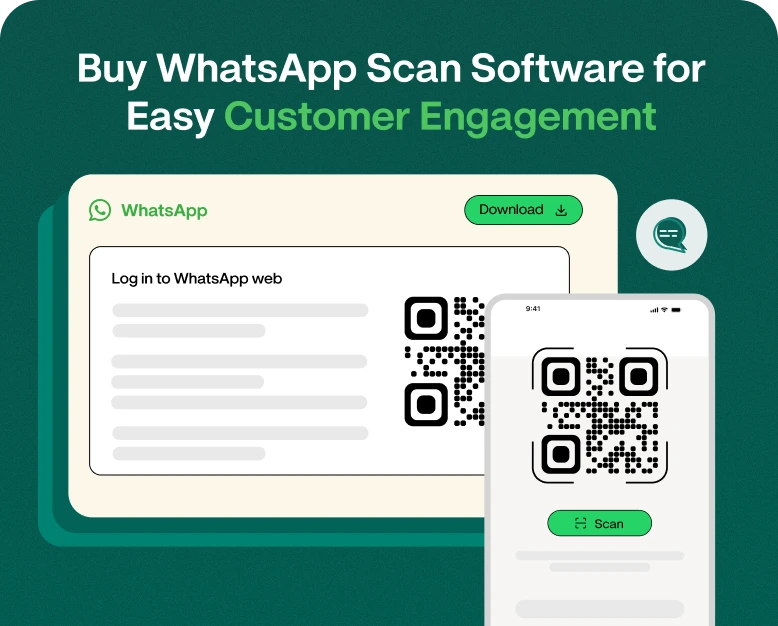
1. Scanning the QR code in WhatsApp Web
WhatsApp Web is a service that enables users to access their WhatsApp account from a computer browser.
Here’s how the process works:
- On your PC, open WhatsApp Web.
- You will see a QR code on the screen.
- Open WhatsApp on your mobile.
- Go to Linked Devices.
- Choose the option to link a device.
- Open WhatsApp Web and scan the QR code with your phone.
- After you are connected your chats will be visible in the browser.
This feature comes handy for businesses who prefer to reply to their customers on their desktop/laptop keyboard.
2. Scan the WhatsApp Business QR Code
Businesses can also use WhatsApp QR codes to help customers initiate conversations.
Say, for example, you own a restaurant. Rather than ask every customer to save your business number, you can display a WhatsApp QR code at the entrance or on the menu.
Customers scan the code, open WhatsApp and start a conversation. This makes it easier to query about reservations, menu items, special offers, and delivery services.
Both methods are more convenient for communication on WhatsApp, but they have different goals. Scanning WhatsApp Web links a device to an account and a business QR code allows customers to start conversations.
Why Should Your Business Invest in Whatsapp Scanner Software?
Customer involvement isn’t just about messaging. It’s about making it easy for customers to contact your business and getting helpful replies.
Here are some reasons to invest in a good WhatsApp scanning solution for your business.
1. Make customer communications easy
People like to reach out to businesses in convenient ways. Opening WhatsApp and asking them to search for a phone number and save it is unnecessary steps.
A WhatsApp QR code cuts out a lot of this friction.
Customers can scan the code and be talking in a matter of seconds. This is especially beneficial for businesses that receive inquiries via offline ads, product packaging, brochures, or stores.
2. Generate More Customer Leads
QR codes can make offline interactions online conversations.
For example, a real estate agency can put a WhatsApp QR code on property ads. Buyers interested can scan to inquire for prices, property details or site visit.
Similarly, a QR code can be placed in admission brochures by an educational institution so that students or parents can directly connect with the admission team.
This gives customers a quick communication channel and makes it easier for businesses to capture inquiries.
3. Save Time for Customers and Staff
It takes time to manually enter phone numbers or search for business contacts.
With the WhatsApp scanning customers can start conversations without these extra steps. Employees can also respond from their computers through WhatsApp Web, which makes it easier to engage in longer conversations and share information.
If coupled with the right customer communication platform, businesses can also manage multiple conversations more efficiently.
4. Increase Client Engagement
You can put a QR code wherever your customers engage with your brand.
Some good places to check:
- Packaging of products
- Cards (Business)
- Display in store
- Restaurantmenus
- Contact pages on websites
- Social media posts
- E-mail newsletters
- Event banner
For instance, a clothing store website could place a WhatsApp QR code on the order confirmation page. Customers can scan it to ask questions about delivery, product sizes or return.
This offers customers another convenient way to engage with the business.
5. Support Speedier Customer Service
When customers need quick answers, they often come to a business.
Providing easy access to WhatsApp communication allows businesses to reduce the effort needed to start a support conversation.
When linked to the right WhatsApp customer service platform, businesses can also use automated greetings, quick replies and team inboxes to answer common questions.
That said, fast customer service still requires employees or automated workflows to be available to respond.
Key Features to Look For Before Buying WhatsApp Scan Software
Not all WhatsApp scanner tools have similar features. “Know what your business really needs before you buy a solution.
Here’s what to look for in important features.
1. Easy WhatsApp QR Code Generator
A good solution will make it easy to generate QR codes that customers can scan.
Look for options that allow you to create codes for a variety of purposes, such as:
- Questions from customers
- Product info
- Customer support
- Making Appointments
- Sales pitches
The QR code should be clear, readable and easy to download or share.
2. QR Codes Customizable
Brand consistency matters in the manner customers interact with your business.
Some QR code tools enable you to customize colors, add a logo or tweak the design to match your corporate identity.
Professional-looking QR codes can be more attractive on marketing materials, but still easy to scan.
Always test the final design on different smartphones before you print it.
3. Help WhatsApp Web
If your employees are used to communicating through computers, Whatsapp Web compatibility can be helpful.
After securely linking an authorized device, team members can access conversations from a desktop browser.
Before you buy, check the device limits and connection requirements of the platform.
4. Texting automatically
Automation can automate repetitive communications.
Depending on the platform you may be able to configure:
- Welcome messages
- Answers to Frequently Asked Questions
- Notifications in business hours
- Standard customer service responses
- Follow Up Workflows
For more sophisticated business messaging, see if the software is built on the official WhatsApp Business Platform and adheres to Meta’s messaging policies.
5. Team Inbox and Conversations Management
Companies with multiple employees may need more than a simple QR code generator.
A team inbox enables authorized agents to manage customer conversations from a shared workspace, based on the platform’s capabilities.
Features that may be useful include:
- Assigning agents to conversations
- Conversational state tracking
- Internal notes
- Customer labels
- Common chat history
- Performance Report
These features can assist businesses to organize customer communication as their inquiry volume grows.
6. Tracking and Analytics
Tracking your QR code performance helps you understand how your marketing is going.
Look for analytics like:
- QR code scans number
- Visits
- Performance-wise campaign
- Customer involvement
- Conversation activities
Remember that a QR code scan doesn’t equate to a customer sending a message or making a purchase. Good analytics should distinguish between scans, conversations and conversions wherever possible.
How to Purchase WhatsApp Scan Software: A Simple Guide
A clear purchasing process you follow makes it easier to choose the right software.
Step 1: Determine Your Business Needs
First of all, think about why you need WhatsApp scanning software.
Want to generate customer inquiries? Link WhatsApp Web? Create QR codes for advertisements? Manage customer conversations?
A small shop may only require a basic QR code solution, but a growing company will require automation and team communication functionalities.
Make a list of your requirements before comparing different products.
Step 2: Compare the available software
Experiment with different platforms and compare their features.
If have: Check
- QR code creation
- Ability to customize
- WhatsApp integration
- Tools for contacting customers
- Team management
- Analysis
- Support Technical
Don’t buy software because it’s got lots of features. Focus on the tools that solve your real business problems.
Step 3: Check WhatsApp Compatibility
This is a big step.
Some tools work via linked devices with WhatsApp Web, and others integrate with the official WhatsApp Business Platform.
The capabilities and the requirements of these technologies are different.
Please verify before purchase:
- The software supports the following WhatsApp services:
- Do you want a device connected to it?
- Does it support the official business platform of WhatsApp?
- Are there any messaging/device limitations?
- Is it aligned with WhatsApp and Meta policies?
Avoid tools that ask for unnecessary account credentials or offer unlimited bulk messaging through unofficial channels.
Step 4: See Pricing and Plans
Pair the subscription price with the features it offers.
Some providers charge by the number of users, connected accounts, conversations or monthly usage.
Also, look out for any extra charges for integrations, premium support, and messaging services.
Choose a plan that fits your budget and has room for growth.
Step 5: Test the Software Before You Buy
If the provider offers a free trial or product demo, use it.
Create a QR Code, scan it using another smartphone and test the customer journey.
Verify that the code opens the correct WhatsApp destination and the conversation flow is smooth.
Test inbox, automation, agent assignment & reporting features for advanced platforms.
Step 6: Create and Publish Your QR Code
Buy your QR codes, configure them and put them in an accessible place for your customers.
The instructions are as follows:
- Scan to connect with us
- Search for product details
- Talk to Our Customer Service Team
- Scan for appointment booking
Print it out, publish it and test every QR code. If a code is broken or linked incorrectly you can miss out on inquiries.
Actual Examples of WhatsApp Scan Software in Different Industries
Scanning on WhatsApp can help engage customers across many industries.
A clothing retailer can print a QR code for WhatsApp on shopping bags and product packaging.
Customers can scan it to check product availability, ask size information or contact the support team.
This even allows for an additional communication channel after the customer has left the shop.
Restaurants & Cafes
QR codes can be placed on restaurant menus and tables.
Customers can scan them to ask about reservations, delivery options, special dishes or event bookings.
A restaurant receives frequent inquiries and can combine QR-based contact with automated replies to common questions.
Real Estate
Property agents could put QR codes on banners, brochures and property listings.
Interested buyers can scan the code to get price details, photos of the property or appointment information.
This helps turn advertising interest into direct conversations.
Institutes for Education and Training
Educational institutions can generate WhatsApp QR codes to be displayed on admission posters and course brochures.
Students may contact the admission team for information regarding fees, eligibility, course schedules, and application procedures.
Common Mistakes When Using WhatsApp QR Codes
QR codes are easy to use but a few mistakes can decrease their effectiveness.
Low quality QR codes: Codes that are blurry or not printed well may not scan. Always get the hi-res version.
Placing codes in tricky places: Customers should be able to see and scan the code easily.
No Instructions. A simple message telling customers what they will receive after the scan can increase interactions.
Ignoring feedback from clients: Creating scans is only half the battle. Businesses should quickly respond to questions.
Unofficial automation tools: Do not use any software that violates WhatsApp policies or puts your business account at risk.
Don’t track performance Track your scans and conversations so you know which marketing channels are producing meaningful inquiries.
FAQ (Frequently Asked Questions)
1. Purpose of WhatsApp scan software?
WhatsApp scan software enables users to connect WhatsApp accounts or customers to begin conversations by scanning QR codes. It can also come with customer management, automation, and analytics features, depending on the platform.
2. How to scan QR code for WhatsApp Web?
Step 2: Launch WhatsApp Web on your PC. On your phone, open WhatsApp > tap Linked Devices > Link a Device. Then scan the QR code that appears on your computer screen.
3. Yes, customers can contact your business through a WhatsApp QR code.
Yeah. You can generate a WhatsApp Business QR code and place it on your website, ads, business cards, or product packaging. Customers can scan this to start a conversation with your business.
4. Is WhatsApp scan software free or paid?
The basic WhatsApp QR code feature might be free. However for advanced software with customization, analytics, automation and team inbox features you may need to get a paid subscription. Prices vary between providers and the plan you choose.
5. How to pick the best WhatsApp scanner software for your business?
Comparison of QR Code Generation, Customization, WhatsApp Compatibility, Security, Automation, Customer Support, Analytics, Pricing. Choose the solution that best fits your current communications needs, and can grow with your business as it grows.
Conclusion: Buy WhatsApp Scanning Software to Improve Client Engagement
Making it easy for customers to contact your business means building better relationships. WhatsApp QR codes offer an easy way to bridge offline and online conversations, reduce the number of steps to start conversations, and create more opportunities for interaction with clients.
Don’t just look at basic QR code generation when buying WhatsApp scan software. Think about whether you need WhatsApp Web connectivity, customer conversation management, automation, team inbox functionality or performance tracking.
The right solution will depend on the size of your business, your communication needs and your future goals.
Want to make it easier to communicate with customers?
Learn about the best WhatsApp scanning and business communication software, and compare features to pick the right one for your needs. Use QR to initiate WhatsApp conversations and simplify the process for your customers to reach out to you. Transform each interaction into a meaningful dialog.
Written by
Prachi Soni
Part of the Wbotz team, writing about WhatsApp Business API, automation and the campaigns that actually convert.