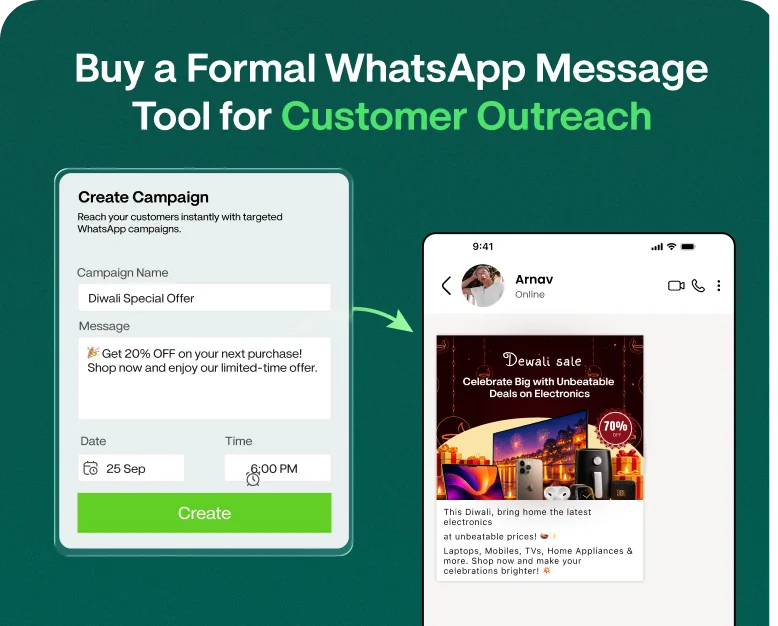
Buy a Formal WhatsApp Message Tool for Customer Outreach
Your customers have busy lives. They might not return phone calls, ignore long emails, or have time to look at your website. But a well-written WhatsApp message gets to them where they are already spending a good chunk…
Your customers have busy lives. They might not return phone calls, ignore long emails, or have time to look at your website. But a well-written WhatsApp message gets to them where they are already spending a good chunk of their day.
The problem is not just sending a message. Businesses need to send the right formal WhatsApp message, to the right customer, at the right time without making the communication feel robotic or unprofessional.
If your team is still manually writing every customer message, following up with each one individually, or trying to keep a consistent brand tone, a WhatsApp messaging tool can make all of this much easier.
Formal WhatsApp messaging tools help businesses create, organise, schedule, automate, and send professional customer communications at scale. It can transform WhatsApp into a structured customer communication channel, from sending appointment reminders and order updates to making sales follow-ups and sending service notifications.
What is a formal WhatsApp message tool? Why do businesses need it? What features should it have? How to use it correctly? How to choose the right solution for your customer outreach strategy?
What is a formal message on WhatsApp?
What is a formal WhatsApp message? A formal WhatsApp message is a professional message written to communicate with customers, clients, leads, partners or other business contacts.
A formal message, unlike a WhatsApp chat, usually includes:
- A clear objective
- Technical language
- A courteous salutation
- Customer Relevant Information
- A straightforward call to action
- Correct formatting
- The identity or signature of the company if necessary
For example, rather than sending:
Hi, your appointment is the day after tomorrow.
A more professional and formal message on WhatsApp could be:
Hi [Customer Name],
Just a friendly reminder about your appointment tomorrow at [Time] with [Business Name]. If you need any assistance, please respond to this message.
Thanks.
The second version is more context for the customer and sounds more professional.
What Is Formal WhatsApp Message Tool?
A formal WhatsApp messaging tool is a business communication software that allows companies to send professional WhatsApp messages to customers and leads.
Businesses might be able to: Depending on the platform
- Create message templates
- Customer notices
- Automate responses
- Plan campaigns
- Handle customer dialogues
- Send follow up message
- Manage Contacts
- track message status
- Connect WhatsApp with CRM
- Collaborate on conversations in a shared inbox
This is a much more efficient way for a growing company than asking employees to copy and paste messages manually throughout the day.
A good tool also helps to maintain consistency. Rather than different messages from each team member, each customer receives communication in your brand style of choice.
Why businesses require a formal WhatsApp messaging tool
Business is growing and so is communication with customers .
Picture a real estate business with 500 new leads every month. The sales team should be sending out property details, follow-ups, appointment confirmations and reminders.
However, there can be several problems if each salesperson has to handle these messages manually:
- Follow ups can be missed.
- Messages may have spelling errors.
- Customers can receive mixed messages.
- Sales reps can spend hours doing the same thing repeatedly.
- Important leads may not be responded to in time.
A formal message tool for WhatsApp can put these activities into a more manageable workflow.
1. Save Time on Repeat Communications
Businesses often send similar messages over and over again.
Some examples include:
- Welcome messages
- Reminders for payments
- Appointment confirmations
- Order Alerts
- Shipping notifications
- Subsequent correspondence
- Customer service answers
- Requests for Comments
Instead of writing the same message over and over again your team may develop an approved template and reuse it when appropriate.
2. Develop a Professional Brand Voice
Your WhatsApp communication IS your business.
You need to have a formal WhatsApp message that’s consistent with your website, emails, advertisements and other customer communication.
Templates Can Help Your Team Stay the Same:
- Greet style
- Style
- About the Company
- Format of Call to Action
- Contact information
- Brand vernacular
This is particularly helpful when multiple employees are in communication with customers.
3. Enhance Follow-Up Management
The lead you have today might require another message tomorrow or next week.
Follow ups can easily be missed without a structured process.
A messaging tool can help businesses organise follow-up workflows so sales teams can spend less time remembering who needs a message, and more time having useful conversations.
4. Increase Customer Conversations
It does pretty well for manual messaging if you have a small customer base.
As your business grows, so do the conversations.
A centralised WhatsApp system makes it easy for teams to manage multiple conversations and keep customer information organised.
What to Look for Before Buying a Formal WhatsApp Messaging Tool
WhatsApp messaging solutions don’t all have the same thing. Consider your actual business needs before you purchase one.
Message Templates
Search for a tool that enables you to create reusable templates for common customer scenarios.
For example:
Welcome Template
Hi [Name], Welcome to [Company Name]! We would be glad to assist you. Tell us how we can be of service.
Follow Up Template
Hey [Name], I just wanted to follow up with you regarding your recent inquiry about [Product/Service]. If you would like further information please let us know.
Appointment Alerts
Hi [Name], this is a reminder that you have an appointment with [Company Name] on [Date] at [Time]. If you need to reschedule please get in touch.
Templates help reduce repetitive tasks and maintain a professional tone.
Contact Management
A good tool should make it easy to organise your customer information.
You might want options for: depending on your needs
- Contacts Lists
- Customer tags
- Main Categories
- Segmentation
- Import contacts
- Customer Reviews
And that is especially the case if your company has thousands of contacts.
Automation can help with repeatable communication.
For example, when a customer inquiry arrives, a workflow might automatically send out a professional sounding acknowledgement message.
A simple process might be something like:
New lead → Welcome message → Sales follow-up → Reminder → Human interaction
Automation should be your team’s assistant, not a substitute for meaningful dialogue with customers.
Scheduling
Customer outreach isn’t always something you want to send out right away.
A scheduling feature allows businesses to prepare messages ahead of time for appropriate communication times.
This may be useful to:
- Appointment notifications
- Event alerts
- Scheduled statements
- Follow Ups
- Campaigns.
- Updates For Customers
If you have multiple employees managing conversations in WhatsApp, a shared inbox can help to prevent communication from being fragmented.
Rather than customer conversations being scattered across individual accounts, a team can manage conversations from a central workspace.
Analytics & Reporting
Before you purchase a formal WhatsApp messaging tool, make sure it has useful reporting.
Analytics may include information about:
- Sent Messages
- Sending message
- Customers’ feedback
- Campaigning work
- Volume of conversation
- Aftercare performance
This information can help your team understand what type of communication gets responses.
Formal WhatsApp Messaging Tool for Client Engagement
The software purchase is just the beginning. The real value lies in using it right.
Here’s a process you can follow hands-on.
Step 1: Define Your Communication Goals
First, identify what you want to achieve.
Are you attempting to:
- Generate new leads?
- Chase down prospects?
- Confirm appointment?
- Send updates to customers?
- Selling products?
- Boost customer support?
- Cut down on repetitive manual work?
What kind of messaging workflow you need depends on your goal.
Step 2: Design Professional Email Templates
Build templates for your most common customer interactions.
Do not remove the message:
- Shorts
- Obvious
- Courteous
- Useful
- Relevan
Don’t fill the message with unnecessary promotional language.
A professional WhatsApp message should make the customer realise why they have received it and what should they do next?
Step 3: Customise Your Messages
Formal messages don’t have to sound cold.
Adding some basic customer information can make the communication more meaningful.
Example:
Hello Rahul, your AC maintenance service request has been scheduled for 28th September at 3:00 PM.
This seems more useful than:
Your appointment has been booked.
If your tool allows it, use personalisation fields with care.
Step 4: Divide Your Contacts
Not every customer wants to hear the same message.
You can sort contacts into groups like:
- Fresh leads
- Current customers
- Customers who return
- High-value clients
- customers appointment
- Questions about the Product
- Support requests
Segmentation allows you to send each audience messages that are relevant to them.
Step 5: Build a Follow-Up Workflow
Customer outreach doesn’t have to stop after the first message.
For instance:
- A customer asks a question.
- Send a professional thank you note.
- Sales rep. follows up.
- Send product information.
- Send a follow up if there is no answer.
- If needed, switch the conversation to a human representative.
This provides your sales team with a repeatable process.
Step 6: Track your results
Once you have launched your messaging workflow, review the data available.
Enquire:
- Are the customers responding?
- What messages get the most replies?
- Are customers asking the same questions?
- Are the follow ups on track?
- Are customers unsubscribing from promotional communication?
Don’t send more messages, send smarter messages based on these insights.
Real-World Example: A Service Business
Suppose a dental practice receives appointment requests through its website.
Employees send appointment confirmations manually before the structured messaging workflow is implemented. Sometimes they forget to remind them and patients call the clinic to confirm their appointment.
The clinic creates a formal flow of messages on WhatsApp.
After you book:
Message 1 – Confirmation
Hello [Name], your appointment with [Clinic Name] is scheduled for [Date] at [Time]. We look forward to seeing you all.
Message 2 – Remind
Hi [Name], just a quick reminder about your appointment tomorrow at [Time]. If you need help please respond.
Message 3 – Follow up
Hi [Name], Thanks for visiting [Clinic Name]. We hope you enjoyed yourself. If you need any further assistance please contact us.
The point is not merely automation. It has created a reliable communication process to keep customers informed.
Best Practices for WhatsApp Messaging
Write a formal message on whatsapp keeping the customer experience in mind.
Make messages easy to read
Big paragraphs are difficult to read on mobile.
Keep sentences short. Divide important information into readable sections.
Start Your Own Business
If it’s an unknown number, customers might not immediately recognise it.
If applicable, include your company or brand name.
Don’t Over Market
A formal customer message should have an obvious purpose.
Don’t make every message a sales pitch, provide useful info first.
Add a CTA that’s Clear
Tell the customer what to do next.
Examples:
- Confirm Answer
- Schedule a visit
- Check Your Order
- Contact us
- Customer Support
- Request a call back
- More info
Respect Customer Choices
Don’t use WhatsApp as a channel to send unlimited promotional messages.
Use appropriate consent, approved WhatsApp business messaging practices and applicable privacy and communication requirements.
Advantages of Purchasing a Formal WhatsApp Messaging Tool
There are a number of practical benefits a business can gain from a dedicated tool.
Improved Productivity
Your employees spend less time on repetitive messages.
Regular Communication
Templates help maintain a similar professional tone across different team members.
Faster Outreach to Customers
Structured workflows can help businesses respond to leads and customers more efficiently.
Simpler to Follow Up
Sales teams can manage follow-ups without relying entirely on memory.
Better organization
You can handle customer conversations, contacts and messaging activities from a more organised environment.
Scalable communications
As your customer base grows, a business messaging system can be easier to scale.
Who needs to buy a formal WhatsApp messaging tool?
Many types of businesses can benefit from a messaging tool, including:
- E-commerce Businesses
- Estate agencies
- Schools & Universities
- Clinics and healthcare
- Travel companies
- Providers of financial services
- Food & Dining
- Car dealerships
- Professional services firms
- SaaS companies
- Local service providers
The best use case depends on how often your business communicates with customers, and how much of that communication is repetitive.
Common Mistakes to Avoid
Even the best messaging tool can’t fix bad communication habits.
Don’t make these mistakes:
Sending Generic Messages to Everybody
Pricing questions shouldn’t be getting the same message as someone that’s already bought.
Writing Long Messages
Keep customer communication focused
Overuse of Automation
Automation is helpful for repetitive tasks, but customers want to talk to a real person.
Disregarding Time
A well-timed message not well received will not get you the response you’re looking for.
Tone that is unprofessional
If your brand has to be formal, don’t use too much slang, unnecessary emojis, ambiguous abbreviations and overly aggressive sales language.
Common Questions
What is the formal WhatsApp message?
What is a formal WhatsApp message? A formal WhatsApp message is a professional message sent to customers, leads, clients, or contacts for business. It typically has a clear purpose, polite language, relevant details, and a suitable call to action.
Is there a way to automate formal WhatsApp messages?
Yes. Business messaging tools can assist to automate some types of communications such as welcome messages, reminders, notifications and follow-ups. What features are available depends on the platform and how it ties into WhatsApp.
How to write a professional WhatsApp message?
Hi, Just a quick note regarding the upcoming meeting on Tuesday, March 7th. The meeting will start at 10 AM in the main conference room. Please bring your latest project status reports. Looking forward to seeing you there. Best regards, [Your Name] Keep the message concise and easy to read on mobile devices.
Is there a real use for a formal WhatsApp message tool for small businesses?
Yes. These tools help small businesses save time on repetitive customer communication, organise leads, create consistent messages and manage follow-ups more effectively.
What to check before buying a WhatsApp messaging tool?
Look for features such as message templates, automation, contact management, scheduling, team inbox features, analytics, integrations, scalability and support from the provider. Make sure the solution also complies with the relevant WhatsApp and privacy requirements.
Enhance the professionalism of your WhatsApp outreach
Customer communication doesn’t need to be complex. The right formal WhatsApp message tool can transform your business from a mess of manual messages to a more organised customer outreach process.
Instead of repeatedly sending the same messages, your team can create professional templates, segment contacts, automate relevant communications, manage follow-ups and track activity all in one place.
If your company is ready to make WhatsApp customer communication faster and more organised, it’s a good time to evaluate a dedicated business messaging solution. Select a formal WhatsApp messaging tool that fits your workflow, create professional templates and start turning everyday customer conversations into a more structured outreach process.
Written by
Prachi Soni
Part of the Wbotz team, writing about WhatsApp Business API, automation and the campaigns that actually convert.