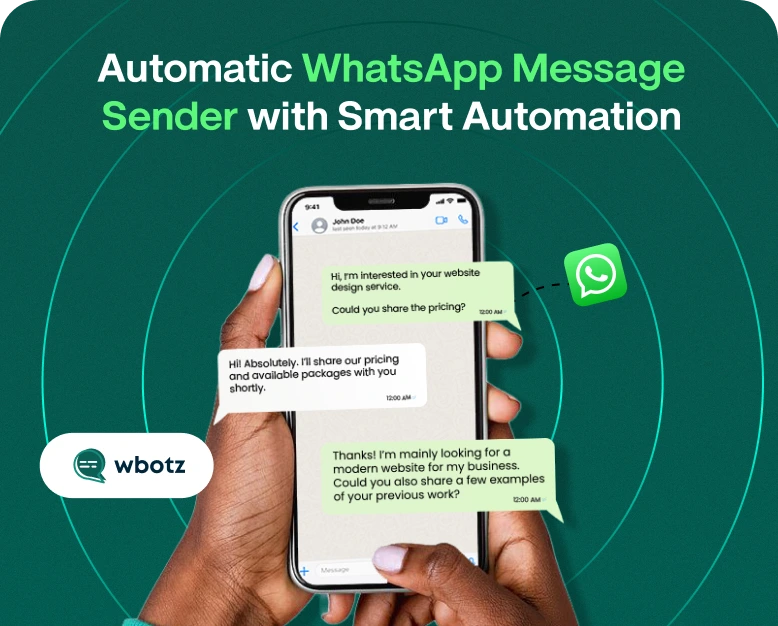
Automatic WhatsApp Message Sender with Smart Automation
Introduction Imagine a customer visiting your website, asking about a product on WhatsApp and waiting hours to get a reply. Your team is occupied with other tasks and that customer may go to a competitor who reacts…
Introduction
Imagine a customer visiting your website, asking about a product on WhatsApp and waiting hours to get a reply. Your team is occupied with other tasks and that customer may go to a competitor who reacts faster. Maybe you have the same problem when you need to send appointment reminders, order updates, payment notifications or follow-up messages to dozens or hundreds of customers.
Sending messages one by one is time consuming and leads to less consistency in your communications. This is where an automatic WhatsApp message sender can come in handy. This means that companies can automate routine messages, respond to common questions from customers and keep the conversation going without having to type out every single message.
Smart automation lets you do more than send messages on a schedule. Trigger messages from customer actions, set follow-ups and link WhatsApp communication to your sales and support workflows.
In this article, you will find out what an automatic WhatsApp message sender is, how it works, what features to look for and how to choose the right solution for your business.
What is an Automatic WhatsApp Message Sender?
An automatic WhatsApp message sender is a tool or system that sends WhatsApp messages automatically based on predefined schedules, customer actions, or business rules.
You are able to set up workflows to handle repetitive communication instead of messaging each customer manually. Depending on the platform and integration, these workflows may include sending welcome messages, appointment reminders, order confirmations, abandoned-cart follow-ups and customer support replies.
For example, an online store can set up an automated notification to be sent after placing an order. It can be used by a service business to remind customers of upcoming appointments, or by a sales team to automatically follow up with leads that have asked for a quotation.
You can automate WhatsApp communication in a number of ways:
- Features of the WhatsApp Business app: Best for basic needs such as greeting messages and away messages.
- WhatsApp Business Platform (API): For businesses that need more advanced automation, integrations, templates and communication at scale.
- Third-party automation platforms : Depending on the vendor, these may include a visual workflow builder, team inbox, customer management, reporting, and integrations.
Your messaging volume, automation needs, budget, and team collaboration needs will dictate the right choice.
How does a WhatsApp Auto Message Sender work?
A typical auto WhatsApp message sender works on a simple premise. A trigger is fired, the system checks the configured conditions, and a message is sent using the supported WhatsApp integration.
This is how it works in practice.
1. The Trigger fires the Workflow
A trigger is an event that informs the system when to perform something. Some common triggers are:
- A customer fills out a form on a web site.
- Your company receives a message.
- An order is placed/shipped.
- Appointment scheduled.
- A lead moves to a certain stage in your sales pipeline.
- The time arrives.
A workflow can be triggered to send a confirmation message when a customer completes a product inquiry form, for example.
2. The system verifies the conditions
Smart automation can use conditions to determine which message to send. An order update for an existing customer, an introductory message for a new lead, etc.
Your platform could support those rules that give you the ability to create different workflows for different customer groups.
3. Message Sent
Once the workflow meets the conditions, the platform sends the appropriate message via its WhatsApp integration.
Depending on the type of message and applicable WhatsApp policies, businesses using the WhatsApp Business Platform may need to use approved message templates. Generally, any messages sent outside the customer-service window are subject to template requirements.
4. The Customer Can Continue With the Conversation
Automation doesn’t have to be a one-way notification. If the customer responds with a question, a chatbot or human agent can take over, depending on your setup.
By pairing automated messages with human assistance, businesses can offer fast responses while avoiding a completely impersonal experience for each interaction.
What to Look for in an Automatic WhatsApp Message Sender
Not all automation tools are capable of the same thing. Before making a purchase, consider which features will actually improve your day-to-day operations.
1. WhatsApp Scheduled Messages
Scheduling enables you to plan messages for a specific date or time. It can come in handy for appointment reminders, event announcements, promotional campaigns and regular customer updates.
Pick a platform where you can manage scheduled campaigns, see your upcoming messages, and change the timing as needed.
2. WhatsApp Auto Reply
A WhatsApp auto-reply allows your business to acknowledge incoming messages without requiring an agent to respond immediately.
For example, if a customer messages your business outside of business hours, an automated response might say:
“Thanks for getting in touch! Our team is not currently available, but we have received your message. We will respond during business hours.”
Automation can also answer common questions about pricing, business hours, product availability and order status for more complex use cases. If a complex question is asked, hand it over to a human agent.
3. Custom Messaging
Personalisation makes automated communications more relevant . Depending on the platform and the customer data you have available, you might be able to add additional information like a customer’s name, order number, appointment date, or product information.
For example, while “Your order has been shipped” is helpful, a message including the actual order number and tracking information could be more helpful.
Maintain accurate and secure customer information at all times.
4. Automation of Workflows
It can help you create sequences without any code, via a visual workflow builder. You are able to write a welcome message, wait for a reply, send a follow-up if necessary, and alert a team member if the customer requests assistance.
The more flexible the workflow builder is, the easier it is to support different customer journeys
5. Team Inbox & CRM Integration
Integrate WhatsApp with a customer relationship management (CRM) system so your team can manage leads and customer interactions all in one place.
A shared team mailbox can also help multiple agents manage conversations, assign chats, monitor responses, and reduce the potential for sending duplicate replies.
6. Reporting and Analytics
Reports give you insights into the performance of your messaging workflows. Depending on the tool, you can see delivery status, read activity, responses, conversions and how the campaign performed.
Use these tips to improve the timing of your message, its content, and how you follow up with customers.
Benefits of the WhatsApp Automatic Message Sender
Smart WhatsApp automation when implemented wisely can help in achieving several business goals.
saves time on routine tasks
It can take hours of work to send the same confirmation or reminder to each customer manually. Automation manages routine messages in the background, freeing up your team to focus on customer questions, sales conversations and other key tasks.
Accelerates response times
When a customer contacts a business they usually expect a prompt response. When your support team is busy, an automatic response can make sure their inquiry is received.
This doesn’t negate the need for a meaningful answer, but it helps customers know what’s next.
Avoid Missed Follow-Ups
Businesses forget to follow up and leads can lose interest. When certain conditions are met, a well-configured workflow can remind your team to either call a prospect or send an approved follow-up message.
For example, a software company might create a follow-up process for people who have requested a product demonstration but have not yet scheduled one.
Facilitates continued communication
Automated workflows use pre-defined messages to ensure uniform wording and reduce the risk of missing important information.
This is especially helpful when confirming orders, reminders about payment, details of a booking or notification of a service.
Helps businesses talk to more people
As companies grow, it becomes increasingly difficult to manually manage each interaction. Automation handles repetitive communication so human agents can spend time on conversations that require judgement, empathy or detailed assistance.
The outcome is determined by the quality of the workflows and the integration of automation and human support.
How to Implement Smart WhatsApp Automation Step by Step
“Don’t try to automate all the conversations at once. Start with a clear use case if you want to bring automation to your business.”
Step 1: Understand Your Business Needs
Decide what you want to automate first.
Ask yourself the following:
- Do customers ask the same questions frequently?
- Need to send booking/order status updates?
- Are you losing leads because you aren’t fast enough to follow up?
- Do multiple agents have to share whatsapp numbers?
- Looking to integrate WhatsApp with your CRM or online store?
List out your biggest problems and choose the one that automation can solve best.
Step 2. Select the Right WhatsApp Automation Platform
Compare platforms on features, pricing, ease of use, integrations & support.
The WhatsApp Business app might be sufficient for simple greetings and away messages. Look for a provider that supports the WhatsApp Business Platform if you need automated workflows, multiple agents, CRM integrations or larger messaging operations.
Before you buy, make sure the provider uses an official, supported integration and that they are clear on their messaging fees, subscription costs and usage limits.
Step 3: Establish Your Business Account
Follow the provider’s onboarding instructions to connect the proper business account and phone number. You may need to do business verification and configure the required WhatsApp Business Platform settings, depending on your setup.
Before you begin automation, check that your business profile, contact details and messaging permissions are correct.
Step 4: Build Your First Workflow
Consider a simple workflow, like a welcome message for new enquiries.
For a simple example, it might look like this:
- A potential customer sends an inquiry for a product.
- The system registers the request.
- Request confirmed by approved WhatsApp message.
- The lead is routed to the appropriate salesperson.
- The salesperson continues the conversation as necessary.
Just keep the workflow simple until you have proven that it works.
Step 5: Create informative, easy-to-understand posts
Keep your automated messages short, relevant, and easy to understand. Explain to the customer why you’re sending the message and what they should do next.
Avoid sending too many messages or using over-the-top promotional language. Provide customers with a clear method to request help or manage their communication preferences, where applicable.
Step 6: Test Before Launch
Send test messages and check that triggers, personalisation fields, links and timing work as intended.
Deliver the right message to the right customer. Also test what happens if a customer replies, a workflow fails or a team member has to take over.
Step 7: Measure Results and Improve
Once launched, analyse delivery reports, customer responses, missed conversations and conversions (if measurable).
If customers often ask you to explain something, make the message clearer. If reminders are ignored, look at the timing and relevance of reminders. If leads aren’t reaching your sales team, check your assignment rules.
Automation only gets better over time and with regular improvements.
Practical instances of WhatsApp message automations
Here’s how an automatic WhatsApp message sender could help businesses in the following scenarios.
Example 1: E-commerce
An online clothing store gets a lot of orders every day. It automates acknowledgements of orders and shipping updates, instead of requiring a person to confirm each order.
Customers get timely information and support agents spend less time answering basic questions about order status.
Example 2: Clinic/Appointment Based Service
A dental clinic automates sending booking confirmations and appointment reminders . If you need to change your appointment please call the clinic.
This keeps the clinic in touch with patients and could reduce missed appointments that don’t need to happen. Any implementation must comply with applicable privacy and data-protection requirements.
Example 3: Real Estate Agency
A number of properties are getting enquiries from an estate agent. When someone requests information about a listing, an automated acknowledgement confirms the inquiry and routes the lead to the right agent.
Then the agent can show property details, schedule a viewing, and answer questions in person.
Example 4: Institute for Education or Training
A training institute gets enquiries about courses and upcoming batches. Automated messages can deliver basic course information, registration instructions, and reminders to interested prospects about application deadlines.
The institute may reserve staff time for counselling and questions needing individual attention.
The examples are illustrative rather than measured case studies. “Real results will depend on your business, your audience, how you design your workflows, and customer consent.
Best Practices for WhatsApp Automation You Should Follow
Automation works best when it respects what customers expect and plays by WhatsApp’s rules.
- Obtain the correct consent: Do not send messages unless you are entitled to and have a legitimate reason to contact the recipient.
- Use approved templates when required: Follow WhatsApp Business Platform policies for messages that are initiated by a business and messages sent outside of the customer-service window.
- Make messages relevant: Don’t blast out unrelated updates or repeated promos.
- Respect opt-outs: Cease marketing communications when customers withdraw consent or request not to be contacted.
- Provide a human support alternative: Make it easy for customers to reach a human when automation cannot solve their problem.
- Protect your customer data: Limit access to personal information and select a provider with adequate security measures.
- Monitor quality: Look at failed deliveries, complaints and negative feedback and modify workflows where needed.
Do not use unofficial bulk-sending tools that say they can send unlimited messages without proper safeguards. Such tools can endanger your account, customer information and business reputation.
How to Choose the Best Automatic WhatsApp Message Sender
Before committing to a paid plan, compare providers against your actual requirements.
| Feature | What to Check |
| Automation | Supports the triggers and workflows you need |
| Official integration | Uses an approved WhatsApp connection |
| Pricing | Clearly explains subscription and messaging charges |
| Personalization | Supports relevant customer and order details |
| Team inbox | Lets agents assign and manage conversations |
| Integrations | Connects with your CRM, website, or store |
| Analytics | Provides useful delivery and engagement reports |
| Support | Offers onboarding assistance and troubleshooting |
If you’re a small business, focus on simplicity and core features. Shared inboxes, integrations and reporting can benefit growing teams more with advanced workflows.
If they have a demo or trial, ask for it. Before committing to a long-term subscription, test your most critical workflow to ensure it works and determine if there are any restrictions on contacts, agents, automations or monthly messages.
Frequently Asked Questions (FAQ)
1. Top Auto WhatsApp Message Sender for Business?
The best option will depend on your needs. For businesses that need basic greeting and away messages, the WhatsApp Business app may be the answer. If your business needs workflow automation, multiple agents, CRM integrations and messaging at scale, compare platforms built on the WhatsApp Business Platform.
2. Can I Auto send WhatsApp messages without coding?
Correct. Many automation platforms come with visual workflow builders that allow you to set up triggers, conditions and messages without writing any code at all. Some integrations may still need technical setup based on your business systems.
3. How to set up an automatic reply on WhatsApp?
If you need to do simple greetings or away messages, check out the messaging tools available in the WhatsApp Business app. For more complex responses based on customer actions or specific keywords, you may need a supported chatbot or automation platform.
4. Is there a free auto message sender for WhatsApp?
You can get some basic WhatsApp Business features without a separate automation subscription. More sophisticated platforms may charge a subscription fee, a messaging fee, or both. Check the provider’s current pricing and applicable WhatsApp charges before choosing a plan.
5. Is WhatsApp Automation Safe for Business Communication?
It may be appropriate if you use supported integrations, secure customer data, get the required consent, and stick to WhatsApp’s messaging policies. Don’t spam, respect opt outs, and make sure customers have a way to reach out to your team.
Conclusion: Smarter Customer Communication Through WhatsApp Automation
An automatic WhatsApp message sender can save your business time, respond faster, manage follow-ups and deliver consistent customer communication. Smart automation helps you manage repetitive tasks more easily – from sending order updates to acknowledging new leads.
The answer is to select what works for your business needs, build practical workflows and always keep the customer experience at the heart of every message. Automation should improve the usefulness of communication, not a flood of unwanted alerts.
Want to simplify communication on WhatsApp?
Explore WhatsApp automation platforms, compare their features for workflow and team inbox and ask for a demo to see how they work for you. Choose one useful workflow, measure your results and scale your automation as your business grows.
Written by
Jayesh Makwana
Part of the Wbotz team, writing about WhatsApp Business API, automation and the campaigns that actually convert.