WhatsApp Business Message Template for Lead Generation
One thing is to get people to notice your business. Getting them to respond, ask questions and become customers is one more. Many companies use WhatsApp to reach out to potential clients but often struggle with what…
One thing is to get people to notice your business. Getting them to respond, ask questions and become customers is one more.
Many companies use WhatsApp to reach out to potential clients but often struggle with what message to send. If the message is overly promotional, it may be ignored; if it is too generic, it may not give the customer a reason to reply.
This is where a good WhatsApp business message template can truly make a difference. A good framework allows businesses to make an offer, respond to customer needs, follow up with leads and get prospects to take the next step.
In this guide, you’ll learn what a WhatsApp business message template is, how it helps you generate leads, what makes a message effective, and how you can create templates that encourage genuine customer responses.
What is a WhatsApp Business Message Template?
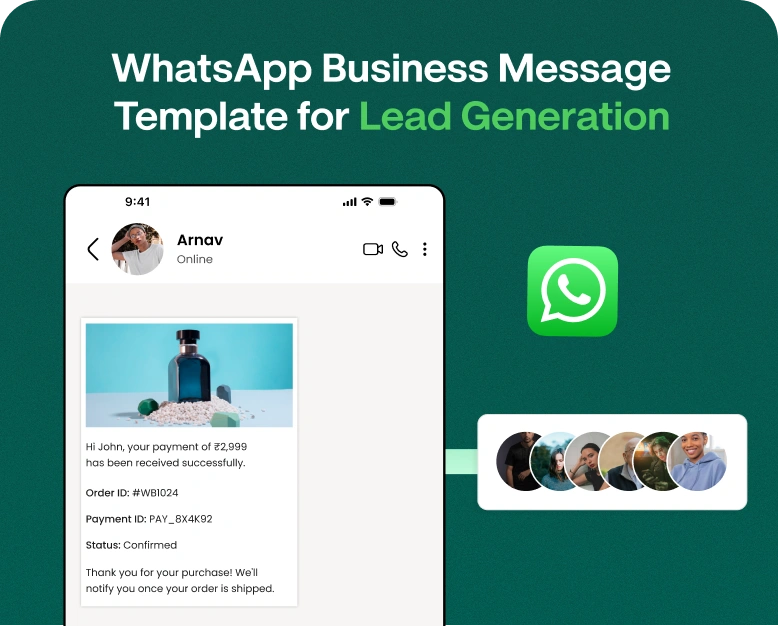
WhatsApp business message templates are pre-written message formats that allow a business to send messages to customers for specific purposes.
Instead of writing each message from scratch, your sales or marketing team can create reusable templates for situations such as:
- Follow-up of new leads
- Promoting a product
- Appointment reminders
- Greeting messages
- Offres et réductions
- Product Questions
- Order Status
- Client Engagement Again
- Request for feedback
- Sales follow-up.
For example, a simple lead gen message might look like:
Hi {{name}}, thanks for your interest in our {{product/service}}. Would you like to know more about our prices and options?
The variables can be tailored to each customer, so the message comes across as more personal.
Businesses can create various WhatsApp business templates based on their customer journey. This speeds up communication, makes it more consistent, and allows sales teams to manage a larger number of leads.
Why Use WhatsApp Messages for Generating Leads?
Generating leads isn’t just about collecting phone numbers. The actual goal is to have conversations with people who may be interested in your product or service.
WhatsApp can help with this as it provides the direct line of communication between a company and their prospects.
A good WhatsApp marketing message template can help you to:
- Start conversations with new prospects.
- Quick answers to questions
- Share helpful product information
- Follow up with warm leads.
- Promote Limited Time Deals
- Drive prospects to purchase
- Minimise repetitive manual messages
- Maintain ongoing sales communication
Imagine a real estate firm getting 100 property enquiries. It might take hours to send each person a totally different message.
Instead, the sales team can create templates for new leads, property suggestions, follow-ups, appointment booking. Then the team can personalise each message before it is sent.
This method saves time and yet does not make the communication feel completely automated.
How To Create The Most Effective WhatsApp Business Message Template?
Not all templates yield responses. For a message to succeed it needs to be relevant, clear and easy to act on.
Here are some important things to look at.
1. Begin With a Personal Greeting
People are more likely to engage when they feel a message is personally relevant.
Instead of:
Hello customer, look at our new products
Please try this:
Hi {{name}} Thanks for checking out our new collection.
Referencing the previous action or the name of the customer can help the conversation feel more natural.
2. Make the message clear
Don’t waste space in your message with unnecessary stuff.
Your customer should soon discover:
- Why you’re contacting them
- What you’re offering
- How it can be useful
- What’s next for them:
A short message is usually better than a long sales pitch.
3. Concentrate on Customer Need
The best way to generate leads is to focus on the customer’s problem, not just on your company.
For instance:
Looking for affordable web hosting? We have plans for simple setup and reliable performance for small businesses.
This immediately tells the customer what’s in it for them.
4. Include a Clear Call to Action
In every message you send to generate leads, you should include a clear next step for the customer.
Examples are:
- Pricing? Reply “YES”
- Schedule a free consultation
- See available plans
- Request a demo
- Today’s offer available
- Book a call
- Submit Your Requirements
Without a CTA, customers may just read your message and move on.
How to Make a WhatsApp Business Message Template for Lead Generation
Creating a good template doesn’t have to be difficult. Do this.
Step 1: Understand Your Target Audience
First decide who will get the message.
Like this:
- First time site visitors
- Current customers
- Trial users
- People who made an inquiry
- Online shoppers
- Leads in real estate
- Education questions
- Opportunities for service companies
A message for someone who is a current customer should be different than a totally new lead.
Step 2: Purpose of the Definition
Decide what you want the customer to do after reading your message.
You might want to:
- Ask a question
- Set up a meeting
- Request a Quote
- Purchase a product
- Schedule an appointment
- Register for event
- Request a demo
The best way to do that is to have one main goal per message.
Step 3: Making a Good First Impression
Your first sentence needs to have a hook to get customers to read on.
For instance:
Hi {{name}}, thanks for requesting more information about our digital marketing service.
Or this:
Hi {{name}}, we saw that you were looking at our premium hosting plans.
These openings are more relevant than a generic promotional intro.
Step 4: Provide the Value
Tell the customer what you can offer.
For instance:
Our small-business plan offers website hosting, SSL, daily backups and easy-to-use management tools.
Make benefits relevant to your audience.
Step 5: Make it personal
Personalisation can be:
Customer name:
Product name Service name Inquiry type Appointment date Location Previous interaction
For example:
Hi {{name}}, we have two plans that could work well for your {{business type}}. Do you want me to tell you the price?
Step 6: Add a CTA
And that’s it! Thanks for reading. Please feel free to leave any questions or comments below.
For example:
Text “PRICE” and we will send you the available plans.
It’s easier than asking customers to know what to do next.
Samples of WhatsApp Business Message Template for Lead Generation
Messaging has to vary at different points in the customer journey. Below are some real-world instances.
Lead Template New
Hi {{name}}, thanks for getting in touch with {{business name}}. Thanks for reaching out about {{service/product}}. Shall we provide you with the options and prices available?
Product Inquiry Form
Hi {{name}} thank you for your interest in {{product name}}. We have this product in stock now. Looking for the current price and details?
Template for follow-up
Hello {{name}}, Just wanted to follow up on your question regarding {{product/service}}. Need help choosing the right option? We are glad to help.
Marketing template
Hi {{name}} we have a limited time special offer available on {{product/service}}. Would you like to see details of the offer?
Request Demo Template
Hey {{name} thank you for your interest in {{product/service}}. Schedule a quick demo to see how it works. Can we share open slots?
Real Estate Lead Form
Hi {{name}}, Thank you for your interest in our properties. We have options depending on your budget and location. Would you like to get the latest property details?
These examples can be customized for different industries and customer journeys.
WhatsApp Marketing Message Template: How to Succeed
If you plan on using WhatsApp for regular lead gen, keep a few best practices in mind.
Relevant Messages Only
Don’t blast out the same offer to everyone Segment your audience by interests, previous enquiries, customer type or stage of buying.
Do Not Use Overly Promotional Language
Customers don’t want every message to sound like an ad.
Instead of;
BUY NOW!!! BIG DISCOUNT!!! LIMITED TIME OFFER!!!
Go more natural:
If you intend to purchase {{product}} this month, this special deal may catch your eye.
Follow Up Without Being Annoying
Following up can help you get back interested leads . But messaging too much can have the opposite effect .
A simple follow up might be:
Hi {{name}}, I wanted to check in to see if you had any enquiries about the plan we shared. Let us know if you want help in choosing an option.
Templates You Can Edit Easily
Create reusable templates with variables like:
- {{product}}
- {{name}}
- {{location}}
- {{date}}
- {{agent_name}}
- {{price}}
This allows your team to tailor messages without re-writing everything.
Advantages of WhatsApp Business Templates for Lead Generation
A well-thought-out template strategy can be a support for both marketing and sales teams.
Faster Lead Response Time
Sales reps don’t need to start every message from scratch. Templates let them reply quickly and still provide relevant customer info.
Ongoing Communication
Your customers get a consistent brand experience no matter which sales representative they talk to.
Improved follow-up management
Many potential customers don’t buy the first time they are contacted. Follow-up templates keep your team engaged with prospects.
More Manageable Campaigns
Businesses can create different templates for different campaigns, products, and audiences.
More Effective Sales Operations
Standardising repetitive communication allows sales reps to spend more time on real conversations and qualified prospects.
How Automation Can Enhance WhatsApp Lead Generation
Manually sending messages works for a few leads, but becomes tricky when your business grows.
That’s where WhatsApp automation software is useful.
A WhatsApp marketing platform enables businesses to organise conversations, automate some responses, manage campaigns, and follow up with leads – all from one system.
For example, a customer may click on an ad on WhatsApp and initiate a conversation. The business can respond with a welcome message, collect basic information and send the conversation to the correct sales rep.
For companies who want to manage WhatsApp marketing and conversations with customers from a more organised workflow, a tool like Wbotz can be useful.
The idea is to use automation to augment conversations—not replace helpful human interaction.
Common mistakes to look out for
A good WhatsApp business message template can be useless if used incorrectly.
Don’t make these common mistakes:
- Irrelevant messaging
Always think about why the customer is entitled to receive the message.
- Overuse of promotional language
Focus on value to the customer, not pressure.
- Writing very long text messages
Keep your message scannable.
- Forget the CTA
Tell customers exactly what to do next.
- Personalisation Not Considered
Use relevant customer data where appropriate.
- Too aggressive follow-up
Leave space for customers to respond.
- Applying the same template to every situation
Make different templates for different parts of the customer journey.
Improve Your Lead Generation Strategies
Lead generation on WhatsApp is not only about templates. Your messaging strategy should be aligned with your overall sales process.
Maybe you would like to try:
- WhatsApp campaigns click
- The lead forms
- Automated greeting messages
- Segmentation of customers
- Follow up series
- Team Mailboxes
- Integrate with CRM
- Campaign analysis
- Offers tailored to you
- Quick answers
For example, a business could create a campaign that takes prospects from an advert straight into WhatsApp. The first message can identify the customer’s interest, and the sales team takes over when the prospect shows buying intention.
This enables a more seamless transition from lead → conversation → qualified prospect → customer.
FAQ’s
1. What’s a WhatsApp business message template?
A WhatsApp business message template is a pre-formatted message that can be reused by businesses to communicate with customers. These templates can be used for lead follow-ups, promotions, reminders, enquiries, and more business interactions.
2. Using WhatsApp templates to generate leads
They help businesses respond faster, communicate consistently, follow up on leads and guide customers through actions such as asking for pricing, booking a demo or making an inquiry.
3. WhatsApp marketing message template What should contain?
A good template would include a relevant greeting, a clear value proposition, concise information, personalisation where appropriate, and a simple call to action.
4. Is it possible to automate WhatsApp business templates?
Yes. WhatsApp automation platforms help businesses automate repetitive communication and manage campaigns and organise lead follow-ups. Automation features are limited to the WhatsApp platform and the applicable business messaging rules.
5. How to send WhatsApp messages to get customers to reply?
Make it relevant, short, about the customer, personalise it if you can, and have one clear call to action – “Reply YES for pricing” or “Would you like a demo?”
Summary
A good WhatsApp business message template is more than just a shortcut to writing. By focusing on the customer’s needs, personalisation, clear value and timely follow-ups, it can become an important part of your lead-generation process.
The best templates don’t pressure customers to buy. Instead, they reduce the barrier for interested leads to ask questions and take the next step.
If your business is getting more and more leads on WhatsApp then you should move beyond manual messaging. A WhatsApp marketing platform can help you organise conversations, automate repetitive tasks, manage campaigns, and create a more structured lead-generation workflow.
Ready to convert more WhatsApp conversations into business? Explore Wbotz to see how WhatsApp marketing automation can help your team more effectively capture, manage, and follow up on leads.
Written by
Prachi Soni
Part of the Wbotz team, writing about WhatsApp Business API, automation and the campaigns that actually convert.