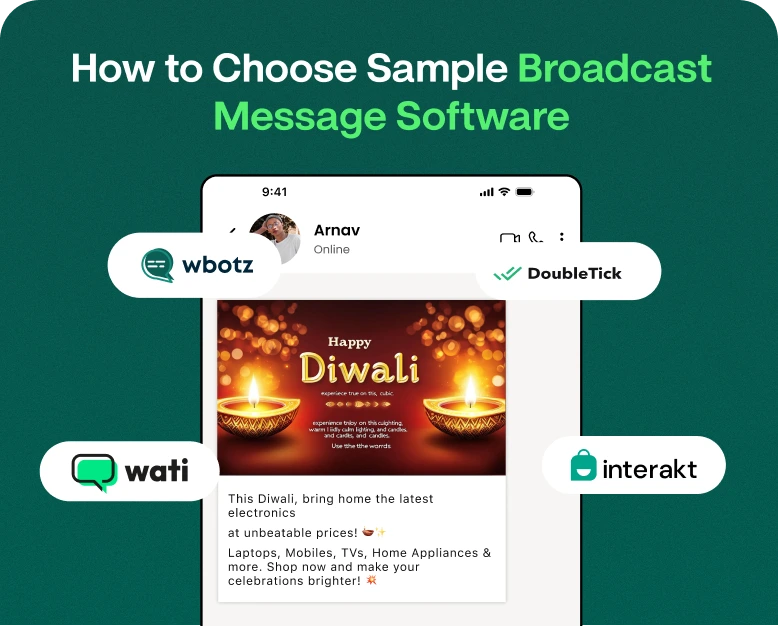
How to Choose Sample Broadcast Message Software
Sending the same message to hundreds or thousands of customers sounds easy. But when businesses start manually doing this things can quickly become difficult. Messages can go out at the wrong time, customer details can…
Sending the same message to hundreds or thousands of customers sounds easy. But when businesses start manually doing this things can quickly become difficult. Messages can go out at the wrong time, customer details can be confused, and there may not be a simple way to find out who actually received or responded to a campaign.
This is where sample broadcast message software can assist.
If you have an online store, real estate business, coaching center, travel company, restaurant or service business, the right broadcast software can help you in sending promotional updates, offers, reminders, product announcements and customer notifications in a more efficient way.
But with hundreds of WhatsApp marketing and broadcast tools out there, how do you know which one to choose?
In this guide, we’ll cover what broadcast message software is, the features to look for, how to compare different options, and how to choose software that’s right for your business needs and budget.
What Is Sample Broadcast Message Software?
It is important to understand what a tool does before choosing it.
A sample broadcast message is a message that has been prepared in advance and will give you an idea of how a business communicates with multiple customers at once. For example:
Hey {{name}}, it’s the weekend sale! Enjoy up to 30% off on selected items. Don’t miss out on exclusive savings, shop now.
Broadcast messaging is used for marketing campaigns, reminders, announcements, offers, event invitations, customer updates, and other business communication.
Sample broadcast message software helps businesses create, organise, personalise, schedule and send these messages to selected customer groups from a single platform.
Businesses can use software to automate the process, rather than copying and sending the same message to each individual contact.
Sample Broadcast Message
Suppose an online clothing retailer wants to send a message to 2,000 existing customers about a new line.
For example, a simple broadcast message might be:
Hey name, our new festive collection is here! Check out the newest styles and enjoy 15% off your first order. Click here to shop: [link]’
With the right broadcast software the business can create the message, select the audience, schedule the campaign and monitor its performance.
Why Do Companies Need Broadcast Message Software?
Customers get hundreds of messages daily. A generic message with bad timing is easily ignored.
Good broadcast software can help the business organise its communication and make it more relevant.
Here are a few common reasons business use it:
- Send messages to large lists of customers
- Save time on repetitive communications
- Plan your campaigns in advance
- Leverage customer data to personalise messages
- Group customers into different segments
- Special Offers & Upsell Products
- Send reminders and follow up
- Monitor campaign performance
- Handle customer replies
- Maintain the communication process consistent
For a growing business these features take messaging from a manual task to a structured marketing activity.
Choosing the Appropriate Sample Broadcast Message Software
The number of messages a software claims to send should not be the only criteria for choosing software. You need to consider how well the platform suits your actual business needs.
These are the main things to watch for.
1. WhatsApp Compatibility Testing
In case WhatsApp is your primary communication channel, start by verifying whether the software supports WhatsApp business messaging properly.
Look for features that enable you to control your campaigns without creating additional manual work.
Depending on what your business requires, you may need:
- Managing WhatsApp campaigns
- Contact management
- Message templates
- Lists of broadcasts
- Auto-responders
- Timetable
- Segmenting Customers
- Campaign analysis
- Team inbox feature
And verify that the solution uses the correct WhatsApp Business infrastructure for your use case.
2. Find Easy Message Creation
Broadcasting a message shouldn’t require a technical degree.
A good platform should be user-friendly for writing, editing, previewing and organising your messages.
For example, you might want to create different messages for:
- New clients
- Existing Clients
- VIP Clients
- Customers who have dropped an inquiry
- Recent purchases for customers
- Customers who haven’t bought in a few months
The easier it is to create messages, the faster your marketing team can roll out campaigns.
3. Ensure personalisation is in place
No one wants to feel like they are being sent a completely random promotion.
Personalisation can help make your communication feel more relevant.
E.g.
Standard message:
“Hi, check out our latest offer.
Personalised message:
Hi Rahul, we have our new running shoes now. Get 15% off this week.
A good example of a broadcast message can include customer information such as:
- First name
- Item bought
- Wherefore
- Type of customer
- Past interaction
- Order info
Personalisation should be helpful, not over the top. The idea is to make the message more relevant, without sounding unnatural.
4. Verify Contact Segmentation
The same message won’t work with every customer.
Let’s say you own an electronics store. For example, a customer who just purchased a laptop may not need the same promotion as a customer who purchased a smartphone.
Find software that lets you divide your contacts into useful groups.
For instance:
- New leads
- Current customers
- Customers who return
- Clients VIP
- Customer-specific products
- Geo-based customers
- Non-active customers
This enables you to create more targeted campaigns.
5. Look for Schedule Features
Timing can have a big impact on campaign engagement.
Let’s say you create a festival offer at 11 PM but send it manually the next morning. This can take unnecessary time.
Scheduling allows you to set up your campaign in advance, and decide when it will get sent.
A restaurant, for instance, might set up:
Monday: Weekly menu reveal
Wednesday: Mid-week deal
Friday: Weekend Special
Feedback: from Customers Message Sunday
Scheduling also lets marketing teams plan campaigns around launches, events, holidays and promotions.
6. Automation Capabilities
If your business sends the same types of messages over and over, automation can save a lot of time.
Depending on the software, you could automate:
- Welcome notes
- Followups
- Appointment alerts
- Updates on order
- Lead response
- Customer reengagement
- Advertising campaigns
For example, a real estate company could automatically follow up on a lead after an inquiry.
The software can help you organise the communication process, instead of having to remember every follow-up manually.
7. Reporting vs Analytics
Campaigns are more than just sending messages.
You need to know what happened next as well.
Look for reporting features that will help you keep track of relevant campaign information, including:
- Sent messages
- Status of Delivery
- Replies
- Click here for available
- Performance of Campaign
- Customer involvement
Analytics can tell you which types of campaigns are helping you get better engagement.
If one broadcast message sample gets a lot more response than another, you can evaluate the difference in the offer, the language, the timing or the audience.
Sample Broadcast Message: Samples for Different Businesses
To better understand the concept, it would help to see some real-life examples.
Sample E-commerce Broadcast Message
Hey {{name}}, your favourite styles are back! Shop our latest collection today and enjoy special launch offers Limited time availability.
Example of a restaurant broadcast message
Are you hungry? Here’s our weekend special! Order your favourite meals today and enjoy our special weekend offer. Tap below to order.
Hi {{name}}, there are new residential properties now available in your preferred location. Reply to this message to get pricing and property details.
Sample Education Business
“Hello {{name}}, our new course is now open for registration. Book your seat now and get the early-bird offer.”
Example of a service business
Hello {{name}} Just a quick reminder about your upcoming appointment. Please reply to this message if you need to reschedule or need any help.
These examples illustrate why companies need to tailor messages to the audience, rather than sending one generic message to all.
Important Features to Compare Before Buying
If you are planning to purchase broadcast message software, create a simple comparison checklist.
| Feature | Why It Matters |
| Contact management | Keeps customer data organized |
| Segmentation | Helps target relevant audiences |
| Message templates | Saves content creation time |
| Personalization | Makes messages more relevant |
| Scheduling | Helps plan campaigns |
| Automation | Reduces repetitive work |
| Analytics | Helps measure campaign performance |
| Team access | Supports multiple users |
| Integration | Connects messaging with other business tools |
| Customer support | Helps resolve technical issues |
Do not choose a platform simply because it offers the highest message limit. A cheaper tool with limited functionality may become expensive in terms of time and manual work.
Consider the size of your business
What might be the right software for a small business might not be the right solution for a larger company.
Small Business
A small business may mainly need:
- Easy Contact Management
- Basic broadcasts
- Templates
- Scheduling as per
- Reasonable price
- Simple setup
Developing Businesses
Growing businesses could need:
- Customer segmentation
- Automaticity
- Analytics
- Integration with CRM
- Team member (singular)
- Improved campaign management
Bigger Businesses
Larger organisations might need:
- Supercharged automation
- Multiple users & permissions
- Access to the API
- In-depth analytics
- CRM integrations
- Messaging infrastructure that scales
- Dedicated support
Before you buy, make a list of your current requirements and features you expect to need in the next 12 months.
Check Price Before Purchase
One of the biggest things to consider when evaluating broadcast software is pricing.
But don’t judge platforms by their advertised monthly price alone.
See what’s really in it.
Ask questions like:
- Are there any set-up fees?
- Is there any charge for messages?
- Contact limits?
- Do you have automation features?
- Is analytics part of the package?
- Additional users can be added at an extra cost.
- Are there any integrations?
- Yes, we do have customer support.
- Does the plan scale with your customer list?
A platform that looks cheap at first may be more expensive if key features are behind expensive plans.
Review security and compliance
Business messaging is customer data. Security can’t be an afterthought.
Before buying software, check out what it does for privacy, security, data and messaging.
Be sure to follow applicable messaging requirements for WhatsApp and local messaging in your campaigns as well.
Do not send unsolicited messages to people who have not agreed to receive business communications. Provide customers the ability to opt-out from receiving promotional messages where appropriate.
Responsible messaging protects your customers and maintains trust in your brand.
Test the Software Before You Purchase It
One of the easiest ways to prevent selecting the wrong platform is to test it before you buy.
Take advantage of a free trial or product demo if available.
Try running an actual campaign instead of just checking the dashboard.
Your Testing Checklist
- Import small contact list
- SAMPLE BROADCAST MESSAGE.
- Make it more personal.
- Build an audience segment.
- Create a test campaign.
- See what messages look like to recipients.
- Campaign reporting review
- Test customer responses.
- Look at the process of support.
- Check the pricing before you upgrade.
This will give you a far better indication if the software is actually right for your workflow.
Common Mistakes to Avoid
No amount of good broadcast software can fix a bad messaging strategy.
Don’t make these common mistakes:
Too Many Messages Sent
If you offer promotions every day, customers can get tired of it.
Focus on communicating effectively, not on the volume of messages.
One size fits all
Customers have different needs. Segmentation can make your campaigns more relevant.
Writing Very Long Messages
Keep your message focused. Tell the customer what the offer is, why it’s important, and what the next step should be.
Overlooking timing
A great offer will fail if it’s delivered to the customers at the wrong time.
Not Making the Call to Action
Tell customers what you would like them to do.
For instance:
- Purchase Now
- Reserve Today
- View Items
- Request a Quote
- Subscribe Today
- Reply for Details
Advantages of Choosing the Right Broadcast Software
The right platform can offer a number of practical benefits.
Save Time
Teams can manage campaigns in one system, rather than manually sending hundreds of messages.
Improving Customer Communication
Templates, segmentation and personalisation can help companies deliver more relevant messages.
Improve Marketing Performance
Automation and scheduling free up marketing teams to spend more time on strategy, and less time on repetitive tasks.
Monitoring Campaign Performance
Analytics can tell us which campaigns are driving engagement and where there might be room for improvement.
Build your business
Managed broadcast software can alleviate the communication burden as your customer database grows.
A Basic Buying Checklist
Before you choose your software, ask yourself these questions:
- Which channel will I use to send messages?
- How many contacts do I have?
- How frequently do I send campaigns?
- Do I need to schedule?
- Do I need to automate?
- Customer segmentation ?
- Will the platform be used by multiple employees?
- Do You Need to Integrate CRM?
- What kind of analytics do you need?
- What is my monthly allowance?
- How scalable is the software for my business?
- Does the provider have customer support?
If you can answer these questions, it will be much easier to compare different platforms.
Frequently Asked Questions (FAQ)
1. Example of a broadcast message?
One example of a message that can be sent to multiple customers at the same time is a broadcast message sample. It can be used for promotions, reminders, announcements, product launches or customer updates.
2. What makes a good broadcast message?
Keep your message brief, relevant, and easy to understand. Make it personal if you can, focus on the benefit, and include a strong call to action.
3. What to Look for in Broadcast Message Software
Look for contact management, segmentation, personalisation, scheduling, automation, analytics, integrations, scalability, security and reliable customer support.
4. Does broadcast software help small businesses?
Yes. Small businesses can use it to save time, organise customer communication, promote offers, send reminders and handle customer follow-ups in a more efficient manner.
5. How Much Does Broadcast Message Software Cost?
Pricing depends on the provider, the number of contacts, message volume, automation capabilities, integrations, and other services. Always look at the total price, not just the sticker price.
Conclusion
Choosing sample broadcast message software is more than just finding a tool that can send messages to a large number of people. The better approach is to find a platform that fits your customer base, your messaging strategy, your budget and your future growth.
First, determine your requirements. Next, compare features such as segmentation, personalisation, scheduling, automation, analytics, integrations, security, and customer support.
Most of all, test the software before you commit to long-term. Try to create a real sample of broadcast messages, run a test campaign, check results and see if the platform makes your daily workflow easier.
The right software can turn business messaging from a repetitive task into a more organised customer communication and marketing process.
Looking to improve your business messaging?
If you want to make managing WhatsApp campaigns, broadcasts, automation, and customer communication easier, check out a platform that combines these tools all in one place. Try Wbotz today and discover its WhatsApp marketing capabilities and how it can help your business manage customer conversations and campaigns more efficiently.
Written by
Prachi Soni
Part of the Wbotz team, writing about WhatsApp Business API, automation and the campaigns that actually convert.