Powerful Tools in WhatsApp to Automate Business Tasks
Managing customer messages is a challenging task for any business and requires a lot of time and effort. This is true for both small and large businesses. WhatsApp is widely used for business activities, including…
Managing customer messages is a challenging task for any business and requires a lot of time and effort. This is true for both small and large businesses. WhatsApp is widely used for business activities, including answering frequently asked questions, updating customers about order status, following up on leads, and promoting products or services. However, with a high volume of incoming messages, business owners often struggle to respond on time or manage every customer conversation, which can lead to missed opportunities and the loss of valuable customers.
Fortunately, WhatsApp has evolved from a simple messaging application into a powerful business communication and automation platform. By using the different tools in WhatsApp, businesses can streamline marketing communication, improve customer experiences, automate repetitive tasks, and manage customer interactions more efficiently. These features help businesses save time, respond faster, and build stronger customer relationships while focusing on growth.
It does not matter what kind of business you run, small, medium or large, or what your business model is, whether an e-commerce business or service provider, or a business with a sales or distribution team, the right WhatsApp business tools can help you optimize and strengthen your business communication, automate processes and relieve you the worry of having to manage every single customer engagement yourself.
This blog will discuss the important WhatsApp business communication features, tools, and integrations, show you how to use them and other related automation tools to optimize your business communication.
What Are WhatsApp Business Automation Tools?
WhatsApp business automation tools are features, software solutions, and integrations that help businesses automate communication and repetitive tasks through WhatsApp. These tools allow companies to send automatic replies, schedule messages, manage customer inquiries, share promotional updates, organize conversations, and follow up with leads.
Instead of manually responding to every customer, businesses can create automated workflows that handle common activities based on customer actions or predefined conditions.
For example, when a customer sends a message asking about business hours, an automated response can provide the information instantly. When someone submits an inquiry about a product, the system can send a confirmation message and notify the sales team.
According to the chosen solution, features of WhatsApp automation can include:
- System-generated welcome messages
- Away messages and instant replies
- Quick replies
- Customer follow-ups
- Appointment reminders
- Order confirmations and other message templates
- WhatsApp marketing campaigns and promotional messages
- Customer segmentation
- Chatbots and automated conversation flows
- Group and assigned team inboxes
- CRM integration and customer tracking
These features can help businesses improve communication response times.
Reasons for WhatsApp Automation by Businesses
The market is competitive and businesses have to ensure they can attend to customers’ needs anytime and respond to their messages in a reasonable time. Customers can be interested in learning about pricing, product availability and delivery, bookings, payments, and after-sales support.
If your team is occupied with other tasks, they may not be able to immediately respond to all messages. In these instances, WhatsApp automation can be of great help.
1. Lessen Time for Repetitive Tasks
The same questions are asked many times and the answers can be programmed to be automated. Customer requests can be about prices, hours of operation, details of products and services, delivery, bookings, return policies, and other terms and conditions.
Staff can be programmed to provide automatic responses based on questions they receive the most.
2. Improve Responsiveness to Customers
As explained above, a failure to respond quickly can cause a prospect to lose interest and contact other businesses.
Automated messages help you acknowledge inquiries immediately, regardless of your team’s availability. With the messages, you can provide basic information, find out what the customer needs to know, and help them know what to do next.
It improves first impressions, and keeps conversations flowing.
3. Improve Lead Generation and Follow-Ups
Many businesses experience failures in lead nurturing because they are unable to consistently follow up on leads. Customers sometimes make inquiries, consider a product, and move on.
WhatsApp automated messages can send follow-up messages to customers, answer the remaining questions, and provide details of the product. The message can even remind customers to finish a purchase.
With valid customer consent and appropriate messaging, businesses can implement a consistent lead nurturing process.
4. Handle More Customer Conversations
As a business grows, the number of customer conversations through WhatsApp can also increase significantly. Managing many messages from one phone can be very difficult.
Many message automation tools help organize and efficiently manage conversations.
Some of the tools even help divide leads based on certain criteria, and automate answering of frequently asked questions.
Powerful Business Task Automation Tools in WhatsApp
WhatsApp Business has a number of built-in tools, and for more enterprise requirements, businesses can use official business messaging solutions integrated with advanced automation tools.
Edit greeting messages to showcase your business and describe your products and services.
Example:
“Hello, welcome to the ABC Store. We have details on all of our products and can take orders, provide pricing, and answer any delivery questions. Let us know if you need anything.”
Set up greeting messages to give customers an easy way to get the information they need and to provide a professional edge to your business.
Best for: New customer inquiries, service businesses, online stores, businesses that receive a lot of messages on WhatsApp.
2. Away messages
Automatically let customers know when your business is unavailable.
Use away messages when your business is closed or unavailable, during the holidays or when your staff is unable to respond to messages.
Example:
“Thank you for contacting us! Our staff is currently away. We will respond to your message during business hours. Please leave a note here with any questions you may have and we will get back to you as soon as we can.”
Messaging away helps set and manage customer expectations and reduces ambiguity.
3. Quick Replies
Quick replies help save and store responses to common questions and messages.
Use quick replies to automatically respond to customer questions.
Here are a few examples of quick replies.
- /hours – to send your business hours
- /price – to send price of product or service
- /delivery – to send shipping and delivery info
- /payment – Insert your payment methods.
- /location – Include your business address.
- /booking – Include details about your appointment booking process.
Quick replies can be extremely helpful for sales reps and customer support teams who field numerous messages throughout the day.
4. Business Broadcasts and Bulk Messaging
Businesses can share relevant messages about offers, announcements and more via private messages to multiple customers using the broadcast function.
For bulk messages, businesses can use the broadcast function or official messaging tools to send messages to a select audience.
Examples of messages include but are not limited to:
- New product announcements
- Seasonal offers
- Festival offers
- Appointment reminders
- Service updates
- Product availability
- Event invitations
If you want WhatsApp bulk messaging software, prioritize solutions that enable official channels, customer consent, and message management.
5. WhatsApp Chatbots
Automating messages via WhatsApp Chatbots can be useful for customer support teams and sales reps to provide automated replies to frequently asked questions and assist in lead generation and qualification.
A travel company customer may get the following options:
- Book a holiday package
- Check package prices
- Find out about hotel availability
- Get travel assistance
- Talk to an agent
Depending on the customer’s selection, the chatbot may provide the information or direct the customer to the respective team.
6. Scheduled Messages
Scheduled messaging helps businesses prepare communications in advance instead of sending everything manually at the last moment.
You can plan reminders, promotional updates, event announcements, and other customer communications around specific dates or times, where supported by your WhatsApp tools.
For example, an online store can prepare a product launch announcement in advance. A coaching institute can plan reminders about upcoming classes, and a service business can schedule appointment-related communications.
Scheduling helps maintain consistency and reduces the risk of forgetting important messages.
7. Automated Follow-Up Messages
Follow-ups are important for converting interested customers into paying customers. However, manually tracking every inquiry can be challenging, particularly when your business receives many leads.
Automation can help send timely follow-ups based on customer interactions or predefined conditions.
For example:
- A customer asks about the price of a product.
- The business shares the product details.
- If the customer has not completed the purchase, an appropriate follow-up is sent later.
- The customer can ask additional questions or proceed with the order.
Follow-up automation is useful for sales teams, real estate businesses, educational institutes, and online stores.
Make sure follow-up messages are relevant, appropriately timed, and based on customer consent.
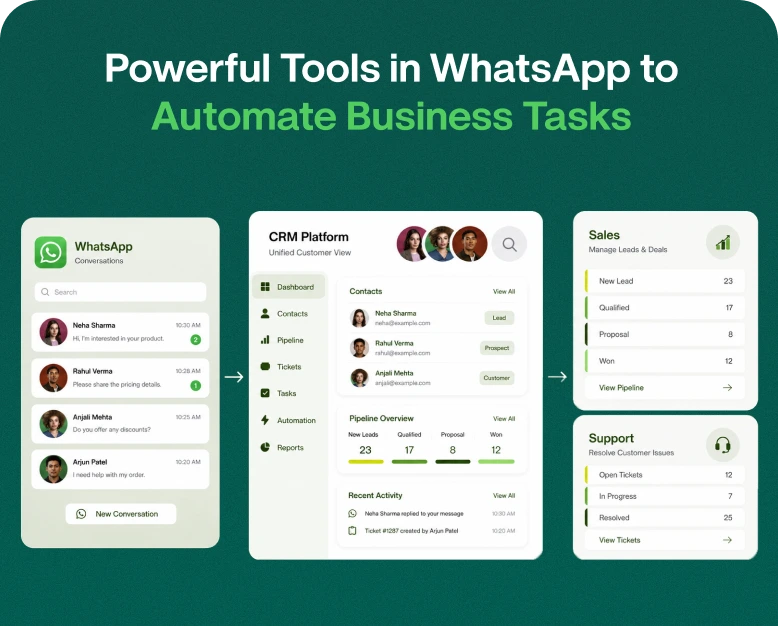
Integrating WhatsApp with a CRM enables businesses to link WhatsApp chats with their customer records, sales activities, and business information.
Organizing customer information on WhatsApp can replace the need to keep customer information on personal devices and numerous business applications.
CRM integration can allow businesses to:
- Record contact information
- Log sales activities
- Capture chat conversation history
- Follow up on leads
- Identify marketing opportunities
- Monitor customer interactions
A real estate business can use CRM integration to log customer information including the location, price range, and type of property a customer is looking to purchase. When a similar property comes on the market, the business can follow up with the customer with the property information.
Integrating CRMs promotes detailed, one-on-one client communication. This helps strengthen client relationships.
9. Multi-Agent WhatsApp Team Inbox
A shared inbox is great for employee communication if multiple employees are communicating with customers.
A multi-agent WhatsApp inbox allows employees to carry on customer conversations through a shared platform rather than relying on a single employee to converse with customers and answer all of the questions.
Some team inbox features may include:
- Conversation assignment to employees
- Internal reminders
- Trace unresolved conversations
- Transfer conversations
- Manage sales vs. support inquiries
- View previous conversations
- Examine employee performance
Suppose a customer asks about pricing and the sales employee assigns the conversation to the support employee for further conversation. If later the customer has a technical issue, the support employee is able to provide service and support rather than losing the context and information about the customer.
This is very useful to a business whose employees are communicating with customers via WhatsApp.
Practical Example of WhatsApp Automation
Automating business communications using WhatsApp can help companies across industries improve customer communication and experience.
<box gap={1}>
<row align=start gap={2}>
<AsyncImage query=”e-commerce business owner packing orders shipping product” aspectRatio=”1:1″ maxWidth=”116px”/>
<col gap={1}>
E-commerce Businesses
Send automated messages to confirm orders, notify about shipment, suggest related products, and respond to customer queries.
</col>
</row>
<divider color=”subtle”/>
<row align=start gap={2}>
<AsyncImage query=”beauty salon receptionist” aspectRatio=”1:1″ maxWidth=”116px”/>
<col gap={1}>
Salons and Service Providers
Send confirmed appointments, reminders, service menus, follow-up messages.
</col>
</row>
<divider color=”subtle”/>
<row align=start gap={2}>
<AsyncImage query=”real estate agent showing property to client” aspectRatio=”1:1″ maxWidth=”116px”/>
<col gap={1}>
Real Estate Businesses
Gather clients’ preferences, send listings, qualify leads, arrange appointments to view property.
</row>
<divider color=”subtle”/>
<row align=start gap={2}>
<AsyncImage query=”education institute teacher classroom student desk enrollment” aspectRatio=”1:1″ maxWidth=”116px”/>
<col gap={1}>
Educational Institutes
Share admission and course details, send reminders about due fees, and communicate class schedules.
</row>
<divider color=”subtle”/>
<row align=start gap={2}>
<AsyncImage query=” customer support employee office headset computer” aspectRatio=”1:1″ maxWidth=”116px”/>
<col gap={1}>
Customer Support Teams
Respond to common questions, automatically route customer messages, and assign conversations to available support agents.
</row>
</box>
As you can see, it helps reduce repetitive tasks and improve organization in customer communication.
How to Use WhatsApp Tools for Automating Business Processes
You don’t have to take on everything at once if you’re hoping to automate business communications. Begin by using automation for simpler tasks to get a hang of using the tools and see how customers interact with the messages.
Step 1: Pinpoint Repetitive Tasks
Examine your day-to-day WhatsApp chats and identify time-consuming tasks.
E.g.,
- Answering the same questions repeatedly
- Sending prices and/or product catalogs
- Confirming orders
- Reminding customers of appointments
- Following up on leads
- Updating customers on status of delivery
The tasks identified above are good candidates for workflow/automation.
Step 2: Decide on an Automation Tool
Choose an automation tool that aligns best with your business.
A small business may require WhatsApp automation tools to send greeting and away messages, and set quick replies.
A more established business may require a chatbot, campaign management tools, CRM integration, and a multi-agent inbox.
You do not necessarily need to purchase a solution with many features, if your team will not make use of all the features.
Step 3: Compose Helpful and Friendly Automated Messages
Make your messages sound friendly and helpful, not robotic.
Avoid messages that are too lengthy, confusing, and/or overly promotional.
Provide message options that give the customer an opportunity to talk to a live agent, should they want to.
Step 4: Build Simple Automation Workflows
Start with simple workflows and build upon them.
You could set up a workflow for lead management whereby:
- A customer sends a WhatsApp inquiry
- A welcome message acknowledging the inquiry is sent automatically
- A chatbot asks the customer what they require
- The message is logged and/or forwarded to the relevant employee
- A member of the sales team follows up with more information, if required
Step 5: Monitor and Improve Performance
With WhatsApp automation, you can scale your business quickly, but you can’t set it and forget it. You have to monitor your performance to see if your messages and workflows are effective.
You need to be on the lookout and measure your performance based on how quickly your customers respond and how many leads or sales you convert.
Some performance metrics to track are:
- Average response time
- Customer replies
- Leads generated
- Appointment bookings
- Sales conversion
- Customer satisfaction
- Unresolved conversations
You can use insights to change the structure and the wording of your workflows and messages.
Using WhatsApp automation can provide numerous benefits to your customers and your business.
Customer satisfaction can improve with quick response messages, and processing times can decrease with less employees needed to take repetitive customer service calls. Messages can give customers the information they need to complete a task or conduct a process without having to take multiple calls with customers. Customer communications can become consistent and business communication can be improved with less errors. Automation can collect leads and follow up with leads to help manage and convert sales opportunities. Automation can scalably manage more conversations than your team can, and it can help leverage your sales and marketing campaigns to help your business grow.
How to Choose the Best WhatsApp Automation Software
Finding the right WhatsApp automation software for your business can be a time-consuming process. To help you save time, here are some things to look for when evaluating WhatsApp automation software:
Official WhatsApp Business Platform
The software you choose should integrate the Official WhatsApp Business Platform. WhatsApp has strict policies on automation and communication, and using the Business Platform and approved WhatsApp automation software helps your business adhere to these policies.
Workflow and Automation
Ideally, your automation software should be easy to use, and allow the creation of workflows to help your business automate certain tasks. While WhatsApp offers basic automation with its business platform, approved WhatsApp automation software can expand on this and provide further features.
Broadcast and Campaign Management
Broadcast messages can help your business reach numerous contacts with one message. To be effective, broadcast messages require segmented audiences. Choose a software that provides campaign management and audience segmentation.
CRM, Shared Inbox, and Multi-Agent Support
A good automation software should integrate with your CRM and other business applications. It should also offer features like a shared business inbox and support for multiple users.
Reporting and Analytics
To be successful with your communication efforts, your software should offer reports and analytics to track the communication statuses and delivery.
Customer Support
WhatsApp has a large and growing user base. To retain your customers, your WhatsApp communication should be handled professionally at all times. Automation can help your business achieve this. The software you choose should provide 24/7 customer support to assist your business if any issues arise.
Transparent Pricing
Your chosen automation software should support your business growth and provide flexible pricing to support its expansion. The software should also have a free plan with limited features to help your business get started.
Other businesses like yours use WhatsApp to communicate with their clients. To retain your clients, you need to automate WhatsApp communication. The questions below will help guide you.
Frequently Asked Questions (FAQs)
1. What are the best tools in WhatsApp for business automation?
To communicate with your clients using WhatsApp, your business will need an automation platform to help with features like automated messages, chatbots, and shared business inboxes. The tools you use will depend on your business needs.
2. Can I automate WhatsApp messages for my business?
Yes. As your business needs change, WhatsApp offers features to help you automate tasks and messages related to your communication.
3. Is WhatsApp bulk message software useful for small businesses?
Using WhatsApp bulk message software for small businesses can help communicate relevant business information to customers. Choose a software that supports audience segmentation and campaign management.
4. What is the difference between WhatsApp automation and a WhatsApp chatbot?
WhatsApp automation includes various automated activities, such as the automatic sending of welcome messages, reminders, messages as part of a marketing campaign, lead follow-ups, and activities related to the integration of WhatsApp with your CRM. A WhatsApp chatbot is a form of automation, the difference is that it is programmed to interact with customers and provide automated responses based on rules or artificial intelligence.
5. Can WhatsApp automation boost sales?
WhatsApp automation can help boost sales by automating responses to frequently asked questions, lead qualification, sending relevant product information, order reminders, and follow-ups. Effectiveness and the actual results achieved depend on several factors, such as the messages being sent, the products being sold, the customer targeting, and the overall sales process.
Conclusion
WhatsApp provides a convenient and easy way to communicate with customers, and it is essential for businesses to adopt a platform that allows them to have such a quick and convenient communication channel with their customers. However, as a business’ customer interaction and sales opportunities increase, so does the workload, and manual communication with customers becomes extremely difficult.
WhatsApp’s tools make it easy for businesses to communicate with customers, manage interactions, automate repetitive tasks and schedule messages. These tools, from quick replies to chatbots and CRM integrations, can help you improve customer communications.
Automation can help you manage your interactions and help your customers, as long as you don’t spam them with a million messages. Useful workflows and message templates are a great starting point. You can always add more workflows and message templates as your business continues to grow.
Ready to make communication changes for your business? Simplify communication with a business automation suite that can provide CRM integration, a team shared inbox, automated follow-ups, and bulk messaging with WhatsApp chatbots.
All you have to do is choose the right tool for your business and you can simplify how you communicate with customers on WhatsApp and build stronger customer relationships.
Written by
Kalpit Parmar
Part of the Wbotz team, writing about WhatsApp Business API, automation and the campaigns that actually convert.