Best WhatsApp API Platform for Marketing and Automation
Imagine hundreds of leads to follow up with, customer questions coming in all day long and promotional campaigns waiting to be sent. Your team can do this manually, but as your business grows, WhatsApp conversations…

Imagine hundreds of leads to follow up with, customer questions coming in all day long and promotional campaigns waiting to be sent. Your team can do this manually, but as your business grows, WhatsApp conversations can quickly become cumbersome.
This is where the WhatsApp API comes in.
The right WhatsApp API platform helps businesses automate messages, manage customer conversations, send notifications, capture leads, run marketing campaigns, and connect WhatsApp with their CRM or other business tools.
But one question is very important: What is the best WhatsApp API platform for marketing and automation?
It is contingent upon your business needs, your automation needs, your budget, your integrations, and how much control you want. This guide will explain how WhatsApp API works, what features to look for, and how to choose a platform that can help you achieve your marketing and customer communication goals.
What is the WhatsApp API?
The WhatsApp Business Platform, or WhatsApp API, enables businesses to embed WhatsApp into software, CRM systems, customer-support tools, marketing platforms, and automation workflows.
The API is a solution for businesses that need to talk to larger audiences and the regular WhatsApp application is not.
For instance, an online store can use WhatsApp API to:
- Order Confirmation Send
- Share updates on shipping
- Claim abandoned carts
- Answer the most common questions
- Inform customers of offers
- Generate new lead
- Send appointment reminders.
- Link conversations to a CRM
- Automated follow-up with customers
The API is not just another WhatsApp app. Most often, businesses build and operate these experiences on a third-party platform or their own software.
What is WhatsApp API Platform?
A WhatsApp API platform is a software solution that enables businesses to harness WhatsApp’s business messaging capabilities without building all of the technical components from scratch.
A good platform might offer a dashboard from which your team can create campaigns, manage contacts, build automation workflows, monitor conversations and analyze campaign performance.
Businesses looking for marketing and automation can use the platform as a central communication layer between WhatsApp and other business systems.
WhatsApp API vs. WhatsApp Business App
The WhatsApp Business App is suitable for small businesses that need only basic communication with customers.
The WhatsApp API is better suited when you need:
- More than one agent
- Automatic workflow
- CRM Integration
- Bulk messaging
- Lead Management (LM)
- API integrations
- Chat-bots
- Automated Alerts
- Campaign management for marketing
As your business grows and your team is spending a lot of time manually responding to customers, moving to an API-based solution can make communication much easier to manage.
Why WhatsApp API is a must for Marketing and Automation in Businesses
WhatsApp has emerged as an important channel for businesses to speak to customers, many of whom already use it comfortably.
Rather than asking customers to go to another platform, businesses can chat through a channel that they’re already using every day.
The WhatsApp API platform gives businesses the ability to transition from manual messaging to structured messaging.
Take a real estate company for example.
Question from a potential buyer about a property. Instead of having to wait for a sales rep to reach out to the lead manually, an automated WhatsApp workflow can automatically send out a confirmation message.
The lead can then get:
- Details of the property
- Documents or Pictures
- Location info
- A way to book a meeting
- Follow up messages
- A chance to talk to a salesperson
It provides a better customer experience and less repetitive work for the sales team.
Key Features to Consider for the Best WhatsApp API Platform
Features vary from WhatsApp API platform to WhatsApp API platform. Before you jump to a solution, think about what your business really needs.
1. WhatsApp Business API Integrations
The platform should be built on a reliable WhatsApp Business API connection.
Check whether the provider supports the official WhatsApp Business Platform and has the tools you need to run your business messaging the right way.
2. Send Message Feature – API of WhatsApp
The main requirement for automation is the ability to send messages through the WhatsApp API by means of software and workflows.
For example, you might want to automatically send:
- Welcome messages
- Payment reminder
- Order Status
- Appointments Confirmations
- Marketing messages
- Notifications for customer support
The platform should enable simple configuration and management of these workflows.
3. Marketing Automation Tools
Marketing Automation is one of the main reasons for businesses to go for the WhatsApp API.
Look for features like:
- Schedule Your Campaign
- Segmentation of customers
- Automated follow ups
- Drip marketing campaigns
- Trigger based messages
- Customization
- Campaign analytics
For example, a new lead might get a series of messages from an education company:
- Day 1: Course details
- Day 2: Benefits & Curriculum
- Day 4: Success stories of students
- Day 6: Frequently asked questions
- Day 8: Enrollment email reminder
Instead of you sending out each message manually, the platform is able to handle the workflow.
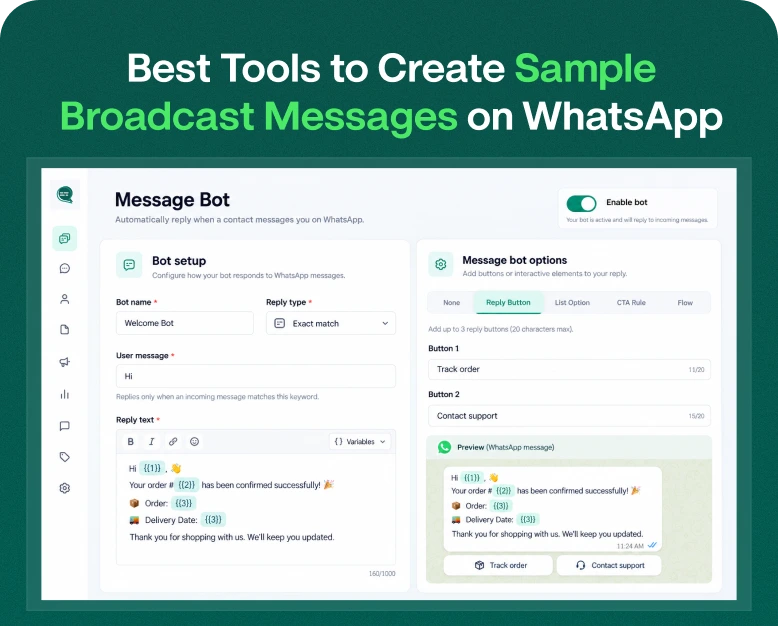
4. Chatbot & Automation Engineer
Chatbots can answer simple questions and complex conversations can be transferred to a human agent.
For example:
Customer: “I want to find out what you charge.”
“Of course. Please pick a service.”
- Web Hosting
- WhatsApp Marketing
- VPS
- Dedicated Server
The customer can choose an option and get the information he needs immediately.
This allows companies to have faster responses and an employee doesn’t have to answer all simple questions.
5. Shared Team Mailbox
If you have multiple employees handling WhatsApp conversations, then a shared inbox can be extremely handy.
The centralized interface lets agents see customer chats on one phone, instead of having multiple people on multiple phones to manage the conversations.
A team inbox can assist companies:
- Engage in conversations
- Track agents
- Add notes
- Monitor answers
- Chat handoff
- Avoid duplicate replies
This is especially helpful for customer-support and sales teams.
6. Integration of CRM
It makes your WhatsApp conversations much more valuable when integrated with your CRM.
For example, when a customer sends a message, your system might identify the customer and link the conversation to their existing record.
CRM integration can enable you to track:
- Source of lead
- Customer data
- Previous interactions:
- Sales Stage Sales Stage
- Status of follow-up
- Purchase history
This provides sales teams with more context before they respond.
7. Reporting & Analytics
Marketing is tough without measurement.
A good platform should give useful data about the campaign such as;
- Sent Messages
- Delivery status
- Read status
- Customer reviews
- Performance marketing
- Conversion related metrics
These insights can give you an idea of what campaigns are working well and what campaigns need work.
How to Choose the Best WhatsApp API Platform?
If a platform lacks important features, it will prove costly later on, so don’t just choose a platform because of the low price.
Follow this process to compare providers.
Step 1. Define Your Business Goal
First, decide what you want to use the WhatsApp API for.
Would you like to:
- Generate leads?
- Automate the customer service?
- Marketing campaigns?
- Manage sales presentations?
- Send transactional notification?
- Make chatbots?
- Sync WhatsApp with your CRM?
The platform you use should reflect your goal.
Step 2: Calculate Your Volume of Messages
Consider how many chats and messages your business will need to handle.
A small business might need only a few hundred conversations per month, whereas an e-commerce company could be dealing with thousands or more.
If you know what you are going to use it makes price comparison easier.
Step 3: See the Automation Features
You want to focus on automation? Don’t settle for basic bulk messaging.
Look for :
- Workflow builders
- Automation trigger
- Drip email sequences
- Chatbots
- Customer segmentation
- Automated replies
- Follow up sequences
Step 4: Check out Integrations
Find out if the platform integrates with the tools your business already uses.
Possible relevant integrations would be:
- CRM software
- E-commerce websites
- Lead forms
- Systems of payment
- Tools for customer support
- Marketing automation platforms
- Webhooks
- REST APIs
Powerful integrations can help your team avoid entering the same customer information into multiple systems.
Step 5: Watch Out For Pricing
Depending on the provider and how you have configured your messaging, there are a number of elements that can affect the cost of the WhatsApp API.
Compare platforms but don’t be swayed by the advertised price of a subscription.
Check it:
- Fees for platforms
- Charges for messaging via WhatsApp
- User count
- Automation bounds
- Contact boundaries
- API utilization
- Additional costs of integration
- Fees for Support
The cheapest platform isn’t necessarily the best option. Look at the total value you get.
Advantages of Utilizing WhatsApp API for Marketing
A well-established WhatsApp API strategy can provide multiple advantages.
Faster Customer Communication
Automation means customers get relevant messages without having to wait for a team member.
Enhanced Lead Follow-up
A new lead can automatically receive a message right after they submit an inquiry.
A timely follow-up can save a business from losing interested prospects.
Less Work to Do
Instead of repeating the same messages over and over, your team can automate regular communication.
Customized Marketing
Companies can cluster customers and send messages according to their interests, behaviors, or previous interactions.
Improved Customer Experience
Customers can get order updates, reminders, answers and support on a familiar messaging channel.
Scalable Communication
As the business grows, automation enables the team to support more conversations without a corresponding increase in manual effort.
Real-world example: E-commerce with the WhatsApp API
An online fashion store gets 500 orders a day.
Without automation, employees might have to send:
- Confirmations of orders
- Payer information
- Shipping updates
- Shipping info
- Request reviews
A lot of these communications can be tied in with the store’s backend with a WhatsApp API platform.
When a customer makes an order.
Trigger: Order acknowledged
Action: Confirmation message for WhatsApp
The order has been shipped.
Trigger: Change in shipment status
Action: Shipping notification via WhatsApp
The order is served.
Trigger: Package delivered
Action: View request
The business saves time, customers receive timely information.
How To Use WhatsApp API
Once you’ve found the right platform for you, the implementation process will usually go through several stages.
1. Create or Link Your Business Account
Complete the required business information and link your business WhatsApp number through the platform.
2. Business Verification Complete
Depending on your set-up and needs you may need to do business verification.
3. Message Templates Generation
Develop approved templates for messages that businesses need to send outside of the relevant customer-service window.
Some examples are:
- Offers & Promotions
- Reminders for appointments
- Updates on orders
- Payment alerts
- Delivery Notices
4. Import Contacts and Organize
Segment your contacts into useful groups.
For instance:
- New Clues
- Current customers
- Repeat Purchases
- Customers not active
- Premium customers
5. Automation Build Workflows
Start with simple workflows and build complex automation.
A useful first workflow might be:
Lead captured Welcome message Product info Follow-up Assign to sales agent
6. Test Before You Deploy
Always test your workflows before sending messages to your entire audience.
Review:
- Content of message
- Personalization Settings
- Links:
- Schedule
- Customer segmentation
- Agent switch
- Error Management
7. Track & Optimize
After you start running your campaigns, check the data regularly.
Understand what messages drive responses and what workflows drive customers away.
Then optimize your campaigns based on those insights.
Avoid These 7 Common Mistakes With WhatsApp API Marketing
A good strategy is not going to get good results with a powerful platform.
Don’t make these common mistakes:
Sending Too Many Messages
Customers don’t want to be overwhelmed with promotions. Relevance and value are the focus.
Disregarding Customer Consent
Follow the right customer opt-in practices and all relevant WhatsApp and local messaging requirements.
Using Generic Messages
Usually, personalized and relevant messages are more useful than sending exactly the same content to everyone.
Automation for Everyone
Automation should make communication easier, not eliminate the human element altogether.
Make it easy for customers to connect to a live person when they need to.
Choosing a Platform Just Because of Price
A low-cost platform that isn’t automated, integrated, analytical or supported can cost you more later.
Is WhatsApp API Worth It for Small Businesses?
Yes, if the business has a clear use case for automation or needs to handle a growing number of customer conversations.
You don’t need dozens of complex workflows from day one in a small business.
You can start with some simple automation like:
- Greeting messages
- Lead alerts
- Appointment reminders Appointment reminders
- FAQ answers
- Customer follow-up
And as your customer base grows, you can gradually introduce CRM integrations, segmentation, chatbots and advanced campaigns.
Frequently Asked Questions
1. What is the best WhatsApp API platform for marketing?
The best platform depends on your business requirements. Look for official WhatsApp API support, marketing automation, chatbot capabilities, CRM integrations, analytics, team inbox functionality, pricing transparency, and reliable customer support.
2. Can I use WhatsApp API to send marketing messages?
Yes. Businesses can use the WhatsApp Business Platform for approved marketing communications, provided they follow WhatsApp’s messaging policies, customer consent requirements, and applicable template rules.
3. What is WhatsApp API send message functionality?
WhatsApp API send message functionality allows business software or an integrated platform to send WhatsApp messages programmatically. It can be used for notifications, customer communication, automation, and approved marketing campaigns.
4. Can WhatsApp API be connected with a CRM?
Yes. Depending on the platform, WhatsApp API can be connected with CRM systems through native integrations, APIs, webhooks, or third-party connectors.
5. Is WhatsApp API good for business automation?
Yes. WhatsApp API can automate repetitive communication such as lead follow-ups, notifications, appointment reminders, customer support flows, and marketing campaigns while allowing human agents to take over when needed.
Final Thoughts
The best WhatsApp API platform for marketing and automation is not necessarily the one with the most features or the lowest price. It is the platform that fits your business workflow and helps you communicate with customers more efficiently.
Before choosing a provider, evaluate its WhatsApp API, automation tools, WhatsApp Business API integration, CRM connectivity, chatbot features, team inbox, analytics, scalability, and overall pricing.
If your business is still handling every WhatsApp conversation manually, now may be the right time to explore automation. A well-planned WhatsApp strategy can help you capture leads faster, reduce repetitive work, improve follow-ups, and create a better customer experience.
Ready to Automate Your WhatsApp Marketing?
Explore Wbotz and discover how WhatsApp marketing and automation can help your business manage customer conversations, campaigns, lead follow-ups and automated communication from one platform. Pick one repetitive WhatsApp task in your business and automate that first. Then build from there.
Written by
Jayesh Makwana
Part of the Wbotz team, writing about WhatsApp Business API, automation and the campaigns that actually convert.