Best Quick Replies for Business to Boost Customer Engagement
Clients expect businesses to reply quickly to their questions about products, services, rates, and orders. Clients hate it when they send a message on WhatsApp to enquire about the availability of a product and do not…
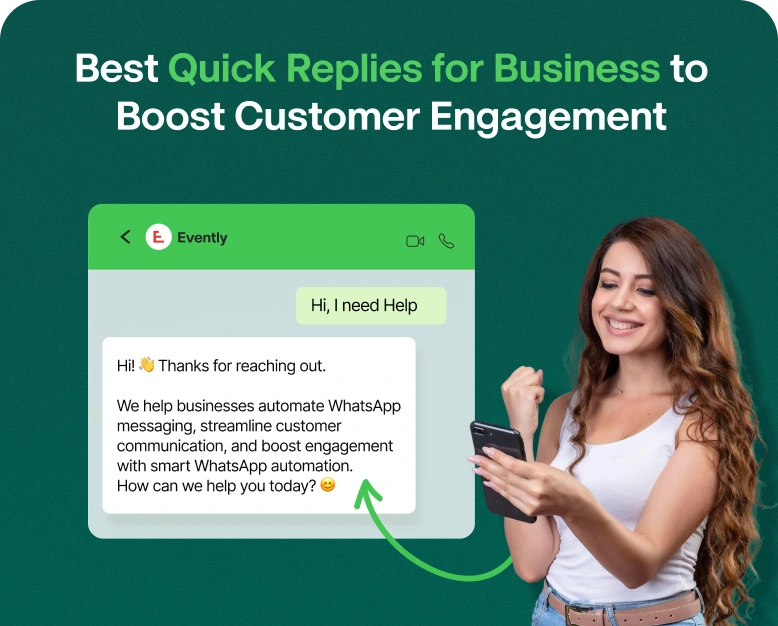
Clients expect businesses to reply quickly to their questions about products, services, rates, and orders. Clients hate it when they send a message on WhatsApp to enquire about the availability of a product and do not get a reply for hours and hours. Such situations result in loss of business opportunity for your company and a bad experience for your client.
Quick Replies will solve the above mentioned issues. With quick replies your employees do not need to write lengthy answers again and again for the same question and they can save a lot of time. Quick Replies will also bring consistency in business communications. Quick Replies are useful for small, medium and large businesses, online stores and customer support teams.
Using WhatsApp for business has multiple advantages for businesses. Thousands of people use WhatsApp for their day to day communications and businesses can take advantage of this. WhatsApp has an unmatched opportunity for businesses for promotion and customer engagement.
This article will cover most valuable quick replies, quick reply messages for WhatsApp, benefits of quick replies, and how to improve customer engagement using quick replies.
What are Quick Replies for Business?
Quick Replies for businesses are pre-written messages for answers of frequently asked questions by clients. With quick replies, employees do not need to write long answers again and again. Employees can select quick replies for frequently asked questions and send it in a click.
These features are great for companies that get lots of inquiries via WhatsApp, websites, social media, etc.
Examples of usage of quick replies include, but are not limited to:
- Responding to product and service inquiries
- Posting prices and payment info
- Giving delivery and shipping info
- Explaining return and refund policies
- Confirming appointments
- Responding to FAQs
- Following up leads
The quick replies feature lets your team manage communication in a more organized way.
Why Are Quick Replies Important for Business Communication?
Customers appreciate businesses that are easy to contact. However, responding manually to every message becomes difficult when inquiry volumes increase.
Quick replies help businesses manage everyday communication more efficiently.
1. Save Time on Repeated Messages
Customer support employees often receive similar questions throughout the day. Writing the same response again and again wastes valuable time.
Quick reply messages for business allow employees to save frequently used answers and send them when needed.
For example, an online clothing store may receive dozens of questions about delivery charges. Instead of typing the delivery policy every time, the support team can use a saved response.
2. Improve Customer Satisfaction
Customers do not always expect complicated answers. Most of the time, they simply want clear information without unnecessary waiting.
Using quick replies WhatsApp features can help your business answer common questions promptly.
For instance, when a customer asks about an order, your team can quickly share the tracking process and explain where to find the latest delivery information.
3. Maintain Consistent Communication
When handling customer conversations, employees may inconsistently explain your business policies.
Saved responses allow your team to communicate using approved information while allowing for the addition of a personal touch.
4. Increase Sales Opportunities
Quick Replies can be effective sales aids.
For example, a quick reply can be used to post a link to the purchase page, giving a potential customer the information needed to make a purchase, with respect to a feature or service in a package the customer had an inquiry about.
Sometimes the right information at the right time can be the response that pushes the customer to make the next step.
5. Handle More Customer Inquiries
With growth comes an increase in the number of customer inquiries. Repetitive business policies, rates and delivery information can be communicated using quick replies, allowing your employees to spend more time engaging with customers.
25 Useful Quick Replies You Can Use In Your Business Now
Depending on your business, industry and customers, the right response may not be listed below. With that in mind, here are quick replies used in businesses today.
1. Welcome Messages
First Example Reply
Hello! Welcome to [Business Name]. Thank you for contacting us. What can we help you with today?
Second Example Reply
Hello! Thank you for contacting us. We would be happy to assist you with our products and services. Let us know if there is anything else we can assist you with.
2. Product Inquiry Replies
Many customers have inquiries about product features, availability, and specifications.
Product Inquiry Replies:
Yes, we do have this product in stock. Would you like us to send over the details?
Product Inquiry Replies:
Here are the details you asked for: [Product Information]. Let us know if we can assist you with anything else.
3. Pricing Inquiry Replies
Pricing is a common question, especially for products and professional services.
Pricing Inquiry Replies:
Our prices start from [Price]. The final cost will depend on the features you select and the package you choose.
Pricing Inquiry Replies:
How would you like us to send you the pricing details?
4. Order Confirmation Messages
After a customer places an order, send a confirmation message to build confidence.
Order Confirmation Messages:
We have received and confirmed your order! Thank you for shopping with us! Your order ID is [Order ID].
Shipping Messages
Thank you for your order. We are in the process of shipping it. We will notify you as soon as we have the tracking details.
5. Customers ask when their order will be delivered.
Example 9:
“Your order has been processed. Track your shipment here: [Tracking Link]“
Example 10:
“Thank you for your order. We are processing your request and will let you know once your item is dispatched.“
6. Appointment Booking Responses
These examples are best for businesses that require appointments (consulting, clinics, spas, agencies, etc.).
Example 11:
“Thanks for reaching out! Let us know your preferred date and time and we can check availability!”
Example 12:
“We confirm your appointment on [date] at [time].”
7. Payment Responses
Clear communication about payments helps customers be aware of the status of their transactions.
Example 13:
“Payment has been successfully processed. Thank you for choosing [Business Name]!”
Example 14:
“Your payment is still not completed. To finish, please go to this [Payment] link. For further assistance, contact us.”
8. Customer Complaint Responses
A professional response can assist with an unhappy customer.
Example 15:
“We are sorry to hear about your experience. For us to look into this for you and give you the assistance you need to resolve this, please provide your order details.”
Example 16:
“Thank you for contacting us regarding this. We understand your concern and are doing our best to give you the best resolution for this.”
9. Business Hours Responses
Let your customers know your business hours.
Example 17:
“Thank you for contacting us! We are open from [Opening Time] to [Closing Time] on Mondays to Saturdays. We are here to help during these hours!”
Example 18:
“Our team is currently not available. Please, leave us a message and we will get back to you during working hours.”
10. Follow-up Messages
Staying in touch with clients that have shown interest in your product, but have not made a purchase, can help you establish a lasting relationship.
Example 19:
“Hello, we want to follow up on your recent inquiry. Is there anything else we can show you to help you with your decision?”
Example 20:
“Hi, thank you for considering our services, how can we help you?”
11. Discount and Promotional Replies
Customers have to ask about your promotions to get them.
Example 21:
“That’s great! We have some special products on special. Would you like to know about the offers?”
Example 22:
“Thanks for asking! To get [Discount]% off, please enter code [Coupon Code] at checkout. Offer ends on [Date].”
12. Feedback and Review Replies
This will give you an opportunity to publicly address a customer’s concerns and thank them for their business.
Example 23:
“Thank you for shopping with us! Please feel free to share your feedback at the following link [Review Link]”
Example 24:
“Thanks for taking the time to give us feedback! We will certainly take your suggestions into consideration.”
13. Closing Conversation Replies
End your conversations in a polite manner while making it easy for the customer to reconnect.
Example 25:
“Thank you for reaching out to [Business Name]. We’re always happy to assist you. Of course, reach out to us any time you require assistance!”
How to Create Effective WhatsApp Quick Replies for Business
It’s good to have standard messages, but it’s equally important to have the right messages. Your messages should be easy to understand and helpful to the customer.
To create effective quick replies, follow the steps below:
Step 1: Identify Frequently Asked Questions
Look through your previous conversations with customers.
There are a set of questions that occur repeatedly. Some examples are:
- What is the price of the product?
- What are the payment methods?
- How do I place an order?
- Do you provide free delivery?
- How can I contact customer service?
Make a list of such questions and put the most repeated questions by your team at the top of the list.
Step 2: Create Responses
Use short messages to respond to frequently asked questions.
If a detailed answer is not necessary, instead of replying with a paragraph, say:
“Delivery is within [Number] business days, depending on your location. We’ll let you know your tracking details when your order is dispatched.”
Step 3: Use Personalization
Personalization makes messages less machine-like and more customer-centric.
Examples of personalization fields include:
- Name of customer.
- Name of product.
- Order number.
- Payment details.
- Appointment date.
Example of a message using the fields above:
“Hello [Customer Name], your order [Order ID] has been processed. Thank you for shopping with us!”
Step 4: Organize Replies by Category
Creating categories makes saved replies easier for your team to find.
You can add categories like:
| Category | Saved Replies |
| Welcome | Greeting and introduction |
| Sales | Pricing and product details |
| Orders | Confirmation and tracking |
| Support | Complaints and troubleshooting |
| Payments | Payment links and confirmations |
| Follow-ups | Inquiry reminders and feedback |
Customize based on your team’s requirements. This strategy benefits team members that handle multiple customer conversations at the same time.
Step 5: Review and Update Your Messages
Business information keeps changing. You may have updated your prices, offers, delivery policy and business hours.
Review your saved messages to make sure they are up to date.
How to Use Quick Replies in WhatsApp Business
The Quick Replies option in WhatsApp Business allows saving frequently used messages.
Here’s how to use it:
- Open WhatsApp Business.
- Go to Settings.
- Select Business Tools.
- Select Quick Replies.
- Tap to add a quick reply.
- Enter the message.
- Add a shortcut. For example /price, /delivery etc.
- Save the quick reply.
To use a saved message, go to the customer chat, type forward slash ( / ), and the shortcut. Select the message and check if it’s correct before sending.
The Challenge with Managing WhatsApp Chats at Scale
As your business grows, managing client messages with a single phone or employee account becomes impossible.
Here, a WhatsApp communication platform such as Wbotz can be of great help.
Wbotz has a number of features that help a business manage customer messages and communication in a better way. Depending on the features integrated with the plan subscribed for, a business can engage customers in several ways.
A business can benefit in the following ways:
1. Manage Customer Conversations in One Place
Having all customer messages in a centralized location helps teams easily organize messages instead of being scattered all over due to the use of several devices and accounts.
2. Increased Collaboration
With all messages organized, the team can easily manage customer messages without delays. This helps distribute messages and engage customers faster.
3. Ready to Use Responses
With message templates, employees can respond quickly to frequent messages without having to type long messages.
4. Effective Communication
With responses and messages organized, the team can respond to more customer messages and engage customers quickly to solve their problems.
5. Satisfy Customer Needs
Providing timely, adequate and relevant information to customers can improve overall experience and build better relationships.
If your business experiences a high volume of WhatsApp messages, and managing them is becoming a challenge, then it is time to consider an alternative.
Best Practices for Using Quick Reply Messages for Business
1. Keep it Simple
Write messages using simple language that a 5 year old can understand. The goal of WhatsApp is to connect friends and family. It should not be complicated to understand messages that are meant to help customers.
2. Keep it Conversational
Write how you would communicate messages in a normal way.
3. Sample Text
To implement the tips above, consider using the message “Have a great day!” instead of the usual “Happy Day!” Message.
Avoid sending unrelated answers: Check that your saved response answers the customer’s question.
Insert relevant information: Add your customer’s name and related order details when applicable.
Include next steps: Tell your customer what you need them to do next.
Use emojis: Use emojis to add more feeling to your message, but do not overdo it.
Assess your messages: See if your messages help customers answer their questions.
Educate your employees: Teach your employees how to use approved quick replies.
The goal is to rapidly provide important info while showing appreciation for the customer.
Frequently Asked Questions (FAQs)
1. What are some good quick replies for business?
The best quick replies for your business depend on your business needs. Good examples include welcome messages, product messages, pricing messages, order confirmation messages, delivery messages, appointment confirmation messages, and customer support messages.
2. How do I create quick replies on WhatsApp Business?
In WhatsApp Business, go to Settings, select Business Tools, and go to Quick Replies. Type your message, create a shortcut and save it. Use the shortcut in customer conversations.
3. Can quick replies boost customer interaction?
Yes, quick replies improve the response time to frequent customer questions and the consistency in the information given. This improves overall customer experience and boosts interaction.
4. Are WhatsApp quick replies automated messages?
Not automatically. Quick replies, or saved messages, on WhatsApp Business are sent manually by employees. They differ from automated greetings, away messages, and chatbot responses.
5. Can multiple employees use quick replies for customer support?
Yes, if the platform allows it. A team inbox for WhatsApp Business or a customer communication platform can allow multiple employees to access and use saved responses for customer support. The features available depend on the service provider and the plan chosen by the customer.
Conclusion
Communication with customers helps businesses build trust and grow. Customers are aware of the importance of communication and expect timely, relevant responses to their queries. Quick replies are helpful in responding to frequently asked questions and standardizing the communication for the queries. This improves the customer experience.
While crafting quick replies, the starting point should be to understand the customer requirements, and then find relevant responses to the queries. The focus should always be on the customer conversation, and responses should be customized.
Want to create quick replies for your business?
Wbotz is here to help you with team conversation and collaboration, and support interaction with customers. The right tools help strengthen customer interactions. Choose the right tools for your business.
Written by
Prachi Soni
Part of the Wbotz team, writing about WhatsApp Business API, automation and the campaigns that actually convert.