Best Integration With WhatsApp CRM for Sales Automation
Imagine a customer who sees your product on the web and messages your business on WhatsApp. Your sales team responds, collects the details of the lead, sets a follow up and updates the status of the customer. Sounds…
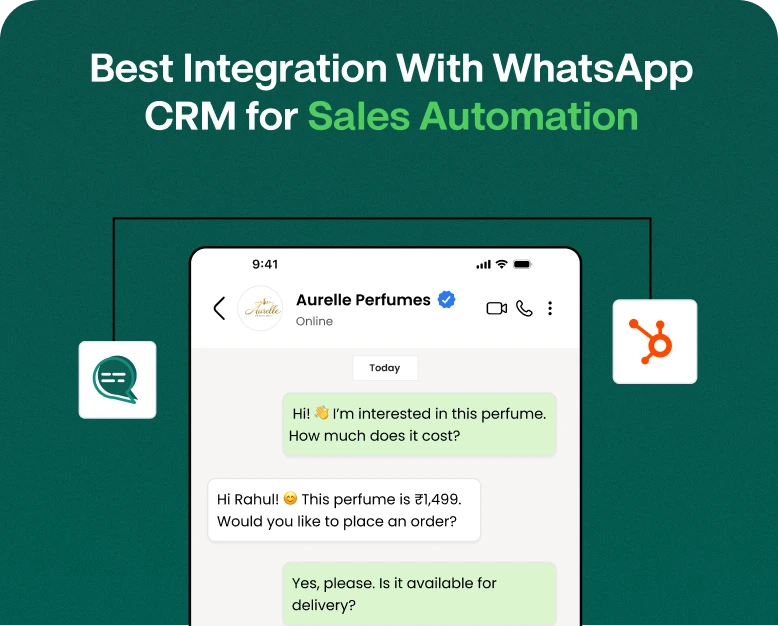
Imagine a customer who sees your product on the web and messages your business on WhatsApp. Your sales team responds, collects the details of the lead, sets a follow up and updates the status of the customer. Sounds simple, doesn’t it?
But when you have dozens, or hundreds, of customers messaging at the same time, things can get tricky fast. Leads get lost, follow-ups are delayed, customer data is scattered across multiple tools, and sales teams waste too much time on repetitive tasks.
That is where integration with WhatsApp CRM can make a huge difference.
By integrating WhatsApp with a CRM, businesses can bring conversations, customer data, follow-ups, lead management, and sales activities into a more organised workflow. Rather than manually moving information from WhatsApp to a CRM, businesses can automate many of these processes.
In this guide, we’ll explain what WhatsApp CRM integration is, how it works, its benefits, how to set it up, and how businesses can use it for better sales automation.
What is Integration with WhatsApp Business API?
WhatsApp CRM integration is essentially the link between WhatsApp and a Customer Relationship Management (CRM) system. It enables customer conversations and sales information to be integrated.
Typically, a sales rep would get a WhatsApp message and then manually input the customer’s name, phone number, requirements and follow up date in the CRM.
Integration WhatsApp workflows can automatically capture and handle a lot of this information.
Your job is to humanise the following text in English, keeping the meaning and tone the same. Do not add or remove any information. Do not add any other text to the output.For example:
Customer sends WhatsApp message → Create lead in CRM → Link conversation to lead → Notify sales representative → Schedule follow-up → Customer moves through sales pipeline
This means a connected sales process, rather than forcing your team to switch between multiple platforms.
A WhatsApp CRM integration can help with:
- Lead generation
- Customer Communications
- Sales follow ups
- Lead scoring
- Automated replies
- Appointment reminders;
- Order Status
- Customer service
- Managing the sales pipeline
- Campaigns for marketing
Why Is WhatsApp CRM Integration Necessary for Companies?
WhatsApp has emerged as an important channel for businesses to communicate as customers often prefer messaging over traditional calls or emails.
The problem starts when the message volume goes up.
Imagine a real estate company gets 100 enquiries in one day. If a CRM isn’t connected, the sales team may have to:
- Read WhatsApp messages.
- Copy customer info.
- Create CRM records by hand.
- Assign sales reps to leads.
- Set reminders to follow up.
- Check past conversations.
- Update lead statuses.
Doing these manually can take up valuable selling time.
Many of these actions can be combined into one automated workflow with a well configured WhatsApp CRM integration.
The result is a more organised sales process where reps can spend more time on conversations and closing opportunities instead of admin work.
How Does WhatsApp CRM Integration Work?
The exact workflow will depend on the CRM and WhatsApp solution you use, but the basic one looks generally like this:
1. A Customer Begins a Dialogue
The customer can contact your business via a WhatsApp button, QR code, advertisement, website widget or WhatsApp link.
For instance:
“Hi, I am interested in your managed VPS hosting packages. What is the price?”
The conversation turns into a potential sales opportunity.
2. Lead Collection
The integration can help to capture the information like:
- Customer’s name
- Reply to Post
- Source
- Interest in Product
- Status of the lead
- Salesperson Assigned
Information can be flowed into the CRM instead of manually creating a record.
3. The Lead Enters The Sales Funnel
When the lead is captured it can then be placed into the correct sales stage.
For instance,
New Lead > Contacted > Qualified > Demo/Meeting > Proposal > Negotiation > Won/Lost
This gives managers and sales reps a better understanding of where each opportunity stands.
4. Automated Follow-Ups Start
A customer asks for pricing and when they get it they go quiet.
Your CRM can prompt the sales team to follow up.
Depending on the setup, automated WhatsApp messages can also be used for appropriate customer communication.
5. Customer information stays organised
Sales reps can access relevant customer information from the connected CRM rather than having to scroll through old WhatsApp chats.
This can give a clearer picture of the customer journey.
WhatsApp CRM Integration: Best Features to Watch Out For
Not all integrations have the same capabilities. If you are selecting a platform for sales automation, take a look at these important features.
1. Lead Capture Automatically
A good integration should facilitate the creation of CRM leads from WhatsApp conversations.
Someone contacts your business, you want their info captured with as little manual effort as possible.
This is especially useful for business operation:
- Whats App advertisements
- Website campaigns
- Lead generation campaigns
- Product promotion
- Customer referral programs.
2. Common Team Inbox
A shared inbox allows multiple sales or support employees to manage customer conversations in one place.
Instead of keeping conversations confined to one employee’s phone, teams can achieve greater visibility into customer communication.
A shared inbox can also assist with:
- Assigning leads
- Conversation history
- Internal collaboration
- Managing response
- Customer hand over
3. Follow-ups automated
Follow-ups are a big part of sales.
A customer might say:
“Let me check with my manager and I’ll get back to you”.
The sales rep may not remember to follow up unless reminded.
A CRM integration with WhatsApp can help to schedule follow-up activities and keep the sales representatives on track.
4. Customer Segmentation;
Every customer has different needs.
You might want to segment customers by:
- Position
- The product is of interest
- history of purchase
- Source of lead
- Type of customer
- Sales phase
Segmentation allows for relevant communication to be created instead of sending the same message to all.
5. WhatsApp Auto Responder
Automation can take care of repetitive communication such as:
- Introductory messages
- Confirmations of nominations
- Order notifications
- Reminders for payments
- Lead acknowledgements
- Customer updates
- Follow-up alerts
But automation needs to be shaped around the customer’s needs. Too many irrelevant messages can negatively impact the customer experience.
6. Analytics & Reporting
Sales managers need more than just talks. They are after information.
Look for reporting features that help you track:
- Whatsapp Leads Number
- Response Percentages
- Conversion ratios
- Sales funnel
- Activity follow up
- Results of the campaign
- Sales Representative Productivity
These insights can help a business determine where they need to improve their sales process.
Step By Step Instructions To Integrate WhatsApp Into Your CRM System
Follow these steps if you want to add WhatsApp to website and CRM workflows.
Step 1: Set Your Sales Target
Know what you want to automate before you choose an integration.
For example:
- Capture leads from your website
- Automate Lead Distribution
- Better follow-ups
- Handle customer conversations
- Send transaction updates
- Increase sales tracking
When there is a clear objective, it is easier to choose the right solution.
Step 2: Select Your CRM
Your CRM should be able to support the sales processes your business actually uses.
Check if it offers features such as:
- Manage leads
- Contact management
- Pipelines handling
- Work management
- Automatisation
- Reporting
- Team access
- Support for API or integration
Step 3: Link Whatsapp
Depending on your setup, WhatsApp can be integrated with your CRM using an approved WhatsApp business solution, integration platform, API or CRM connector.
When you set up you need to make sure your business complies with the relevant WhatsApp policies and messaging requirements.
Step 4: Link Your Website
If lead generation is your goal, think about adding WhatsApp entry points to your site.
For example:
Product Page → “Chat on WhatsApp” → Customer Message → CRM Lead → Sales Allocation
Supported integrations include WhatsApp buttons, links, QR codes, or other website integrations.
Step 5: Build Automated Workflows
Start with simple automation.
For example,
New WhatsApp Admin
↓
Add Contact to CRM
↓
Sales Representative Assignment
↓
Send Welcome Message
↓
Create Follow Up Task
↓
Change Lead Stage
This eliminates a lot of repetitive manual work.
Step 6: Test All
Before you launch your workflow, test it with various scenarios.
Check:
- Is the lead being added into the CRM?
- Is the correct phone number registered?
- Right salesperson assigned.
- Does the customer get the message?
- Is the follow-up task created?
- Is the conversation saved correctly?
Testing keeps you from making mistakes when you start to get real customer questions.
Real Life Example: How a Business Can Use WhatsApp CRM
Imagine an online education company marketing a new professional course.
A potential student visits the website and clicks on the WhatsApp button.
They send:
“Tell me about the fees and duration of the course?”
The integration can initiate a workflow:
1. Got a whatsapp message
Start customer conversation.
2. CRM lead generated
The customer contact details are logged.
3. Record lead source
The CRM recognises the inquiry originated from the website.
4. Sales Rep. Assigned
The lead is routed to the right counsellor.
5. Auto-responded
The customer receives a first response with basic information about the course.
6. Counsellor continues the dialogue
The sales person answers detailed questions.
7. Follow up planned
A follow-up activity is created when a student needs time to decide.
This simple workflow reduces manual data entry and helps the sales team in consistent follow up.
Benefits of Integrating WhatsApp with CRM
Improved Lead Management
By linking WhatsApp conversations with CRM records, sales teams will be able to manage leads in a more systematic way.
Businesses can create a structured sales process instead of relying on individual chat histories.
Speedier Customer Response
Customers don’t typically want to wait long for basic answers.
Automation means new queries can be acknowledged quickly, while sales reps can spend time on more detailed conversations.
Fewer Lost Leads
Enquiries made on multiple channels can lead to lost leads.
CRM streamlines a workflow for businesses to keep track of incoming opportunities.
More Productive Salespeople
Sales reps don’t have to spend as much time copying information from one system to another.
They can spend more time qualifying leads and building relationships with customers.
Improved Customer Experience
A system that’s connected can provide sales reps with relevant information before they respond.
This means customers won’t have to repeat information they have already provided.
Better Management of Follow-up
A potential client who does not purchase immediately is not necessarily a lost opportunity.
CRM based follow-up workflows can help businesses stay in touch at the right stage of the sales cycle.
WhatsApp CRM Integration Mistakes You Should Avoid
Integration can be a boon for sales operations, but bad implementation can create new headaches.
Don’t Automate Everything
Not every conversation is for a bot to handle.
When dealing with complex pricing, complaints, technical issues or customised solutions, customers might want to speak to a real person.
Don’t send too many messages
Too many promotional messages can annoy customers.
Use automation thoughtfully and ensure communication is relevant and appropriate.
Data Quality: Don’t Miss Out
CRM performance can be hurt by duplicate contacts, incorrect phone numbers, and incomplete lead data.
Establish clear policies for documenting and altering customer information.
Don’t Leave Your Sales Team Out
Technology doesn’t sell by itself.
Your team needs to know:
- How assignments of leads are made
- Conversations: how do they work
- When to follow up
- Updating the stages in CRM
- When to hand over automation to a person
Choosing the right WhatsApp CRM integration
Make a checklist before you purchase a WhatsApp CRM solution.
Query:
- Does it support the WhatsApp business setup that your company has?
- Does it automatically capture leads?
- Can it assign leads to team members?
- Do you have a shared inbox?
- Can it do follow-ups automatically?
- Is it compatible with websites?
- Will it work with your current CRM?
- Does it have analytics
- Will the system grow with your business?
- Does it have the features your sales team truly needs?
Don’t pick an integration because it has a long list of features. See if it really solves your sales workflow problems.
Why to Integrate WhatsApp in Your Website
People who are interested in your goods and services are already visiting your website. Adding WhatsApp can give them another convenient way to start a conversation.
For example,
Website Visitor → WhatsApp Button → Chat → Lead Capture → CRM → Sales Follow-Up
This can shorten the time from finding the website to talking about sales.
Businesses can embed WhatsApp entry points in:
- Home Page
- Single product page
- Pricing pages.
- Landing pages.
- Contact Us Page
- Pages of service
- Posts on blog
The trick is to make the option visible but not obtrusive.
FAQ’s (Frequently Asked Questions)
What is WhatsApp CRM Integration
Whatsapp CRM integration links the conversations on WhatsApp to a customer relationship management system. It can assist businesses in capturing leads, organising customer information, managing conversations, automating follow ups, and tracking sales activities.
Can I add WhatsApp to my website?
Yes. Businesses can add WhatsApp buttons, links, QR codes, widgets or other supported means to their sites. When connected to a CRM, website visitors become sales leads that you can track.
Here’s how integration of WhatsApp with sales teams helps in several ways.
It can minimize manual data entry, enhance lead tracking, structure conversations, allow automated follow-ups, and provide sales teams with better visibility into customer interactions.
Can WhatsApp CRM Integration Automate Follow Ups?
Businesses can set up automated workflows for appropriate follow-ups, notifications, reminders and other customer communications, depending on the CRM and WhatsApp solution.
Is WhatsApp CRM good for small businesses?
“Yes. Small businesses can use it to organise customer conversations, capture leads, manage follow-ups and get rid of repetitive sales tasks without a large sales team.
Final Thoughts
With WhatsApp CRM integration, everyday WhatsApp conversations turn into a structured sales workflow. Businesses may utilize WhatsApp as more than just a messaging application by integrating conversations with lead management, customer records, sales pipelines, follow-ups and reporting.
The best way to begin is with a good business goal. Understand what repetitive duties your sales team does, sync WhatsApp with your CRM, develop simple automation and keep optimising the workflow as you interact with real customers.
If you need a practical way to combine WhatsApp marketing, CRM, lead management, automation and team conversations, consider a WhatsApp-centric platform that can bring these activities together in one place.
Automating your WhatsApp sales process? Start with the right WhatsApp CRM solution and turn more conversations into organised sales opportunities.
Written by
Prachi Soni
Part of the Wbotz team, writing about WhatsApp Business API, automation and the campaigns that actually convert.