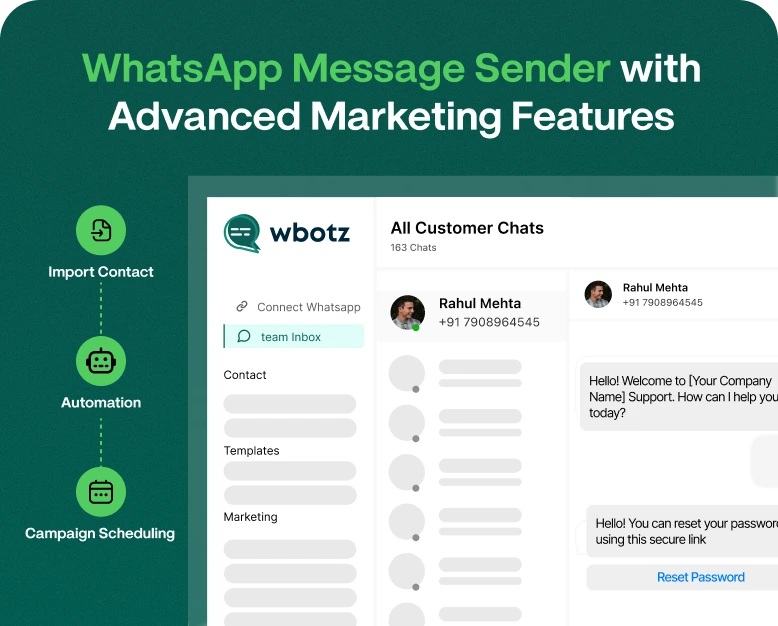
WhatsApp Message Sender with Advanced Marketing Features
When you can send the right message to the right customer at the right time, it can positively impact your business. But, the process of sending messages to hundreds or thousands of customers can be very time…
When you can send the right message to the right customer at the right time, it can positively impact your business. But, the process of sending messages to hundreds or thousands of customers can be very time consuming, inefficient and frustrating. Your business may be missing out on opportunities to connect with potential customers because of your dependence on manual messaging.
A WhatsApp message sender with marketing automation features gives businesses the ability to manage messaging with customers, create and send promotional campaigns, set up automated responses, and schedule messages to be sent at specific times. Additionally, it helps businesses track and measure the performance of campaigns.
No matter the type of business you own, whether an online store, service business, agency or growing company, leveraging the right WhatsApp marketing solution can improve your business’s customer communication and help you automate and better manage customer communication.
In this article, we will cover what a WhatsApp message sender is, how its marketing features work, the benefits of using one and how to identify the right WhatsApp message sender for your business.
What Is A WhatsApp Message Sender?
A WhatsApp message sender is a marketing software or platform that helps businesses organize their customer communication on WhatsApp. Instead of having to contact customers manually, businesses can leverage the software to better manage customer communication and automate marketing campaigns.
Different features may be available, depending on the WhatsApp platform, and may include the following:
- Bulk messaging to opted-in contacts
- Personalized promotional messages
- Scheduled messages
- Automated messages and chatbots
- Customer segmentation and messaging
- Message templates
- Campaign tracking and reporting
- Contact and CRM management
- Multi-agent inbox management
For businesses that communicate with a lot of customers, the features available with a WhatsApp messaging platform can decrease the amount of repetitive work and increase the efficiency of customer communication.
When communicating with their customers, businesses must use solutions that are in line with WhatsApp’s policies, and use proper opt-in messaging and consent practices. A business may find it more beneficial to utilize WhatsApp’s official Business Solution to manage their structured marketing campaigns.
Why would a business need a WhatsApp Message Sender?
When your customer base grows, it may become difficult to manage the communications needed to keep your customer base informed and updated with the level of detail and personalization expected in today’s market.
Using WhatsApp to manage customer communications may be the solution to better organize your customer communications and reduce the time your employees spend on repetitive messaging, increasing the time your employees spend on more high value and creative tasks.
1. Reach Multiple Customers More Efficiently
Sending messages individually can become time-consuming when your business has hundreds of customers.
A WhatsApp bulk message sender allows businesses to manage campaigns for multiple opted-in contacts without preparing every message manually.
For example, an online clothing store launching a seasonal sale can send an announcement to customers who have agreed to receive promotional updates. Instead of contacting each person separately, the marketing team can manage the campaign through a single dashboard.
This makes communication more organized and helps businesses reach their intended audience efficiently.
2. Improve Customer Engagement
Create a direct communication channel to respond to questions and requests or send updates.
To deepen engagement, send messages tailored to a recipient or small group of recipients. For example, a consumer electronics store could send a recommendation for a Bluetooth speaker to a customer based on the customer’s recent purchase of a cell phone. A travel agency could suggest holiday packages for a customer based on the customer’s recent inquiry for a vacation package.
Distinguishing communication based on the needs of the audience is more useful than delivering an identical message to everyone.
3. Automate Repetitive Conversations
When a business receives the same or similar questions about an offer, service, or product, that question is probably repetitive and could be automated.
An automated WhatsApp sender chatbot could be used to respond to frequent questions.
Automation can be used for messages such as:
- Welcome messages
- Frequent Questions
- Order confirmation
- Appointment reminders
- Payment notifications
- Customer Support
This frees employees to focus on other duties and enables customers to get information they need without waiting for an available employee.
4. Save Marketing Time and Resources
Marketing personnel have several responsibilities including managing customer communications, lead follow-ups and the other numerous tasks associated with marketing.
An all-in-one WhatsApp marketing platform could streamline several marketing activities.
With the WhatsApp marketing platform, marketing personnel could manage customers, campaigns and messages in one centralized system, thereby eliminating the need to use several marketing tools.
5. Build Better Customer Relationships
Continual communication between a business and customers is imperative. Too many promotional messages could deter customers. Useful information, exclusive offers and timely communication should be the focus of a WhatsApp marketing strategy.
An online grocery store can send order statuses, delivery alerts, and special offers via WhatsApp.
Communication becomes valuable to customers when it provides updates on their order status, delivers offers based on their preferences, and alerts them of delivery window.
Leverage Advanced Marketing Features with Your WhatsApp Business Account
There are several features available in WhatsApp Business Solutions. Depending on your needs, you can find a solution that works best for your business.
1. Bulk Message Sender
Bulk messaging can be used for time-bound communications, such as a
- Product launch,
- Special offers,
- Seasonal sale,
- Promotions,
- Service or event announcements,
- Important business alerts, or notifications.
Managing your contact list and campaigns, and accessing delivery reports are useful features in a marketing solution. Remember that in bulk messaging, consent should be obtained and the recipients should have the option to opt out.
2. Message Scheduling
A scheduling feature allows a marketing team to plan campaigns in advance, and aids in workload management. A campaign can be prepared in advance and scheduled to be delivered at a specific time. For example, a campaign for an offer can be planned and scheduled in advance to be delivered on an off-day.
Scheduled messages can also be used for:
- Greeting cards for a festival
- Notifying customers about a product launch
- Reminding customers about an event
- Scheduling special offers
3. Personalized Message Templates
Messages are more useful to customers when they include information related to them.
Personalization features allow businesses to add customer information that is approved to be included in messages to the template.
Example
“Hello ”+ customer_name + “, your order ” + order_id + “ is confirmed. Thank you for shopping with us!”
Personalized communication makes automated messages more relevant and reduces the burden of writing thousands of messages individually.
Marketing messages sent over the WhatsApp Business Platform require the use of approved templates.
4. Automated Replies and Chatbots
Responding to common questions through a WhatsApp sender automation can help lessen the need for human resources to be dedicated to conversation management.
An example of a workflow with a chatbot:
- A customer asks about product X.
- The chatbot responds with the product categories.
- The customer responds with the selected category.
- The chatbot responds with product information, or connects the customer to an agent.
A workflow with a chatbot can help improve and speed up the organization of customer conversations.
5. Contact Segmentation
Sending the same messages to all of your customers can often be inefficient.
Contact segmentation allows businesses to group their customers in audience segments based on relevant information, such as:
- Purchase history
- Customer location
- Customer enquiries
- Subscription information
- Customer lifecycle
A fitness business, for example, can have audience segments of customers who have recently made enquiries, current customers, and former customers.
It can then send messages related to the offers to the audience segments rather than sending indiscriminate messages to the entire list.
6. Campaign Analytics and Reports
Not evaluating marketing campaigns by the number of messages sent, but rather by how the campaign performs, should be the focal point for businesses.
Knowing how each WhatsApp campaign is performing can be valuable when using a sender to distribute messages.
Reports can differ based on the service provider, but can show:
- Message delivery
- Message open rate
- Customer engagement
- Click-through rate
- Campaign performance
By monitoring message performance, marketing teams can adjust and improve areas of engagement.
7. CRM and Team Inbox Integration
Integrating a CRM helps businesses tie customer data to WhatsApp conversations.
This helps centralize interactions and enquiries, while helping team members manage leads and understand customer journeys.
A shared inbox can be useful in a similar way to the CRM as it helps centralize customer conversations and eliminates the need for relying on a single person’s cell phone.
This can be useful for marketing agencies and customer support and sales teams.
How to Use a WhatsApp Message Sender for Marketing Campaigns
A WhatsApp message sender allows users to upload contacts and blast messages, but businesses should be focused on how to plan effective campaigns and reach the right audience.
Here are a few steps to get started.
Step 1: Choose the Right WhatsApp Marketing Platform
Want to conduct automated support, send marketing campaigns, schedule reminders, or manage sales calls?
Think about the following for each platform:
- What kind of support do they offer for the official WhatsApp Business Platform?
- What kind of automation tools do they have? What about chatbots?
- How do they handle contact segmentation?
- What kind of CRM integrations do they have?
- What kind of analytics and reporting do they have?
- What is their pricing? What are their messaging charges?
- What kind of customer support do they offer?
Think about your anticipated messaging volume and the size of your business when choosing a solution.
Step 2: Setting up Your Business Account
Choose a provider, complete the business verification, and set up your WhatsApp account.
Depending on the provider, you may need to set up a WhatsApp Business Account, and a phone number via the official WhatsApp Business Platform.
Add detailed information about your business to your account.
Step 3: Organize Your Customer Contacts
Create a clean and organized contact list.
Based on customer interests, previous interactions, and/or subscriptions create segments to further organize your contacts.
Examples of Segmentation:
- New customers vs. repeat customers
- Customers interested in Fashion vs. customers interested in electronics
- Customers requesting product updates
- Only contact customers that have given you permission to contact them.
Step 4: Compose Your Message
Keep your message simple and to the point.
Marketing messages shouldn’t be unnecessarily long. Explain what you’re marketing and what the customer should do next.
Example:
“Hello! Our weekend sale is here! Check out our promotions and grab the offers while stocks last. To view the specials, click the link in our bio.”
You are also able to add related images, product info, or other content as the case may allow.
Step 5: Schedule or Launch Your Campaign
Last minute check of the message content and the audience to be sent to and of the approved template and you are good to go.
When scheduling a campaign, you can set it to go out at a time you think your audience may be most active.
For a first time campaign, it’s advisable to test messaging to a small, relevant audience.
Step 6: Review Results and Improve
See how the campaign performed and adapt your next campaign accordingly.
Clicks, deliveries, and whether the message was understandable, are all things to look at.
If your target audience is not interacting with your message, make sure your offer is attractive. Play around with different audiences, messages and timings.
For example, if you send out a promotional message for a campaign and it generates clicks but nobody buys, check your product pricing and landing page. The issue might not be with the message.
Real-world Examples of WhatsApp Marketing
Different business categories can use WhatsApp marketing to solve day to day communications challenges.
For example, a person can buy a smart phone, then get an order confirmation, shipment and delivery notifications via WhatsApp.
Educational Institutions
Schools, colleges, and coaching centers can send admission reminders, class and exam notifications, and event info to students or their guardians, opted-in to receive notifications. This helps schools share information, less manually.
Clinics can use WhatsApp to send reminders and confirmations for appointments and updates on their services. They should ensure sensitive patient information is shared safely.
Travel and Hospitality
Hotels and travel agencies can use WhatsApp to notify customers of their bookings and provide travel and itinerary updates. Hospitals can share test results and other information to patients using WhatsApp.
Hotels can send confirmation for customers’ reservations and check-in instructions. WhatsApp can be used for marketing and other business communication.
Benefits of Investing in an Advanced WhatsApp Message Sender
A good messaging platform, along with an effective business strategy, can help businesses improve their communication, organization, and relationships with customers. This can be achieved through, among others:
Better management of campaign: All customer related information can be stored centrally and campaigns can be scheduled in advance and managed from one central location.
Improved customer service: Businesses can provide automated communication and respond to enquiries using a shared inbox.
More relevant communication: Messages can be segmented and personalized based on customer preferences.
Less work for employees: Automation and scheduling of messages can be done in advance.
Understand business performance and communication: Businesses can tell how customers engage with their communication.
Stay connected to customers: Businesses can communicate to their audience in a way that makes them feel valued.
What to Avoid When Using WhatsApp Sender
Large marketing software packages cannot produce efficient results if their campaigns are poorly designed.
Avoid these mistakes:
Sending messages without consent: Use proper opt-in methods and honor customer choices.
Sending too many promotions: Irritating your customers with too many promotional messages will eventually lead to blocks and/or complaints.
Not personalizing messages: Generic messages are irrelevant and may not be helpful to customers.
Making misleading offers: Promotional messages should not contain false claims.
Not analyzing campaign reports: You should review your campaign reports to understand what’s working and what’s not.
Using unofficial tools: It is best to use legitimate and compliant solutions to the WhatsApp Business Platform instead of unauthorized automation.
An efficient messaging strategy helps build and preserve your customer trust.
Frequently Asked Questions
1. What is a WhatsApp message sender?
A WhatsApp message sender allows businesses to send messages to customers over WhatsApp, and receive customer messages on WhatsApp. The tool can help support bulk messaging, scheduled messages, automated replies, segmentation of customers, and reports on campaigns.
2. Can I send bulk WhatsApp messages to customers?
Yes, you can. You can use the WhatsApp Business Platform solutions to send bulk messages to customers through approved templates. Message limits, pricing, and template requirements are determined by WhatsApp’s policies and your account’s eligibility.
3. Is a WhatsApp bulk message sender good for small businesses?
Yes, a WhatsApp bulk message sender is great for small businesses. For small businesses, messaging automation and campaign scheduling can help optimize time to manage customer communication. Choose a plan that supports your contact limit, marketing needs, and budget.
4. Can I schedule WhatsApp marketing messages?
Yes. Some WhatsApp marketing platforms let you schedule your campaigns in advance. Whether a given platform offers scheduling depends on the specific provider and the kind of messaging arrangement in place.
5. How do I pick the best WhatsApp message sender?
Consider whether a platform supports official WhatsApp integration, bulk messaging, automation, scheduling, personalization, CRM integration, analytics, and pricing, as well as the kind of support they provide. Also review whether the platform supports WhatsApp’s requirements around messaging and user consent.
Conclusion: Pick the Right WhatsApp Message Sender
As your business grows, it becomes harder to manage customer communication manually. The right WhatsApp message sender can help organize customer contacts, and automate communication within your team.
Personalized messaging, scheduled campaigns, bulk messaging, chatbots, contact segmentation and CRM integration help turn WhatsApp into a powerful marketing tool.
When choosing a WhatsApp marketing platform, the most important consideration should be reliability, official integration with WhatsApp, pricing, and analytics.
Want to refine your WhatsApp marketing strategy?
Check out Wbotz. Analyze the features and pricing, and see if it helps you better organize your marketing campaigns and customer conversations. Begin with an emphasis on messages that are relevant and timely, and ensure you obtain proper customer consent.
Written by
Prachi Soni
Part of the Wbotz team, writing about WhatsApp Business API, automation and the campaigns that actually convert.