Create a WhatsApp Chat Link to Boost Customer Engagement
Picture your customer going through your website, locating a product of interest, preparing to make a purchase, but has to clear up a quick question first. Now your customer has to locate your business number, save it,…
Picture your customer going through your website, locating a product of interest, preparing to make a purchase, but has to clear up a quick question first. Now your customer has to locate your business number, save it, and open WhatsApp to start a conversation manually. Pretty unlikely your customer will go through all that. So most likely, your customer will just leave the site without completing the purchase.
Why not make it simple for your customer to contact you? Add a WhatsApp chat link to your website, your socials, your ads, your emails, your product pages, etc, and make it one click for your customer to start a conversation with your business.
For business owners and marketers looking to optimize their customer communication, WhatsApp links help achieve just that. Customers no longer need to save your contact number to start a conversation.
This article breaks down the basics of WhatsApp links including examples and use cases. You will learn how to create WhatsApp links, the tools of the trade to effectively manage customer conversations, as well as tips for small business owners and marketers to enhance customer engagement using WhatsApp links.
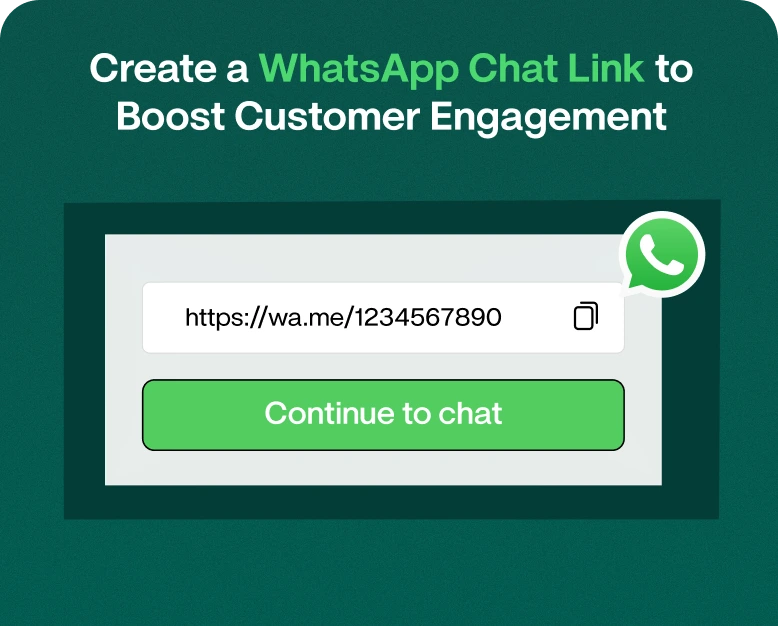
The format for a basic WhatsApp chat link is:
https://wa.me/YourPhoneNumberIn this format, replace YourPhoneNumber with your phone number including your country code without the plus sign, brackets, or hyphens.
For example, if your phone number is +91 9876543210, your WhatsApp chat link would look like this:
https://wa.me/919876543210You can also create WhatsApp chat links where a message is filled in for the user. Users have the option to edit the message before they send it.
A sample link where the message is filled in for the user is shown below:
https://wa.me/919876543210?text=Hello%2C%20I%20want%20to%20know%20more%20about%20your%20services.The suggested message is shown in the message box to the user, and the user can edit the message before sending it to you.
Why Should Your Business Create a WhatsApp Chat Link?
Adding WhatsApp chat links to different marketing channels of your business can help customers contact your business in a more convenient way. There are lots of benefits to adding WhatsApp chat links and we are going to mention a few.
1. Convenient Customer Communication
Customers can contact your business easily using a WhatsApp chat link. Using a WhatsApp chat link eliminates the need for customers to contact your business using several different channels and then search for your business phone number.
2. Lead Generation
A WhatsApp chat link gives your business the opportunity to contact website visitors and social media followers and engage them in valuable conversations.
3. Improve Social Media Engagement
Many businesses use Instagram, Facebook, and other social platforms to promote their products and services.
Adding a WhatsApp link to your social media profile gives interested followers another way to connect with your team.
You can use it for:
- Product inquiries.
- Service bookings.
- Appointment requests.
- Customer support.
- Promotional campaigns.
- Event registrations.
4. Provide a More Personal Customer Experience
WhatsApp supports direct conversations between businesses and customers. Customers can explain their requirements, ask questions, and receive relevant information.
Unlike a general contact form, a WhatsApp conversation can feel more immediate and conversational.
Businesses can also use personalized greetings and quick replies to make communication more convenient.
5. Reduce the Effort Required to Contact Your Business
A customer may be interested in your service but unwilling to complete a lengthy contact form.
A WhatsApp link provides a straightforward alternative. With one click, customers can open a conversation and send their inquiry.
This can be especially useful for local businesses, consultants, service providers, and online retailers.
How to Create a WhatsApp Chat Link: An Easy to Follow Guide
Step 1: Identify Number to which Customers will Reach Out
You can use either a regular WhatsApp account or a WhatsApp Business account. WhatsApp Business is preferred by most businesses as it includes features like a business profile, greeting messages and quick replies.
Ensure your number can receive WhatsApp messages.
Step 2: Include Your Country Code
Your WhatsApp link should include your number in its entirety.
For example, an Indian business number would start with 91, followed by the mobile number.
The link should have the following format:
https://wa.me/91XXXXXXXXXXKeep in mind:
- Do not include the plus sign.
- Do not add spaces.
- Do not use brackets.
- Do not include hyphens.
- Include the correct country code.
Step 3: Create WhatsApp Link
Once you have the number, copy and paste it after wa.me/.
For example,
https://wa.me/919876543210Is the basic WhatsApp chat link.
To test the link, copy the URL and paste it in a browser or mobile device to check if it opens WhatsApp to the right account.
Step 4: Pre-Filled Message
To enhance your WhatsApp link, you can include a suggested message.
The format would be:
https://wa.me/919876543210?text=YourMessageFor example,
https://wa.me/919876543210?text=Hello%2C%20I%20am%20interested%20in%20your%20services.To include longer suggested messages, you can use an online URL encoder.
These are some examples of pre-written messages:
For product inquiries:
“Hi, I want to learn more about your products.”
For service inquiries:
“Hi, I would like to learn more about your services.”
For booking appointments:
“Hi, I would like to schedule an appointment.”
Pre-written messages can help your team better understand why a customer is contacting you.
Step 5: Share Your WhatsApp Link
After creating your link, add it to areas where your customers will interact with your business.
Some examples are:
- Contact Us pages on your website.
- Your product and service pages.
- Social media pages (i.e. Facebook, Instagram).
- Your Google Business Profile.
- Email signatures.
- Paid advertisements and promotions.
- Landing pages.
- Digital brochures and QR codes.
When using a WhatsApp link, make sure that your text states what the customer is able to do (i.e. “Chat With Us on WhatsApp” or “Schedule a Consultation”).
The Best Places to Use a WhatsApp Link
Now that you have your WhatsApp link, the most important next step is placing it in areas that will lead to the most customer engagement.
1. Using a WhatsApp Link on Your Website
One of the best places to add a WhatsApp link is on your company website.
Some examples are your:
- Home page.
- Contact page.
- Services or Product page.
- Pricing page.
- Landing pages.
2. Add Your Link to Social Media Profiles
WhatsApp links in profiles or promotional content serve as direct communication channels for interested users.
For example, a clothing store can post its new collection on Instagram and direct users interested in purchasing to WhatsApp for order placement.
3. Use WhatsApp Links in Email Campaigns
Your business can add a WhatsApp contact link to newsletters, promotional emails, and customer update emails.
This gives the subscribers an alternate channel to reach out to you for questions or for requesting additional info.
A software company, for example, can add a link saying, “Talk to Our Sales Team” to an email announcing the launch of a new product, and use it to provide additional info to interested customers.
4. Add WhatsApp Links to Ads
Click-to-WhatsApp advertisements allow interested users to initiate a chat with a business to request information or make a purchase.
For example, a toy store can place a click-to-WhatsApp ad that allows users to chat with a salesperson for product recommendations.
5. Generate a WhatsApp QR Code
WhatsApp links can be converted to QR codes and used in print or digital media.
Customers can scan the QR code to launch a chat with you.
Use a WhatsApp QR code in display spots like your business visiting cards, product packaging, store displays, menu cards, event banners or product brochures.
WhatsApp QR codes can benefit businesses that want their customers to use their mobile devices to start a chat with their sales team for product information, instead of using an interactive printed material.
WhatsApp Marketing and Customer Communication Tools
Running a growing business can become difficult as you receive more WhatsApp inquiries. Manually managing numerous customer conversations can become a daunting task, especially when dealing with a large workforce handling customer communications.
How about you consider Wbotz to manage conversations related to your business and improve communication within your workforce?
Depending on your chosen plan and integration, Wbotz can offer features such as:
Shared Team Inbox
Through the shared inbox, various team members are able to manage customer conversations from a single location.
For instance, a client is able to contact your business via a WhatsApp business link located on your company website, and your sales staff is able to handle the conversation, while your other employee manages customer support conversations.
Automated Welcome Messages
Wbotz is able to greet your customers with a welcome message. An example of a welcome message is:
“Hi, Thank you for contacting our business. Our team will help you with your query soon.”
This lets the customer know that the business has received their message and is attending to it.
Quick Replies
Frequently asked questions by your customers can be answered using quick replies to avoid your staff having to type the same messages over and over again. Quick replies can be
programmed to include:
- Business hours
- Delivery information
- Service availability
- Appointment information
- Frequently asked questions.
- Conversation Assignment
Through this feature, chat conversations involving customer inquiries can be assigned to employees based on the department. For instance, chat conversations involving a product can be assigned to your sales staff, while chat conversations related to a service can be assigned to your customer support staff.
Customer Follow-Ups
Customers will sometimes ask for more information but not make a purchase. With the right follow-up process, your team can pick up the conversation at the right time.
Be sure to respect customer wishes and WhatsApp’s terms of service when using follow-up messages.
Real World Example of WhatsApp Chat Links
Here are some common use cases for WhatsApp links.
Online Clothing Store
An online clothing store posts a new collection on their site and social media.
They add a WhatsApp chat link to their product pages with a prefilled message:
“Hello, I would like to know more about this product.”
This allows customers to easily get more information about sizes, colors, prices, availability and more without having to search for contact info.
Digital Marketing Agency
A digital marketing agency provides services in SEO, PPC, social media marketing, and website development.
They add a WhatsApp button on their service pages with a pre-filled message:
“Hello, I am interested in your digital marketing services.”
This allows leads to easily initiate a conversation to find out more about the services offered.
Restaurant
A restaurant places a WhatsApp link on their web pages, printed menus, and takeout menus.
This allows customers to contact the restaurant to find out more about the menu, hours, to make a reservation, and for other inquiries.
These are just a few use cases, for more information on what works, see the examples above. Keep in mind actual sales are contingent upon many factors such as your offer, your audience, your website and the quality of your customer service.
Create an Effective WhatsApp Chat Link
Using the following tips will help you create a professional WhatsApp link.
Add a clear call to action: There is no need to use the unprofessional call to action “Click Here.” Be sure to use something like “Chat With Our Team” or “Ask About Pricing.”
Pre-fill messages: Save your customers time and let them know the messages they can send you based on the page they are viewing.
Test your links: The phone number may be wrong and/or the link may not open the correct account.
Make links mobile-friendly: Most people will be opening WhatsApp using their phone.
Respond to messages: There is no use having a link people can use to message you if you don’t assist your customers once they do.
Understand the results of your campaign: Be sure to set up tracking for links and see which of your marketing campaigns are generating the most messages.
Protect customer Privacy: There are data and WhatsApp policies you must follow and you must have your customers’ consent before using their contact info for marketing.
Frequently Asked Questions
1. How do I make a WhatsApp business chat link?
You can use the format wa.me and replace the placeholder with your number. Be sure to include the country code without spaces or special characters. You can then share the link anywhere.
2. Can I create a WhatsApp link with a pre-filled message?
Yes. To generate a WhatsApp link with a pre-filled message, you just need to add ?text= and your URL encoded message after the link. When a user clicks on that link, the suggested message gets auto filled in the chat box and can be changed before sending.
3. Is a WhatsApp chat link free to create?
Yes. A basic WhatsApp chat link created using the official wa.me format is free to make. Other services such as link management, marketing automation and WhatsApp business platform messaging may be chargeable.
4. Can I use a WhatsApp chat link on my website?
Yes. You can use a WhatsApp chat link on your website by using a text hyperlink, contact button or a supported chat widget and allow your visitors to start a chat with your business.
5. Can I create a WhatsApp link without saving a phone number?
Yes. You can share a WhatsApp chat link without requiring the users to save your number in their phone contact list.
Conclusion: Easily Communicate with More Customers through WhatsApp
A WhatsApp chat link allows customers to contact you quickly. It can increase the number of ways your customers can contact you through your marketing channels.
You can use a WhatsApp chat link to help break communication barriers for your business, and help facilitate more informative conversations with customers.
You can customize your WhatsApp chat link, by changing the messages that appear pre-filled in your WhatsApp chat.
As your business grows, you should use WhatsApp chat links in combination with marketing tools such as a shared team inbox, automated messages, quick replies, and follow up messages to help better manage your customer communication.
You can get your WhatsApp chat link, add it to your marketing channels, and start contacting interested customers. Visit Wbotz to learn more about other WhatsApp marketing tools to facilitate your business’s customer communication.
Written by
Jayesh Makwana
Part of the Wbotz team, writing about WhatsApp Business API, automation and the campaigns that actually convert.