Buy WhatsApp OTP Message Services for Secure Verification
Now imagine a customer who tries to sign up for an account on your website or make an online payment. They enter their mobile number and wait for the one-time password (OTP). If the verification message takes too long…
Now imagine a customer who tries to sign up for an account on your website or make an online payment. They enter their mobile number and wait for the one-time password (OTP). If the verification message takes too long to arrive, the customer may abandon the verification process. If your business is solely reliant on traditional SMS, delivery problems or a poor user experience can cause unnecessary issues.
This is where the WhatsApp OTP message services come in handy. Businesses may utilise WhatsApp to send single use passwords for account verification, login authentication and other security related activities. It’s a helpful channel of communication when it’s accessible and well set up, if your customers are already using WhatsApp on a daily basis.
If you run an e-commerce store, financial technology platform, educational website or subscription-based service, choosing the right WhatsApp OTP solution can improve the verification experience while helping you with your security processes.
In this article, you will learn how WhatsApp OTP verification works, its key benefits, how to choose a provider and what to consider before buying a service for your business.
What is an OTP Message on WhatsApp?
A WhatsApp OTP message is a one-time passcode sent via WhatsApp to help verify a user’s identity or to verify access to an account. OTP is short for one-time password. It is usually an alphanumeric or numeric code that has a limited period of validity or becomes invalid after use.
For example, when a user logs into your app, your system may request an OTP. After the customer enters their registered mobile number, your verification system will generate a code and send it using an approved WhatsApp Business messaging setup.
The customer then enters the code into the application to finish the verification process.
A typical WhatsApp OTP process looks like this:
- User request: Customer enters a phone number or initiates a login process.
- Code generation: Your authentication system generates a temporary One-Time Password.
- Send message: The code is sent via the configured WhatsApp messaging service.
- Code verification: The customer inputs the code into your website or app.
- Verification Successful: If the code is verified successfully, the system provides access.
The WhatsApp OTP service is not just a tool to dispatch normal chat messages. It must work with your authentication system, with approved messaging templates where required, and with appropriate security controls.
Why Should Businesses Buy WhatsApp OTP Message Services?
Businesses need a reliable way to authenticate users without making the process cumbersome. A dedicated WhatsApp OTP solution can help organisations manage verification messages through a dedicated business messaging channel.
Here are some reasons to think about it.
1. A Convenient Verification Experience
“A lot of our customers use WhatsApp already to talk to their friends and family and businesses.” If users have WhatsApp, a verification message via a familiar application could make the process easier.
For example, a customer signing up for an online course might receive a verification code via WhatsApp instead of switching between apps to find a message.
2. Account Security Support
OTP verification adds an extra step to the login or registration process. Combined with good authentication practices it can help to minimise unauthorised access.
However, an OTP alone does not ensure the security of an account. Businesses should also implement rate limits, short code expiry periods, attempt limits, device or session checks and risk-based authentication where appropriate.
3. Enhanced Communication Management
A dedicated service to connect WhatsApp messaging to your website, mobile application, CRM or authentication workflow. This gives your technical team a more structured process for managing verification requests.
Depending on the provider, you might also get delivery-status info, API integration, reporting, and support for approved message templates.
4. A Potential SMS Alternative
Traditional SMS is still useful for verification purposes but delivery and cost varies by country, network and provider. Eligible users can use WhatsApp as an additional delivery channel.
A well-designed system can select WhatsApp as the preferred channel when appropriate and maintain SMS or another secure means as a backup. This can be particularly helpful when customers are unable to access WhatsApp, or receive a message through it.
5. Support for Business Expansion
As your business grows, you may experience increased verification requests during product launches, seasonal sales, or new customer registrations. With an API-based WhatsApp OTP service, you can automate message requests instead of employees sending codes manually.
Before you buy, make sure the provider can handle the amount of messages you expect and your peak traffic.
How does OTP verification work on WhatsApp?
Understanding the process can help you select the right service and work with your development team.
Step 1: User Requests Verification
When a customer registers, logs in, resets a password or confirms a sensitive action, they enter their mobile number.
Your app should validate the request and set limits to avoid multiple requests for the OTP.
Step 2: OTP will be generated by your system
Your auth backend generates a random ephemeral code. The code has to be unpredictable, and associated with the correct user, verification purpose and session.
Do not generate OTPs in the browser and do not expose OTPs in application logs, analytics programs, or error messages.
Step 3: OTP delivery via WhatsApp
Your application connects to the WhatsApp messaging provider through an API or an integrated authentication platform. After WhatsApp Business Platform requirements, the provider sends the message.
Depending on how businesses are set up, they may also be required to have an approved authentication template, and must comply with applicable consent, messaging and account requirements.
Step 4: The customer gets the code
The user gets the message with WhatsApp OTP code and enters the code on the original website or application.
The message should be concise, brief, and only include information needed to verify. Never ask customers for their OTP to share with any employee or support agent.
Step 5: OTP Validation by System
Then your backend will verify that the code is valid, not expired, and not already used. If all checks pass, the action requested can proceed.
If successfully verified, make the OTP invalid immediately. If delivery fails, your system should provide a controlled retry or another approved verification method.
WhatsApp OTP Message Template for Businesses
A clear message helps customers identify a valid request for verification. The wording and format must conform to the approved template and relevant WhatsApp requirements.
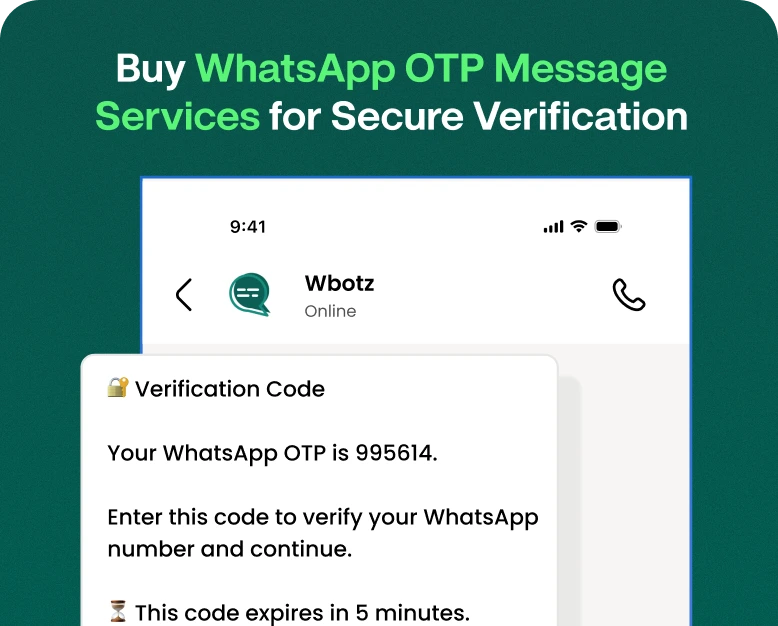
Here is an example of a simple WhatsApp OTP message to verify your account:
Example 1: Registration of Account
Your verification code is {1}. Use this code to finish registering your account. It is valid for 5 minutes. Do not give this code to anyone.”
Example 2: Safe login
“Your login verification code is {1}. Use it to verify your login request. This code is expiring soon. “Protect your account if you didn’t request it.”
Example 3: Forgot password
{1} is used to confirm your password reset request. This code is valid for a limited time. “Never share your verification code with anyone.”
Here are some examples to give you an idea, but they are not guaranteed pre-approved templates. Your provider will be able to tell you how to send the right authentication template and set its variables.
Business should not embed personal information, account passwords, payment details or sensitive information that is not necessary in OTP messages.
WhatsApp OTP Message Services Buying Guide – Step by Step
Selecting a provider is an important decision as the service will be part of your authentication process. Here are the instructions on how to compare options before you buy.
Step 1: Identify Your Verification Needs
First decide where you need OTP verification. Typical uses include:
- Registering on the website and mobile app
- Secure Sign In
- Retrieve password
- Customer Account Verification
- Confirmation needed for important account changes
- Authentication in relation to transactions, where applicable
Estimate your monthly OTP volume and know the countries where your customers are. This information will assist you in comparing coverage, prices and capacity of providers.
Step 2: Evaluate Whatsapp OTP Providers
Find a provider that supports the official WhatsApp Business Platform or a suitable authorised integration.
Assess the following features:
- API documentation and integration assistance
- Authentication message template help
- Error handling and delivery-status reporting
- Guidance on rate limiting and abuse prevention
- Support for your destination countries
- Transparent billing and usage reports
- Service availability and technical support commitments
- fallback verification methods
Do not select a service on the basis of its advertised message price alone. A low-cost service might not offer the security, reporting, or integration support that your business needs.
Step 3: Check pricing and additional fees
WhatsApp messaging costs can depend on things like the recipient’s country, the applicable message category, the current platform pricing and the provider’s own fees.
Ask for a detailed quotation before purchase. It should include:
- Applicable charges on WhatsApp platform
- Provider or API service charges
- No Minimum Commitment or Monthly Subscription
- Set-up and integration costs
- Tax and other applicable fees
- Refund, Cancellation and Credit Expiry Rules
Request a quote based on your expected monthly volume. Don’t just compare the headline price per message, compare the total cost of a successful verification.
Step 4: Look for Security and Compliance
Since OTP messages are used for authentication, security should be a top priority.
Check to see if the service has secure API authentication, encrypted connections, control of access, and appropriate handling of message data. Generate and validate OTPs securely within your own application.
Make sure your business follows any applicable privacy laws and WhatsApp Business Platform policies. Obtain appropriate permission where required and do not use OTP messaging for unrelated promotional content.
Step 5: Connect the API
Once you’ve chosen a provider, your development team can integrate the service with your authentication backend.
A common integration is.
- Configure or set up the business messaging account that is required.
- Configuring the sender number and the approved authentication template.
- Get API credentials and save them somewhere safe.
- Integrating the verification workflow with the messaging API.
- Configure OTP expiry, retry limits and validation.
- Testing delivery, errors and fallback behaviour before launch.
Do not ever put your secret API keys into public JavaScript, mobile app code or public repos.
Step 6: Test Before Going Live
Test the full verification flow using authorised test accounts and representative devices.
Test message delivery, code correctness, expiration, duplicate requests, invalid codes, and network interruptions. Also test for the case where a customer does not have WhatsApp or the message fails to be delivered.
After testing, monitor completion rates for verification, delivery failures, suspicious requests and costs. Take the results and improve the process over time.
Important Features to Look for in a WhatsApp OTP Service
When comparing plans, prioritize features that directly support your authentication requirements.
| Feature | Why It Matters |
| Official API integration | Helps connect messaging with your authentication system |
| Authentication templates | Supports compliant OTP message delivery |
| Delivery reporting | Helps identify message delivery issues |
| API documentation | Makes implementation and troubleshooting easier |
| Rate limiting | Helps reduce automated abuse and OTP spam |
| Expiry and retry controls | Limits the usefulness of stolen or outdated codes |
| Fallback options | Helps users verify their accounts when WhatsApp is unavailable |
| Transparent pricing | Makes it easier to estimate operating costs |
| Technical support | Helps resolve integration and delivery problems |
Not every provider includes all these features in its standard plan. Ask for a demonstration or trial environment, if available, before committing to a long-term subscription.
Best Practices to Secure WhatsApp OTP Messages
A reliable delivery channel is not enough for a secure authentication system. Adopt the following practices to safeguard your users.
Short OTP’s
Select an expiration period that is appropriate for your security requirements. A code should not be valid for eternity.
Limit Number of Attempts
Limit the number of times the user can ask for a new code and the number of incorrect attempts. Add controls against automated abuse without locking out legitimate customers unnecessarily
OTP Reuse Prevention
Each code should be linked to its intended verification session and become invalid after successful usage.
Protect Sensitive Data
WhatsApp OTP message should not contain passwords, full payment card details or any other sensitive information which is not required. Do not log the full value of OTP.
Create a Safe Fallback Process
Some customers may not be able to access WhatsApp. Choose an alternative verification method that corresponds to the risk level of your app, such as SMS, an authenticator app, or a passkey.
Educate Your Clients
Please remember that legitimate verification codes should never be shared with another person. If someone receives an OTP they did not ask for, alert them not to share it and to secure their account if suspicious activity continues.
Real-World Example: E-Commerce Business
Imagine an online store that gets hundreds of new customer registrations each day. The store wants to verify phone numbers before customers can use some account features.
It integrates a WhatsApp OTP service into its sign-up flow. When a customer enters their phone number, the backend generates a temporary code and requests delivery via the messaging API configured. The application checks the code entered by the customer and finishes the registration.
The business tracks message delivery, failed verification attempts and the percentage of users that complete registration. If WhatsApp delivery is not possible, the system will offer a suitable alternative.
This way the store has a systematic way to check things without the staff needing to send codes manually. Real gains in conversion, delivery speed or cost will be driven by provider, customer behaviour, country and quality of implementation.
Mistakes to Avoid While Buying WhatsApp OTP Services
Be on guard against these common problems before you buy:
- If you are just looking at price: Compare reliability, security features, support and total cost.
- Exempting template approvals: Be sure to fulfill template authentication requirements before launching them.
- Skipping security testing: Test expiration of code, invalid attempts, duplicate requests, and API failures.
- Single channel dependency: Offer a sensible fallback for users who can’t receive messages on WhatsApp.
- Ignore privacy requirements: Collect and process only the data needed for verification.
- Marketing with OTP messages: Separate authentication communication from promotional messaging, adhering to applicable rules.
- Not tracking usage: Track failed requests and unexpected traffic to identify possible abuse and unexpected costs.
Frequently Asked Questions (FAQ’s)
1. What is a WhatsApp OTP message used for?
A WhatsApp OTP message is a one-time verification code sent through WhatsApp that can be used to verify a user’s phone number or authorise an action on an account. Common use cases are registration, login and password recovery.
2. How to purchase WhatsApp OTP message services?
Explore providers that support the official WhatsApp Business Platform or an acceptable authorised integration. Before buying a plan, review the API features, authentication template support, security controls, geographic coverage, technical support and pricing.
3. Are WhatsApp OTP messages secure?
It is part of a secure authentication process, but no delivery channel is secure by itself. Use short-lived codes, attempt limits, secure backend validation, one-time use and other safeguards as appropriate for your application’s risks.
4. Can I take a sample WhatsApp OTP message for my business?
Yes, an example can help you to prepare the wording of the message. But you need to adjust the message to the needs of the authentication template in use and the provider setup. The use of a sample is not a guarantee of approval and delivery.
5. Is WhatsApp OTP better than SMS OTP?
Neither is better than the other. It’s convenient for those customers who use it frequently but SMS can reach the users who don’t have WhatsApp access. Evaluate delivery performance, total cost, customer preference, geographic coverage and fallback requirements before choosing.
Conclusion: Select Best WhatsApp OTP Solution for Your Business
Secure verification processes help businesses protect accounts and provide a smoother customer experience. A well-integrated WhatsApp OTP message service can assist in account registration, login verification, and other authentication procedures via a channel that users are familiar with.
So be sure to compare providers carefully before you buy, and review the full pricing structure, confirm authentication template requirements, and test the integration. Most importantly, combine message delivery with secure OTP generation, expiry, validation and abuse prevention.
Ready to enhance your business verification process?
Compare WhatsApp OTP providers, request a quote, and try out an API demo before choosing a plan. Choose a solution that fits your message volume, security needs, and growth plans so that your customers can confidently verify their accounts.
Written by
Jayesh Makwana
Part of the Wbotz team, writing about WhatsApp Business API, automation and the campaigns that actually convert.