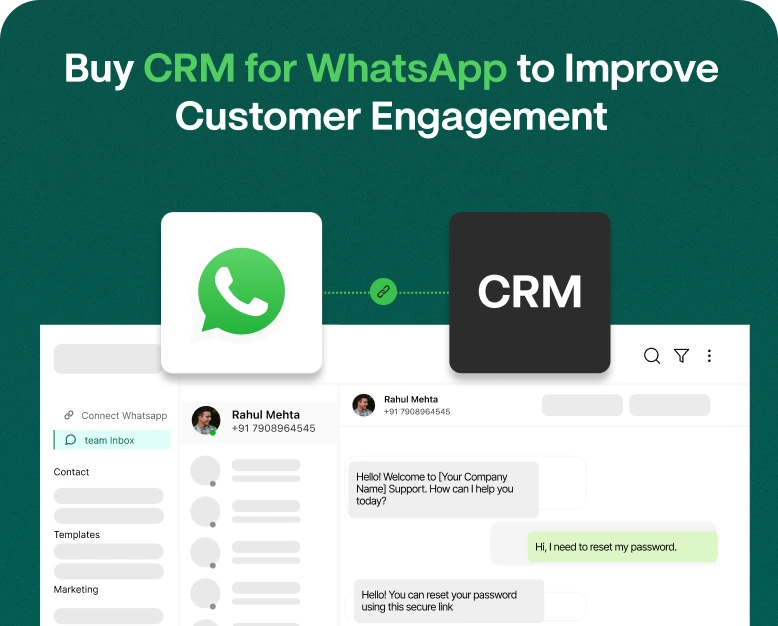
Buy CRM for WhatsApp to Improve Customer Engagement
How many times has your business lost a customer because the sales team didn’t get the message about the customer’s question on WhatsApp? A business can easily lose a customer because the sales team is fragmented and…
How many times has your business lost a customer because the sales team didn’t get the message about the customer’s question on WhatsApp? A business can easily lose a customer because the sales team is fragmented and overloaded. If you don’t have a CRM system to manage your customer engagements via WhatsApp, you risk losing valuable customer information.
Many businesses have customer engagements on WhatsApp but don’t know the best way to manage all the conversations, leads, engagements, and follow-ups. Using WhatsApp as a customer engagement platform means you have hundreds of engagements to manage and follow-up on. Managing all that information can be challenging, but integrating CRM for WhatsApp can make it easier.
With the help of CRM for WhatsApp, a business can organize WhatsApp customer engagements and lead management. It can also help automate repetitive tasks and engage customers at various touchpoints.
What Is a CRM for WhatsApp?
Whether you’re a small business, an online store, a service company, or a sales company, the right CRM for WhatsApp can help you enhance customer engagements and organize communications.
In this article, you’ll find what WhatsApp CRM means, what features to consider when buying a WhatsApp CRM, how to choose the right WhatsApp CRM, and why you need a WhatsApp CRM.
It allows businesses to consolidate customer interactions on a centralized platform, eliminating the reliance on multiple telephones, spreadsheets, and separate messaging applications.
A traditional CRM focuses on lead management and sales automation. A WhatsApp CRM allows businesses to communicate with their customers while managing the interactions and lead information in a structured manner.
A WhatsApp CRM may offer the following functionalities in their platform:
- Centralized WhatsApp conversations.
- Contact and Customer Management.
- Lead Management and Sales Automation.
- Templated and Automated Responses and Follow-up Messages.
- Shared Inbox for Multiple Users.
- WhatsApp based Marketing campaigns.
- Segmentation and Personalization for Customers.
- Reports and Analytics for WhatsApp conversations.
For example, a customer may contact a Real Estate agency over WhatsApp to know more about an apartment. A sales representative may capture the requirements of the customer and assign the lead to an agent of his/her choice and set a reminder for a follow-up. A follow-up may be required if the customer has any other queries.
With a CRM for WhatsApp, businesses can streamline their conversations with customers and improve their services.
Why Should Businesses Invest in a CRM for WhatsApp?
Customers want quick and informative responses. A forgetful business is a losing one.
Rising competition means that businesses have to cater to their customer’s expectations to remain in the game. Some reasons to invest in a WhatsApp CRM are:
1. Consolidate All Customer Conversations
Employees can miss important messages, different employees can respond to the same customer messages, and employee messages can get buried.
WhatsApp CRM with a shared inbox pulls all the conversations in one place. Employees can view all chats, and manage and assign customer requests.
This can greatly benefit businesses which have a large volume of inquiries like sales and support businesses.
2. Enhance Customer Engagement
Businesses can use WhatsApp to engage customers before, during, and after the purchase. CRM integration can help businesses provide even more useful and relevant information to customers.
3. Eliminate Repetitive Tasks
Support employees can be relieved from repetitive tasks like answering FAQs or sales employees from following up on leads. A WhatsApp CRM can be configured to perform these tasks.
Automation can facilitate human interaction. For instance, if a customer messages to inquire about pricing, an automated message can be sent with the pricing information and point the customer to the salesperson.
In several cases, personal interaction should still be preferred. Important questions and bigger concerns of the customer should still be handled by a person.
4. Better Lead and Sales Follow-Up Management
Most leads do not result in an immediate sale. Some leads need additional information, while others need to evaluate their options.
The long sales cycle can pose a challenge for your sales representatives as they may forget to follow up on leads.
A WhatsApp CRM allows your sales team to sort leads according to their stage in the customer journey such as: new lead, contacted, interested, following up, negotiation, sale, not interested.
This allows your sales team to identify leads in need of follow-up and prioritize leads for interaction.
5. Improve Customer Support
Customers do not want to repeat themselves to different employees. They want their concerns resolved as quickly as possible. A centralized, organized approach to customer support and engagement is needed to satisfy customers’ requests. A WhatsApp CRM can help support teams review previous interactions, assign chats to team members, and track requests that remain unsolved. This can help in better organizing customer requests.
Important Features to Check Before Buying a WhatsApp CRM
Not every CRM platform offers the same functionality. Before purchasing a subscription, compare its features with your actual business requirements.
1. Official WhatsApp Business Platform Integration
This should be one of your first considerations.
Choose a provider that supports the official WhatsApp Business Platform or an authorized integration.
Official integration provides access to supported business messaging capabilities and helps businesses manage conversations according to WhatsApp’s policies.
Ask the provider about account setup, message templates, pricing, messaging limits, and integration requirements before purchasing.
2. Multi-Agent WhatsApp Inbox
For teams where multiple employees manage customer conversations, a shared inbox can improve workflows.
Features to look out for are:
- Support for multiple agents
- Chat assignment
- Conversation labels
- Internal notes
- Availability settings
- Chat history
- Workflow metrics
These features help minimize the chances of a duplicate reply and help agents identify who is managing which customer.
3. Contact Management and Customer Segmentation
A good WhatsApp CRM should help you manage your customer contacts.
You may want to create separate contact lists for leads, customers, repeat buyers, and/or inactive contacts.
Customer segmentation helps you send appropriate messages to different customer groups instead of sending a promotional message to the entire customer contact list.
4. Automated Workflows and Quick Replies
Automation helps your team efficiently manage frequent communication.
Check if the CRM supports workflows such as:
- Welcome messages
- Responses to frequent questions
- Follow up messages
- Scheduled messages
- Lead assignment
- Customer notification workflows
Quick Replies help your agents save time by not having to type frequent responses.
5. Campaign Management and Bulk Messaging
If your business frequently sends promotional messages, ensure your WhatsApp CRM has features to support bulk messaging campaigns.
The CRM should help you manage approved templates, create audience segments, schedule campaigns, and give you insights on the campaigns performance.
Check if the tool enables WhatsApp’s messaging API. Businesses are responsible for obtaining customer consent for commercial communications and for respecting opt-out requests. Bulk promotional messages should not be sent to customers without their consent.
6. Analytics and Reporting
Reports help you track your team’s communication with customers.
Depending on the tool, useful metrics may include:
- Total conversations
- Average first response time
- Agent performance
- Lead conversion
- Campaign delivery
- Customer engagement
- Sales activities
These can be used to identify where the main communication blockers are, as well as improve processes for both sales and support.
How to Choose and Buy the Right CRM for WhatsApp
Making the right choice for your business can be difficult. Here’s a simple guide.
Step: 1 Identify your Business Requirements
Decide what challenges you would like a CRM to help you solve.
- Do you need to manage several WhatsApp agents?
- Do you need to set up automated messages for customers?
- Do you need to better track your sales leads?
- Do you need a platform for bulk campaign messaging?
- Do you need to integrate WhatsApp with your current CRM?
- Do you need more in-depth customer reports?
Once you’ve answered these questions you’ll be better able to pinpoint the features you’ll need in a CRM.
Step:2 Compare Available CRMs
After your needs analysis, research different WhatsApp CRMs and see how they compare feature wise and price wise.
When building your shortlist, don’t just pick the most featured rich platforms. You may be better off with a solution with just a few features that meet your main needs.
Many CRM providers provide a free trial so your team can learn the tool.
Step 3: Evaluate Pricing and Other Fees
The pricing model of a CRM may vary based on the number of users, the features and functionalities of the CRM, integrations, and messaging.
Be sure to evaluate:
- The fees for various subscription periods (i.e. monthly vs. yearly)
- The number of users allowed
- The cost for WhatsApp messaging
- Automation limits
- Integration costs
- Contact and storage limits
- Onboarding and setup fees
- Official WhatsApp Business Platform Access
Step 4: Evaluate Integrations
Your CRM must work with your existing tools and help automate business processes.
Consider integrations with:
- Ecommerce platforms
- Payment systems
- Email marketing tools
- Customer support tools
- Existing CRM tools
- Contact and lead forms
Integrations can facilitate managing customer information and eliminate the need for manual data entry.
Step 5: Try Before You Buy
If possible, try the tool by starting a free trial or requesting a demo.
Test features such as:
- Integration with WhatsApp Business
- Customer message routing
- Creating customer records
- Setting up automated responses
- Managing customer opt-outs
- Reporting
A tool may look powerful during a demo, but only by testing can you see if it fits your business processes.
Step 6: Train Your Team and Begin Using the CRM
Train your employees on features such as managing conversations, updating customer information, lead assignment, and automated workflows.
Rather than automating everything at the start, initiate using the CRM by implementing a few critical processes. See how the workflows evolve as your business needs change.
Real World Example of WhatsApp CRM
WhatsApp CRM can help address multiple needs of a business. Here are some examples.
E-commerce/Online Shopping
An online fashion store gets a lot of queries related to product sizes and prices, delivery and return information, etc.
Using WhatsApp CRM, the sales team can manage queries through a shared inbox, group customers based on interests and send order updates to customers.
For example, if a customer queries about a product, the assigned representative can send that customer the product information without requiring the customer to explain the query again.
Business benefit: Better organization of customer communication and increased opportunity for repeat purchase.
Education and Coaching Institutes
A coaching institute gets lead queries for various courses offered.
The CRM helps the admissions team group leads based on interests, assign leads to counselors, and schedule follow-ups.
The WhatsApp messaging feature of the CRM can help send reminders about course information to students.
Business benefit: Better management of lead inquiries and a structured admissions process.
Real estate agencies get queries about property prices, locations and availability, and requests for site visits.
Using WhatsApp CRM, the real estate agents can maintain customer requirements, assign leads, and track the status of each inquiry.
Business benefit: Better organization of customer communication and lead management.
Sales teams can prioritize prospects and have structured conversations with the ability to set reminders.
Healthcare and Appointment-Based Services
Money is tight and many businesses are getting creative on how to make use of the free version of WhatsApp to send confirmations, reminders and updates to clients.
WhatsApp improves team communication. The shared inbox lets employees divide and conquer the questions they are getting.
Business Benefit: Improved communication of appointment reminders and following up on missed appointments.
WhatsApp CRM Best Practices
It’s not enough to purchase a CRM. You have to optimize it for your business to gain value.
Get the most out of your WhatsApp CRM by following these best practices.
Provide Personalized Communications
Personalize your communications with customers by using details that help you segment customers into different groups. Use suggested responses to prompt messages that answer common questions customers may have.
Avoid sending promotional messages.
Timely Communications
Define responsibilities. Create an ongoing conversation with a customer by routing messages to the correct employee, or set an hourly reminder.
Offer suggestions and solutions to common issues customers may be having.
Thoughtful Use of Automation
Engage customers with useful communications. This includes FAQs and routine messages.
Give the option for customers to communicate with a live agent.
Maintain Accurate Data
Customize notes to refer back to an important message. Update the lead status to reflect where the lead is in the sales process.
Monitor Performance
Review lead progress and look over team performance reports to identify improvement areas.
Respect WhatsApp Messaging Policies
To remain within the WhatsApp Business messaging policies, you must use the right opt-in processes, employ approved message templates where necessary, and utilize best practices for messaging. Respect opt-out requests and do not send promotional messages to users who have not given their approval.
Frequently Asked Questions
1. What is the CRM for WhatsApp?
A CRM for WhatsApp is a messaging and communication solution for customer relationship management. A CRM for WhatsApp integrates customer communication, automation, lead management, and workflow tools for support and sales to help businesses manage customer communication efficiently.
2. Why should I buy WhatsApp CRM for my business?
If your business frequently uses WhatsApp to communicate with customers and leads and needs to organize customer communication, manage and automate repetitive tasks, and improve customer communication, a WhatsApp CRM is a good option for your business.
3. What is the difference between WhatsApp and WhatsApp CRM?
WhatsApp is a messaging app used for business communication and individual communication. A WhatsApp CRM is an integration of WhatsApp with a CRM to help support and sales teams manage customer communication, lead and customer management, automation, integration, and reporting for large business communication workflows.
4. Can multiple users use one WhatsApp CRM account?
Yes, several agents can use a WhatsApp CRM account. Administrators can assign conversations, manage user access, and monitor the activities of other users.
5. How much does WhatsApp CRM software cost?
The cost of a WhatsApp CRM solution depends on the number of agents, the features offered by the provider, automation and integration, subscription plan, and WhatsApp messaging costs. Some providers offer basic plans, while others offer advanced plans. Compare the complete pricing before buying.
Conclusion: WhatsApp CRM to Improve Customer Relationships
When your business is just starting out, it’s easy to keep track of your customer conversations. However, as your business grows, it can quickly become impossible to keep track of all your customer conversations in an efficient and organized manner. You may miss messages, respond to messages too slowly, fail to follow up, or lead to miscommunications with your customer information becoming disconnected. All of this can ultimately result in lost sales and dissatisfied customers.
In order to overcome these challenges, you should look into a WhatsApp CRM to help organize customer communications, lead management, business process automation, and team collaboration.
Prior to your purchase, consider important features including official WhatsApp integration, multi-agent inboxes, customer segmentation, automated workflows and campaigns, reporting, and pricing.
Just because a WhatsApp CRM has a higher price tag, doesn’t mean it’s the best for your business. Look for a WhatsApp CRM that is going to help you meet your business communication goals and supports your business growth.
If you are ready to have better customer engagements and business relationships, look for a WhatsApp CRM, compare plans, have a product demo, and see if it’s the right tool to help you and your team coordinate customer conversations and efficiently carry out follow-up interactions.
Written by
Jayesh Makwana
Part of the Wbotz team, writing about WhatsApp Business API, automation and the campaigns that actually convert.