Customers today demand instant communication. They don’t want to fill out long contact forms or wait for hours for an email response. Instead, they would rather message businesses directly through WhatsApp, the app they use on a daily basis.
That is exactly why adding a WhatsApp code to your website has become one of the easiest ways to boost customer engagement, generate more leads and improve conversions.
Whether you run an eCommerce store, agency, restaurant, clinic or local business, a WhatsApp QR code lets visitors scan the code with their phone and instantly start a conversation with your business.
This guide will teach you everything you need to know, from what a WhatsApp code is to how to create one in just a few minutes. We’ll also cover best practices, real-world examples, and common mistakes to avoid.
Table of Contents
What’s a WhatsApp Code?
A WhatsApp code is a QR code that, when scanned, instantly opens a WhatsApp chat with a specific phone number or WhatsApp Business account.
Rather than having to ask customers to save your number, they just:
- Open their phone’s camera
- Scan the QR code
- Tap the WhatsApp prompt
- Start chatting now
It takes only a few seconds.
Many businesses also call it a:
- WhatsApp QR Code
- WhatsApp Chat QR Code
- WhatsApp Business QR Code
- WhatsApp Contact QR Code
A website WhatsApp QR code is meant to connect your customers directly with your business, whereas a WhatsApp Web QR Code is used to login to WhatsApp Web on your computer.
WhatsApp Code vs WhatsApp Web QR Code
Many people confuse these two QR codes.
| WhatsApp Code | WhatsApp Web QR Code |
| Starts a chat with your business | Logs you into WhatsApp Web |
| Used on websites | Used on desktop login screen |
| Helps customers contact you | Helps users access their account |
| Great for marketing | Used for account authentication |
Understanding the difference helps avoid using the wrong type of QR code on your website.
Why Add a WhatsApp QR Code to Your Website?
Including a WhatsApp QR code is not only a convenience but can also directly impact your business growth.
1. Immediate Customer Communication
Visitors will not have to look up your contact information.
One scan sparks the conversation.
2. Greater Conversion Rates
Sending a WhatsApp message is much easier than filling out a long inquiry form.
Quick communication often means faster sales.
3. Enhanced Customer Experience
Customers like businesses that keep communication simple.
A code in WhatsApp eliminates unnecessary steps.
4. Establishes Trust
Displaying an official WhatsApp contact makes visitors feel your business is approachable and responsive.
5. Device Compatibility
Whether they’re on mobile or desktop, visitors can get to your WhatsApp chat quickly.
6. Great for Any Business
WhatsApp QR code works good for:
- Web shops
- Estate Agencies
- Marketing Agencies Digital
- Health clinics
- Dining establishments
- Training establishments
- Advisors Self-employed
- Local business
Create a WhatsApp Code for Your Website in Minutes
Creating a WhatsApp code is surprisingly easy.
Do the following.
For business use, WhatsApp Business is recommended and has:
- Profile of the business
- Automated replies
- Product catalog Tags
- Fast replies
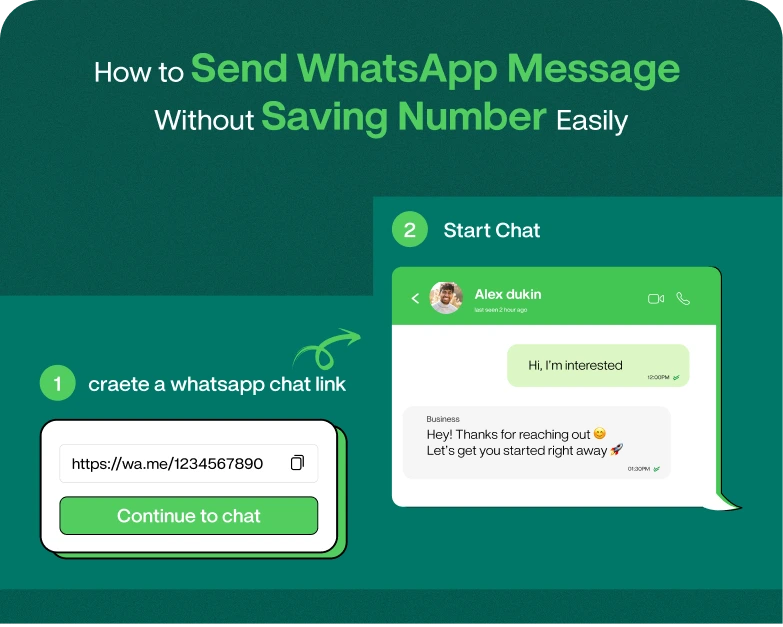
Step 2: Build Your WhatsApp Link
Your WhatsApp chat link is like this:
Example:
Replace the number with your own number ( including the country code of course ) .
Step 3: Include a Pre-Filled Message
You can make it even easier for your customers.
Example: 1.
https://wa.me/91xxxxxxxxxxx?text=Hi I want to know more.
Customers don’t even have to type their first message anymore.
Step 4: Create the WhatsApp QR Code
Use a QR code generator to create a scannable QR code of your WhatsApp link.
Most generators can do the following:
- Colors change
- Your Logo
- Download high quality PNG
- Download SVG
- PDF ready for printing
Step 5: Adding the QR Code to Your Website
Popular places are:
- Home
- Contact page
- Footer
- Sidebar
- Products Pages
- Landing pages
- Checkout page
The easier it is for customers to find it, the more conversations you’ll have.
WhatsApp QR Code Best Practices
Tips to maximize results.
Use WhatsApp Business.
It looks more professional and has business tools.
Let’s get started!
Instead of just showing the QR code, write something like:
- Need Help?
- Scan to Chat Scan Here
- Get Support Now
- Chat with our team
- Get a Free Quote
- Keep QR Code in Sight
Don’t bury
it in the depths of your website.
Place it where your visitors will naturally look.
Test Before Going Live
Always scan the QR code yourself to ensure it opens the correct WhatsApp chat.
Mobile Friendly
Most visitors will scan with smartphones.
Ensure the QR code is large enough to be easily scanned.
Real-World Illustration
Imagine this: an online furniture store.
No WhatsApp QR code:
- Customer question
- Searches for the page of contacts
- Copy Phone
- Save it
- Open WhatsApp
- contact searches
- Send an email
Many customers drop out before they get through all those steps.
WhatsApp QR code:
- Customer scans
- WhatsApp opens.
- The conversation starts immediately.
This simple improvement can greatly increase inquiries and sales.
Common Mistakes to Steer Clear Of
Many businesses make mistakes that could have been avoided.
Using Wrong QR Code
Do not put the QR Code for WhatsApp Web on your website.
It’s just for logging into WhatsApp Web.
Wrong number linked
Double check your phone number before publishing.
No Country Code If Lost
Always make sure you include your international dialling code.
Low Quality QR Image
A blurry QR code may not scan right.
Download high resolution files.
No call to action
A QR code without instructions gets ignored.
Give visitors a clear action to take.
WhatsApp code: SEO benefits
While a WhatsApp QR code doesn’t directly improve rankings, it supports a number of important SEO factors.
Improved User Experience
Visitors can contact you immediately.
Reduced Bounce Rate
Customers remain engaged rather than leaving.
More Conversions
More conversations, more sales.
Greater Confidence
Simple communication builds trust.
Search engines favour websites that offer a positive user experience.
Who is a WhatsApp QR code for?
It can benefit almost every business.
Examples:
- Online shops
- Marketing firms
- SaaS companies
- Consultants
- Doctors
- Dentists
- Gyms
- Hotels
- Travel agencies
- Schools
- Coaching centers
- event planners
- lawyers
- Realtors
If customers contact you before buying, it’s worth adding a WhatsApp QR code.
Tips to Boost More WhatsApp Chats
To promote additional scans:
- Put the QR code above the fold
- Scan to chat
- Put it on brochures & business cards.
- Add to invoices
- Use on product packaging.
- Put it in email signs
- Put it in social media posts.
- Offer Immediate Help During Business Hours
Commonly Asked Questions
1. WhatsApp code is what?
What is a WhatsApp code? A WhatsApp code is a QR code that opens a WhatsApp conversation with a business or person when scanned.
2. Is WhatsApp QR Code free?
Yes. There are many free QR code generator tools that you can use to create a basic WhatsApp QR code.
3. WhatsApp Web QR Code and WhatsApp QR Code are the same?
Nope.
What’s the difference between a WhatsApp QR code and WhatsApp Web QR code? A WhatsApp Web QR Code is only used to login to WhatsApp Web, while a WhatsApp QR code is to help customers start a chat with your business.
4. Is it possible to customize my WhatsApp QR code?
Yeah. Most QR code generators allow you to change the color, add your logo, and customize the design to fit your brand.
5. Where to place WhatsApp QR code on a website?
The best spots are:
- Homepage of
- Contact us page
- Footer
- Pages of products
- Destination pages
- Checkout area
The aim is to make it easy for visitors to find and scan.
Closing Thoughts
Adding a WhatsApp code to your website is one of the quickest and most effective ways to improve customer communication. Generate a simple QR code in minutes that reduces friction, sparks immediate conversations, and converts more visitors into paying customers.
Whether you are a small business owner, freelancer, or large enterprise, a WhatsApp QR code makes your website more interactive, accessible, and customer-friendly. Just don’t confuse it with the WhatsApp Web QR Code, which is for something else entirely.
Using the steps and best practices detailed in this guide, you can build a professional WhatsApp code that will boost your marketing efforts and offer a better user experience.
Want to make it easy for customers to get in touch?
Don’t let potential customers walk away from your website without reaching out. Create your WhatsApp QR code today and begin turning more visitors into conversations – and conversations into customers.
Need a total WhatsApp Marketing Solution? Our platform to generate WhatsApp links, produce QR codes, automate customer conversations and grow your business easily.